C, C++
Detect Windows Display Scale Factor 윈도우 배율 확인
J-sean
2025. 12. 22. 02:26
반응형
윈도우 디스플레이 배율을 확인 해 보자.
#include <windows.h>
#include <iostream>

void getDisplayScaleDpi(HWND hwnd) {
	/*if (hwnd == NULL)
		hwnd = GetDesktopWindow();

	UINT dpi = GetDpiForWindow(hwnd);*/

	// Get the DPI for the system.
	UINT dpi = GetDpiForSystem();

	// Calculate scale factor: 96 DPI = 100% scale
	double scaleFactor = (double)dpi / 96.0;
	double scalePercent = scaleFactor * 100.0;

	std::cout << "DPI: " << dpi << std::endl;
	std::cout << "Scale Factor: " << scaleFactor << std::endl;
	std::cout << "Scale Percent: " << scalePercent << "%" << std::endl;
}

int main() {
	// Ensure the application is DPI aware.
	SetProcessDpiAwarenessContext(DPI_AWARENESS_CONTEXT_SYSTEM_AWARE);
	//SetProcessDPIAware(); // same as above

	getDisplayScaleDpi(NULL);

	return 0;
}

모니터(디스플레이)의 크기를 여러가지 방법으로 확인해 보자.
#include <iostream>
#include <Windows.h>

int main() {
	HWND hWnd = GetDesktopWindow();
	if (hWnd == NULL)
		return -1;

	RECT rc;
	GetWindowRect(hWnd, &rc);
	//GetClientRect(hWnd, &rc);
	//GetWindowRect()와 같은 결과.(실제 해상도(150%): 3840 X 2160)

	std::cout << "Desktop Window Rect" << std::endl;
	std::cout << "(" << rc.left << ", " << rc.top << ")" << ", ";
	std::cout << "(" << rc.right << ", " << rc.bottom << ")" << std::endl;

	POINT pt;
	GetCursorPos(&pt);
	std::cout << "Cursor Position: " << "(" << pt.x << ", " << pt.y << ")" << std::endl;

	//HMONITOR hmon = MonitorFromWindow(hWnd, MONITOR_DEFAULTTONULL);
	HMONITOR hmon = MonitorFromPoint(pt, MONITOR_DEFAULTTONULL);
	// 마우스 포인터가 위치한 모니터를 반환한다.
	MONITORINFO mi{ .cbSize = sizeof(mi) };
	GetMonitorInfo(hmon, &mi);

	std::cout << "Monitor Rect" << std::endl;
	std::cout << "(" << mi.rcMonitor.left << ", " << mi.rcMonitor.top << ")" << ", ";
	std::cout << "(" << mi.rcMonitor.right << ", " << mi.rcMonitor.bottom << ")" << std::endl;

	return 0;
}
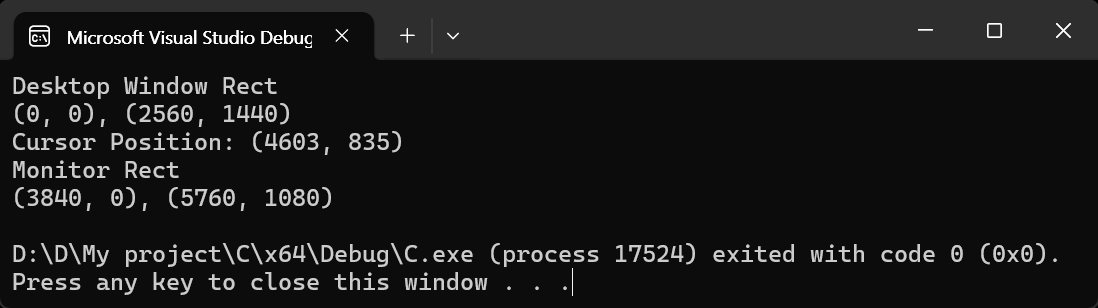
기본 모니터의 실제 해상도는 150% 확대되어 (3840 X 2160)이지만 (2560 X 1440)으로 표시된다.
프로그램 실행 시 마우스 커서를 보조 모니터에 두고 실행했기 때문에 두 번째 해상도는 (1920 X 1080)으로 표시된다.
(5760 - 3840 = 1920)
※ 참고
Confine the mouse cursor to one monitor
반응형