


[SDL3] SDL Audio Wav
SDL, raylib 2025. 12. 16. 18:30 |반응형
SDL3를 이용해 wav 파일을 간단히 플레이 해 보자.
#define SDL_MAIN_USE_CALLBACKS 1  /* use the callbacks instead of main() */
#include <SDL3/SDL.h>
#include <SDL3/SDL_main.h>

static SDL_AudioStream* stream = NULL;
static Uint8* wav_data = NULL;
static Uint32 wav_data_len = 0;

/* This function runs once at startup. */
SDL_AppResult SDL_AppInit(void** appstate, int argc, char* argv[])
{
	SDL_AudioSpec spec;
	char* wav_path = NULL;

	SDL_SetAppMetadata("Example Audio Load Wave", "1.0", "Sean");

	if (!SDL_Init(SDL_INIT_AUDIO)) {
		SDL_Log("Couldn't initialize SDL: %s", SDL_GetError());
		return SDL_APP_FAILURE;
	}

	/* Load the .wav file from wherever the app is being run from. */
	//SDL_asprintf(&wav_path, "%smusic.wav", SDL_GetBasePath());  /* allocate a string of the full file path */
	SDL_asprintf(&wav_path, "music.wav");  // assume current working directory
	if (!SDL_LoadWAV(wav_path, &spec, &wav_data, &wav_data_len)) {
		SDL_Log("Couldn't load .wav file: %s", SDL_GetError());
		return SDL_APP_FAILURE;
	}

	SDL_free(wav_path);  /* done with this string. */

	// Print out some info about the .wav file we loaded.
	int bitDepth = SDL_AUDIO_BITSIZE(spec.format);
	int bytesPerSecond = spec.freq * spec.channels * (bitDepth / 8);
	float duration = (float)wav_data_len / (float)bytesPerSecond;
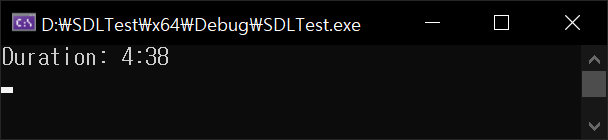
	SDL_Log("Duration: %d:%d\n", (int)duration / 60, (int)duration % 60);

	/* Create our audio stream in the same format as the .wav file. It'll convert to what the audio hardware wants. */
	stream = SDL_OpenAudioDeviceStream(SDL_AUDIO_DEVICE_DEFAULT_PLAYBACK, &spec, NULL, NULL);
	if (!stream) {
		SDL_Log("Couldn't create audio stream: %s", SDL_GetError());
		return SDL_APP_FAILURE;
	}

	/* SDL_OpenAudioDeviceStream starts the device paused. You have to tell it to start! */
	SDL_ResumeAudioStreamDevice(stream);

	return SDL_APP_CONTINUE;  /* carry on with the program! */
}

/* This function runs when a new event (mouse input, keypresses, etc) occurs. */
SDL_AppResult SDL_AppEvent(void* appstate, SDL_Event* event)
{
	switch (event->type) {
	case SDL_EVENT_QUIT:
		return SDL_APP_SUCCESS;  /* end the program, reporting success to the OS. */
	case SDL_EVENT_KEY_DOWN:
		// Since there's no window, this won't work, but if there were, it would log key presses.
		SDL_Log("Key down: %s\n", SDL_GetKeyName(event->key.key));
		if (event->key.key == SDLK_ESCAPE) {
			return SDL_APP_SUCCESS;  /* end the program, reporting success to the OS. */
		}
		break;
	default:
		break;
	}

	return SDL_APP_CONTINUE;  /* carry on with the program! */
}

/* This function runs once per frame, and is the heart of the program. */
SDL_AppResult SDL_AppIterate(void* appstate)
{
	/* see if we need to feed the audio stream more data yet.
	   We're being lazy here, but if there's less than the entire wav file left to play,
	   just shove a whole copy of it into the queue, so we always have _tons_ of
	   data queued for playback. */
	if (SDL_GetAudioStreamQueued(stream) < (int)wav_data_len) {
		/* feed more data to the stream. It will queue at the end, and trickle out as the hardware needs more data. */
		SDL_PutAudioStreamData(stream, wav_data, wav_data_len);
		// 이렇게 한 번만 넣어주면 끝까지 재생됨.
		// 이 경우, wav_data_len 만큼의 데이터를 계속 넣어주게 되므로 재생이 끝난 후에도 계속 반복 재생됨.
	}

	return SDL_APP_CONTINUE;  /* carry on with the program! */
}

/* This function runs once at shutdown. */
void SDL_AppQuit(void* appstate, SDL_AppResult result)
{
	SDL_free(wav_data);
	SDL_DestroyAudioStream(stream);

	SDL_Quit();
}
반응형
'SDL, raylib' 카테고리의 다른 글
| [SDL3] Particle 파티클 (Snow) 2 (3) | 2025.07.23 |
|---|---|
| [SDL3] Parent Window Child Window Input Separation 부모 자식 윈도우 입력 구분하기 (0) | 2025.06.06 |
| [SDL3] Display Information 디스플레이 정보 가져오기 (0) | 2025.06.02 |
| [raylib] Window Handle 윈도우 핸들 (0) | 2025.05.04 |
| [raylib] Particle 파티클 (Snow) (0) | 2025.05.04 |