


[C#] 콘솔 프로그램 실행하고 결과 확인하기
C# 2026. 3. 28. 09:56 |반응형
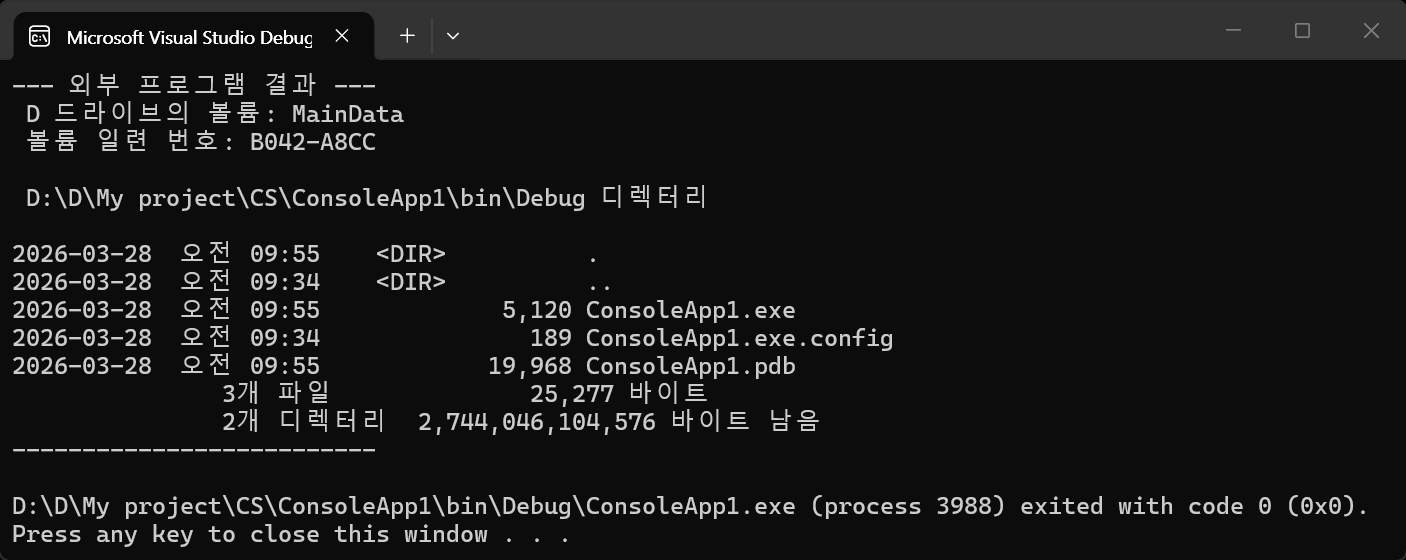
다른 콘솔 프로그램을 실행하고 결과를 확인해 보자.
using System;
using System.Diagnostics;
using System.IO;

namespace ConsoleApp1
{
    internal class Program
    {
        static void Main(string[] args)
        {
            // ProcessStartInfo 설정
            ProcessStartInfo startInfo = new ProcessStartInfo();
            //startInfo.FileName = "cmd.exe"; // 실행할 프로그램 (예: cmd)
            //startInfo.Arguments = "/c dir"; // 프로그램 인자 (예: 현재 디렉토리 파일 목록)
            startInfo.FileName = "cmd.exe";
            startInfo.Arguments = "/c dir";
            startInfo.UseShellExecute = false; // 쉘 사용 안 함 (리다이렉션 필수 설정)
            startInfo.RedirectStandardOutput = true; // 표준 출력 리다이렉션
            startInfo.CreateNoWindow = true; // 콘솔 창 띄우지 않음

            // 프로세스 실행
            using (Process process = Process.Start(startInfo))
            {
                // 3. 출력 내용 읽기
                using (StreamReader reader = process.StandardOutput)
                {
                    // 전체 결과 가져오기. 너무 길면 메모리 문제 발생 가능
                    //string result = reader.ReadToEnd();
                    //Console.WriteLine("--- 외부 프로그램 결과 ---");
                    //Console.WriteLine(result);
                    //Console.WriteLine("--------------------------");

                    // 한 줄씩 읽기
                    string line;
                    Console.WriteLine("--- 외부 프로그램 결과 ---");
                    while ((line = reader.ReadLine()) != null)
                    {
                        Console.WriteLine(line);
                        //Console.Write(line + Environment.NewLine);
                    }
                    Console.WriteLine("--------------------------");
                }
                process.WaitForExit(); // 프로그램 종료 대기
            }
        }
    }
}
2025.04.14 - [C, C++] - 명령창(cmd)을 열지 않고 명령 실행하고 결과 받아오기 popen(pipe open), pclose(pipe close)
반응형
'C#' 카테고리의 다른 글
| [C#] DateTime Class & DateTimePicker (0) | 2026.04.07 |
|---|---|
| [C#] Asynchronous Threading 비동기 스레딩 (0) | 2026.03.31 |
| [C#] 언어, 지역, 문화에 따른 숫자, 날짜 등 데이터 표현 (0) | 2026.02.07 |
| [C#] 난수 생성, 배열 섞기, 리스트 컴프리헨션 (1) | 2025.12.30 |
| [C#] 파일 내용 읽고 한 줄씩 출력하기 (0) | 2025.12.29 |