[C++] deque 덱
C, C++ 2026. 5. 2. 09:53 |반응형
Double-Ended Queue를 의미하는 deque(덱)의 사용법을 알아보자.
Queue에서 데이터를 제거하는 dequeue(디큐)가 아니다.
#include <iostream>
#include <deque>
#include <numeric> // For std::accumulate

int main() {
	// dqque는 양쪽 끝에서 삽입과 삭제가 가능한 시퀀스 컨테이너다. std::deque는 동적 배열과 유사하지만, 양쪽 끝에서 빠르게 요소를 추가하거나 제거할 수 있다.
	// 또한, std::deque는 임의 접근이 가능하여 벡터와 유사한 성능을 제공한다.
	// 양쪽 끝에서 삽입과 삭제를 하여도 std::deque는 내부적으로 여러 개의 블록으로 데이터를 관리하기 때문에, 요소를 추가하거나 제거할 때마다 전체 요소를
	// 이동시키지 않아도 된다. 따라서, std::deque는 양쪽 끝에서 빠르게 요소를 추가하거나 제거할 수 있다.
	std::deque<int> dq = { 1, 2, 3, 4, 5 };

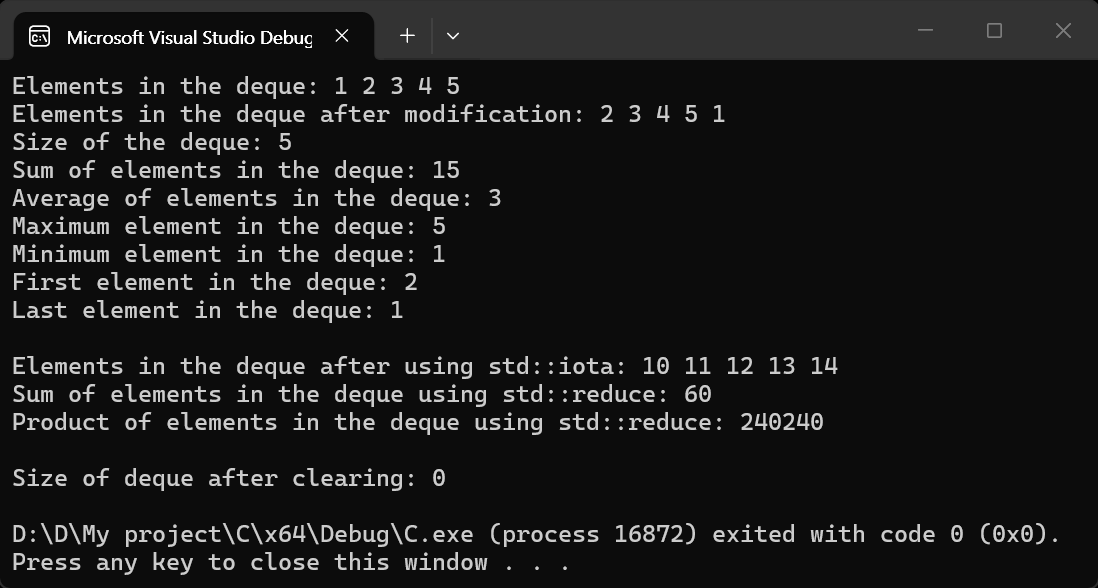
	std::cout << "Elements in the deque: ";
	for (const int& element : dq) {
		std::cout << element << " ";
	}
	std::cout << std::endl;

	dq.pop_front(); // Remove the first element (1)
	dq.push_back(1); // Add a new element (1) at the end

	std::cout << "Elements in the deque after modification: ";
	for (const int& element : dq) {
		std::cout << element << " ";
	}
	std::cout << std::endl;

	std::cout << "Size of the deque: " << dq.size() << std::endl; // Get the size of the deque
	std::cout << "Sum of elements in the deque: " << std::accumulate(dq.begin(), dq.end(), 0) << std::endl;
	// std::accumulate 함수는 C++ 표준 라이브러리에서 제공하는 알고리즘으로, 범위 내의 요소들을 합산하는 데 사용된다.
	// 세 번째 매개변수는 초기값을 나타내며, 이 값에서부터 요소들을 더하기 시작한다.
	std::cout << "Average of elements in the deque: " << static_cast<double>(std::accumulate(dq.begin(), dq.end(), 0)) / dq.size() << std::endl;
	std::cout << "Maximum element in the deque: " << *std::max_element(dq.begin(), dq.end()) << std::endl;
	// Get the maximum element in the deque
	std::cout << "Minimum element in the deque: " << *std::min_element(dq.begin(), dq.end()) << std::endl;
	// 가장 작은 요소를 100으로 변경하는 예.
	// std::min_element는 범위 내에서 가장 작은 요소의 위치를 반환하므로, 해당 위치에 100을 할당하여 최소값을 변경할 수 있다.
	//*std::min_element(dq.begin(), dq.end()) = 100; // Change the minimum element to 100

	// Get the minimum element in the deque
	std::cout << "First element in the deque: " << dq.front() << std::endl; // Get the first element in the deque
	std::cout << "Last element in the deque: " << dq.back() << std::endl << std::endl; // Get the last element in the deque

	// std::iota 함수는 C++11에서 도입된 알고리즘으로, 범위 내의 요소들을 순차적으로 증가하는 값으로 채우는 데 사용된다.
	std::iota(dq.begin(), dq.end(), 10); // Fill the deque with sequentially increasing values starting from 10
	std::cout << "Elements in the deque after using std::iota: ";
	for (const int& element : dq) {
		std::cout << element << " ";
	}
	std::cout << std::endl;

	// std::reduce 함수는 C++17에서 도입된 알고리즘으로, 범위 내의 요소들을 합산하거나 다른 이진 연산을 적용하여 단일 값으로 축소하는 데 사용된다.
	// std::accumulate와 유사하지만, std::reduce는 병렬 실행이 가능하며, 더 효율적인 방식으로 결과를 계산할 수 있다.
	// 아래는 std::reduce를 사용하여 deque의 요소들의 합을 계산하는 예시.
	std::cout << "Sum of elements in the deque using std::reduce: " << std::reduce(dq.begin(), dq.end(), 0) << std::endl;
	// deque 요소들의 곱을 계산하는 예시.
	std::cout << "Product of elements in the deque using std::reduce: " << std::reduce(dq.begin(), dq.end(), 1, std::multiplies<int>()) << std::endl << std::endl;

	// Clear all elements from the deque
	dq.clear();
	std::cout << "Size of deque after clearing: " << dq.size() << std::endl; // Get the size of the deque after clearing

	return 0;
}
※ 참고
반응형
'C, C++' 카테고리의 다른 글
| [wxWidgets] Build and Simple Example 빌드와 간단한 예제 (feat.OpenCV) (0) | 2026.05.03 |
|---|---|
| [C++] Linear Interpolation (Lerp) 선형보간 (0) | 2026.05.02 |
| [OpenMP] Parallel Programming Simple Example 병렬 프로그래밍 간단한 예제 (0) | 2026.05.01 |
| [C++] Memory Leak Detection 메모리 누수 감지 (0) | 2026.04.16 |
| [C++] Multi Thread & Mutex 멀티 스레드 & 뮤텍스 (0) | 2026.02.17 |