반응형

YOLOE를 사용해 제로샷 프롬프트 객체 검출을 해 보자.


먼저 Git과 CLIP이 설치되어 있어야 한다.

Git 설치

CLIP 설치: pip install git+https://github.com/ultralytics/clip.git


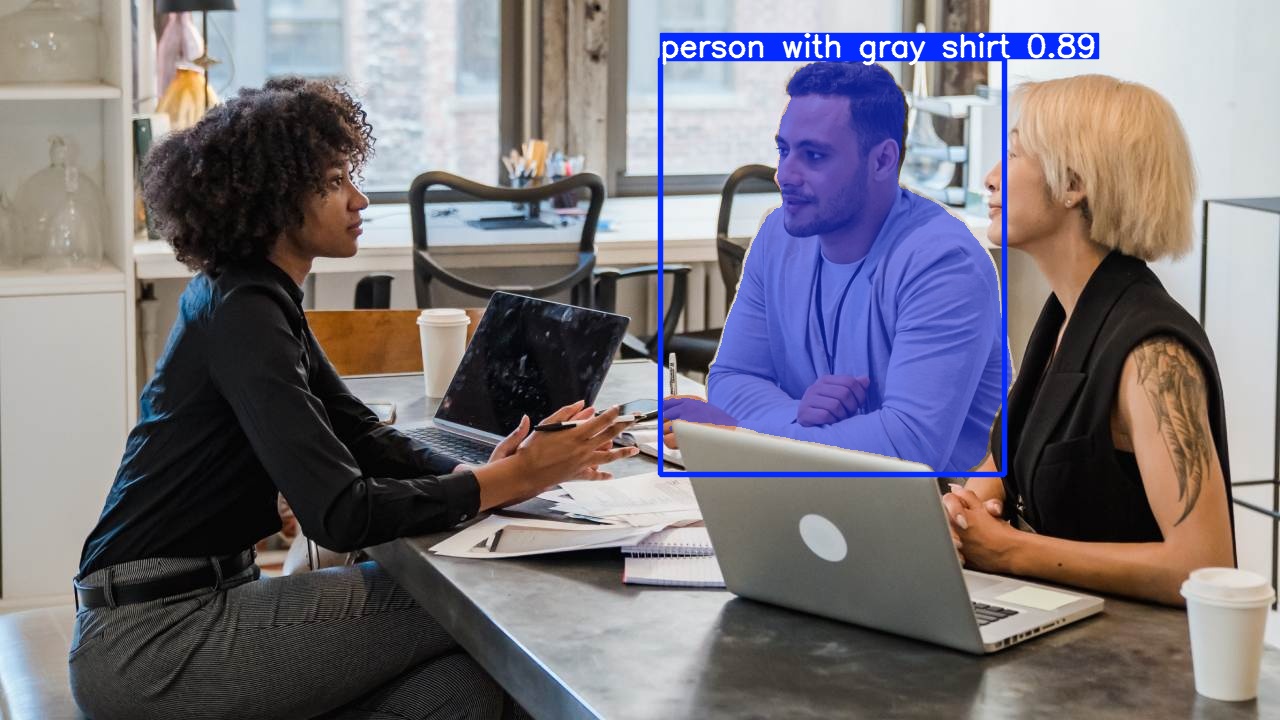
from ultralytics import YOLOE

model = YOLOE("yoloe-26l-seg.pt")
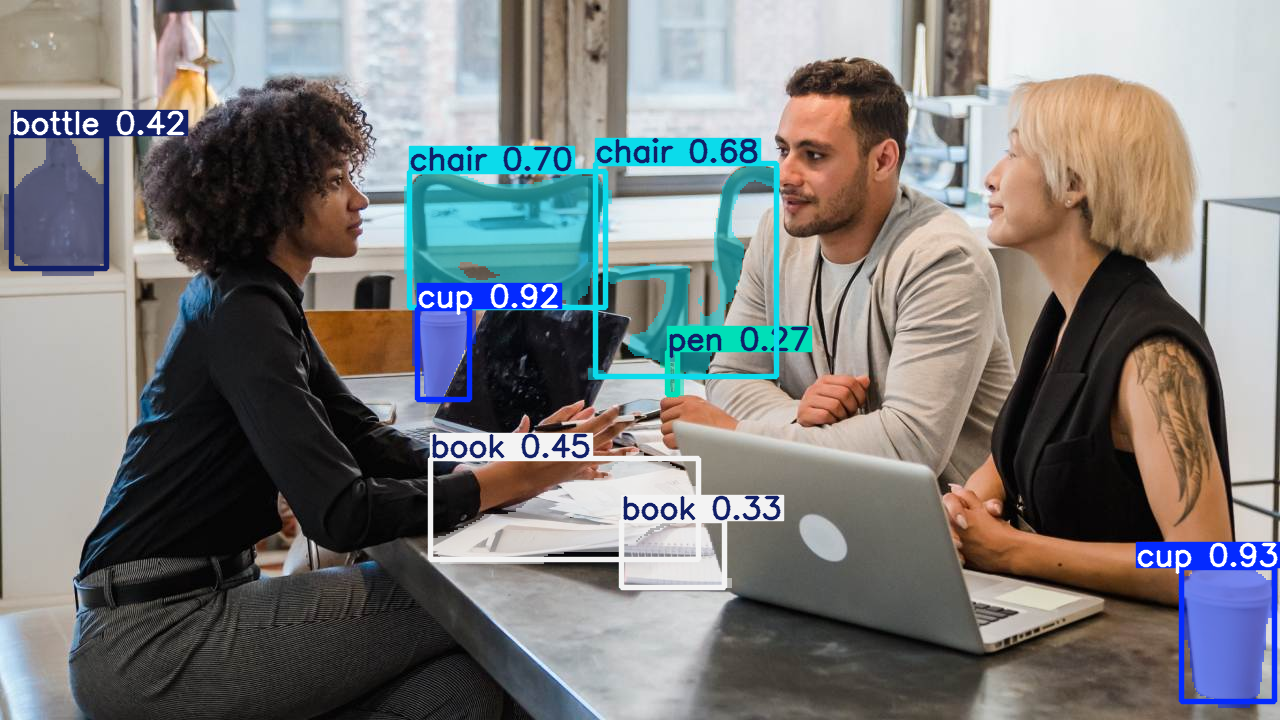
model.set_classes(["cup", "chair", "book", "pen", "bottle"])
results = model.predict("office.jpg")

results[0].show()


office.jpg


from ultralytics import YOLOE

model = YOLOE("yoloe-26l-seg.pt")
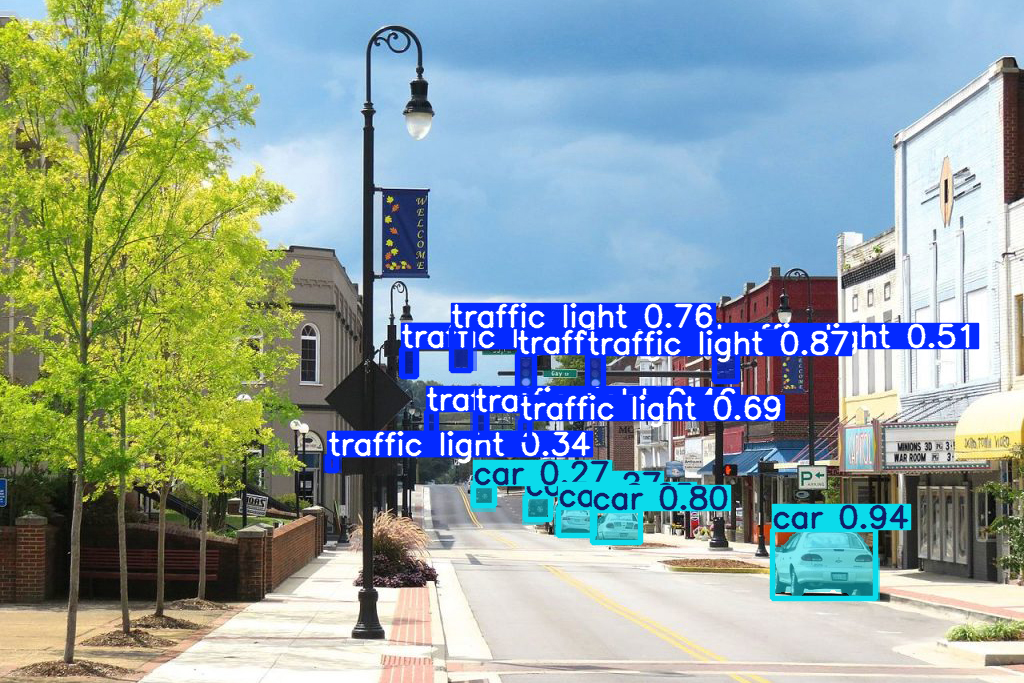
model.set_classes(["traffic light", "car", "tree"])
results = model.predict("street.jpg")

results[0].show()


street.jpg


나무는 검출하지 못했다.


from ultralytics import YOLOE

model = YOLOE("yoloe-26l-seg.pt")
model.set_classes(["tree"])
results = model.predict("tree.jpg")

results[0].show()


tree.jpg


나무가 명확한 사진에서는 나무를 검출한다.


from ultralytics import YOLOE

model = YOLOE("yoloe-26l-seg.pt")
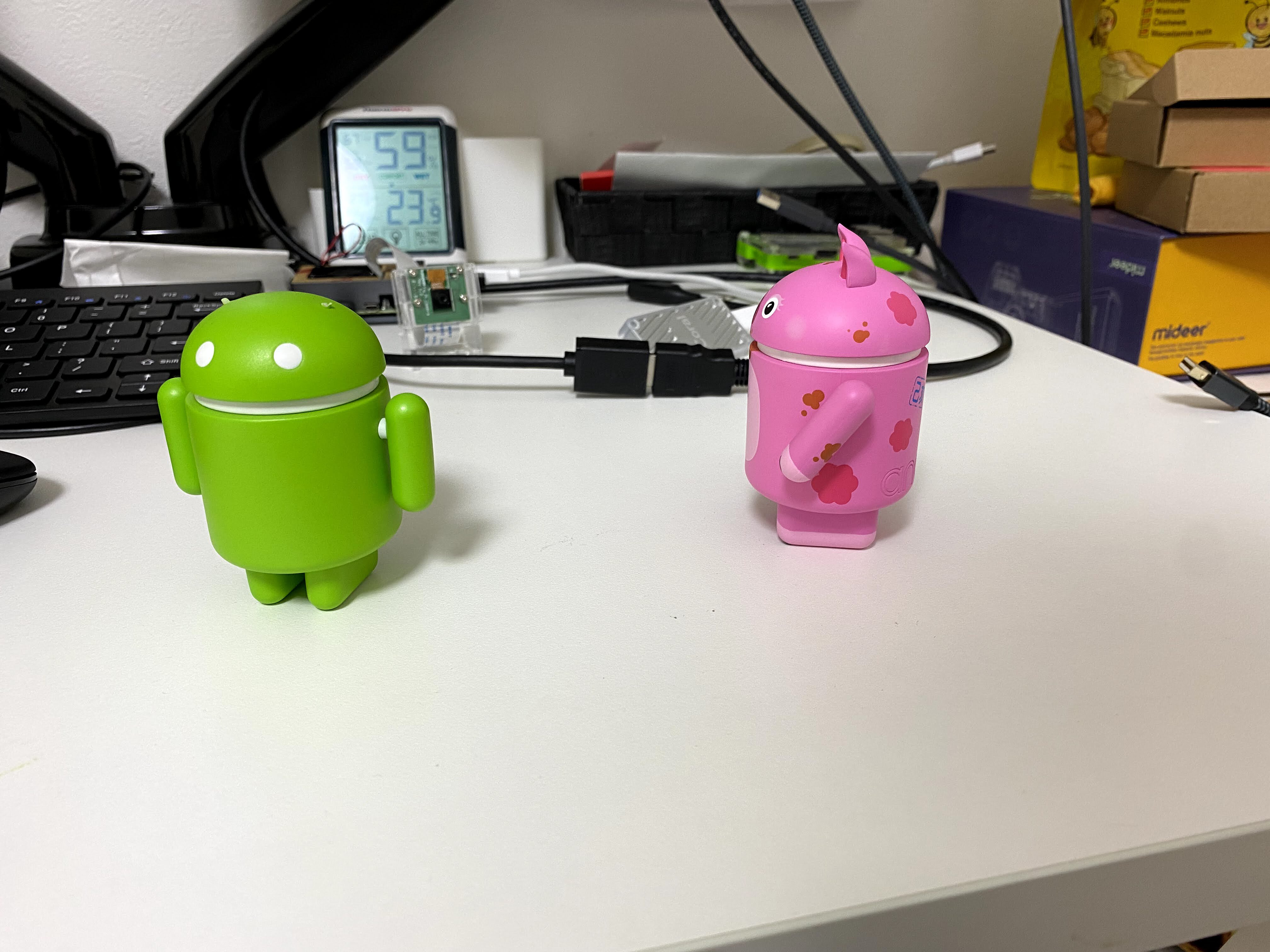
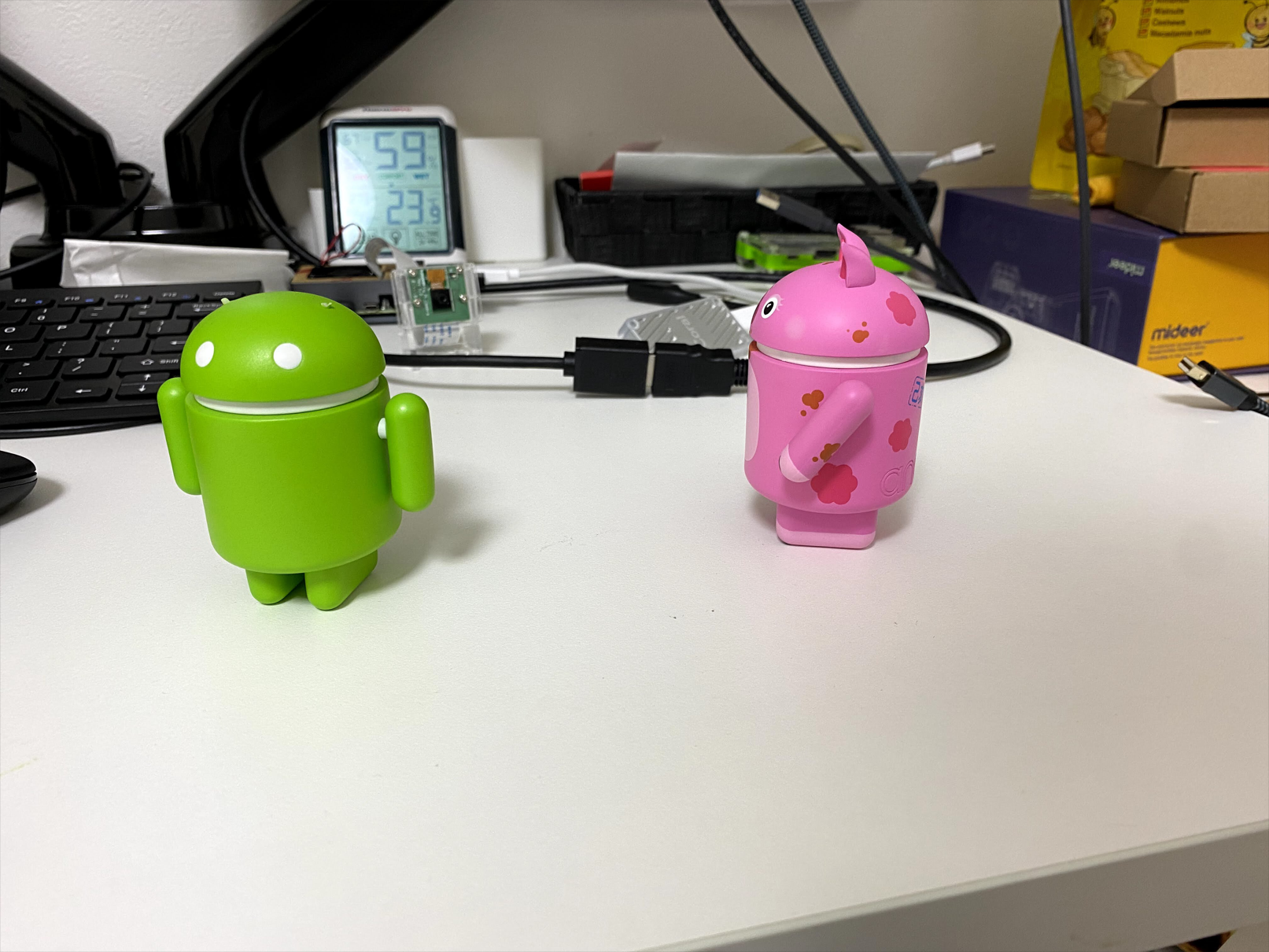
model.set_classes(["android"])
results = model.predict("android.jpg")

results[0].show()


android.jpg


아무것도 검출하지 못했다.


프롬프트를 android figure로 바꿔보자.


from ultralytics import YOLOE

model = YOLOE("yoloe-26l-seg.pt")
model.set_classes(["android figure"])
results = model.predict("android.jpg")

results[0].show()


빨간색 안드로이드만 검출했다.


프롬프트를 green android figure로 바꿔보자.


from ultralytics import YOLOE

model = YOLOE("yoloe-26l-seg.pt")
model.set_classes(["green android figure"])
results = model.predict("android.jpg")

results[0].show()


녹색 안드로이드만 검출된다.


프롬프트를 "red android figure", "green android figure"로 바꿔보자.


from ultralytics import YOLOE

model = YOLOE("yoloe-26l-seg.pt")
model.set_classes(["red android figure", "green android figure"])
results = model.predict("android.jpg")

results[0].show()


모두 검출했다.


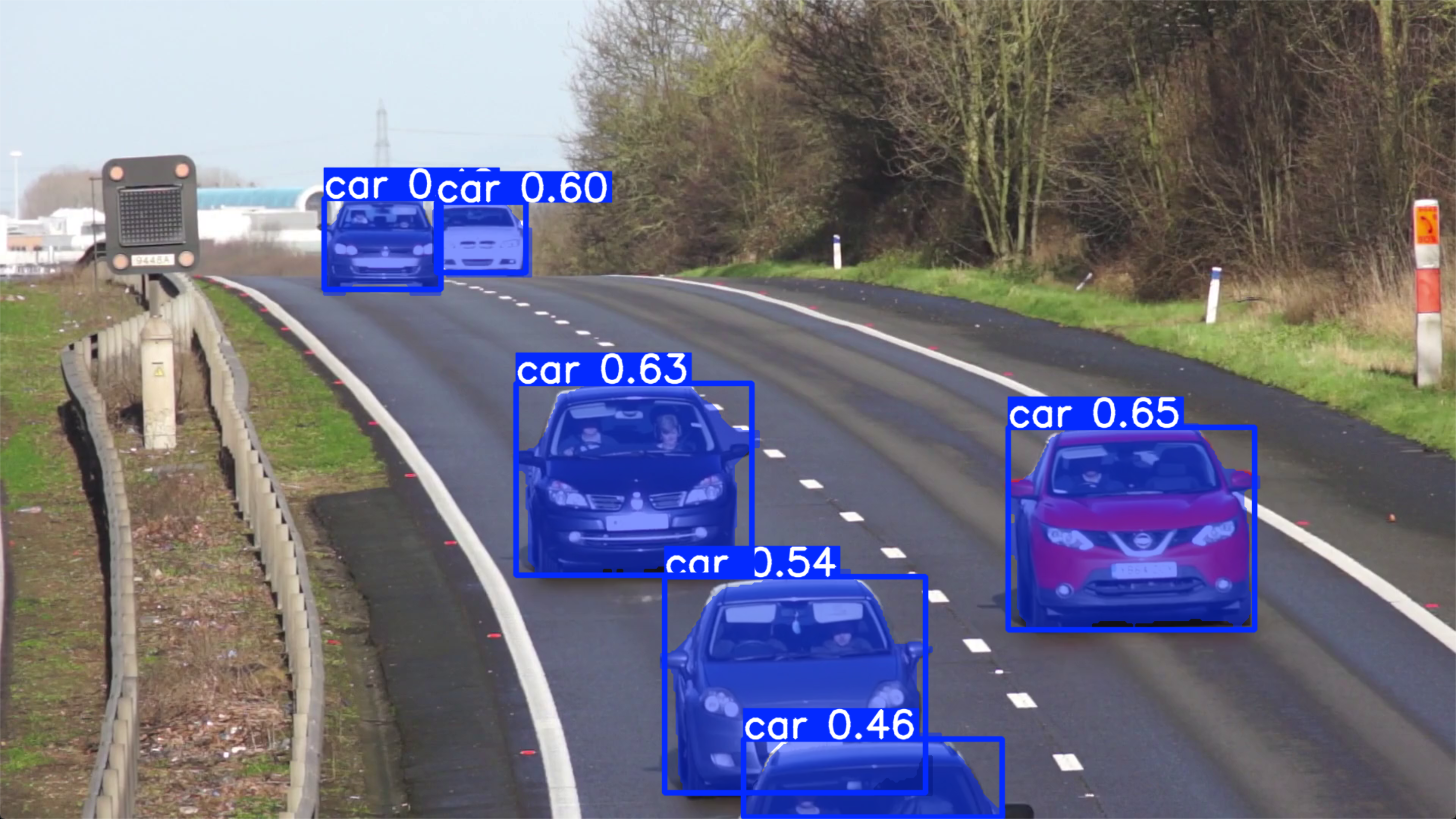
OpenCV를 이용해 영상에서 원하는 객체를 검출해 보자.


import cv2
from ultralytics import YOLOE

model = YOLOE("yoloe-26n-seg.pt")
cap = cv2.VideoCapture("Cars_On_Highway.mp4")

while cap.isOpened():
	success, frame = cap.read()

	if success:
		model.set_classes(["car"])
		results = model.predict(frame, verbose=False)
		cv2.imshow("frame", results[0].plot())

		if cv2.waitKey(1) & 0xFF == ord("q"):
			break
	else:
		break


반응형

'AI, ML, DL' 카테고리의 다른 글

[YOLO] Instance Segmentation 객체 분할  (0) 2026.02.10
[YOLO] Multi-Object Tracking 물체 추적  (0) 2026.02.10
[YOLO] Model Training 모델 훈련  (0) 2026.02.09
[YOLO] with OpenCV  (0) 2026.02.08
[YOLO] YOLO models to ONNX 파일 변환  (0) 2026.02.08
Posted by J-sean
:
반응형

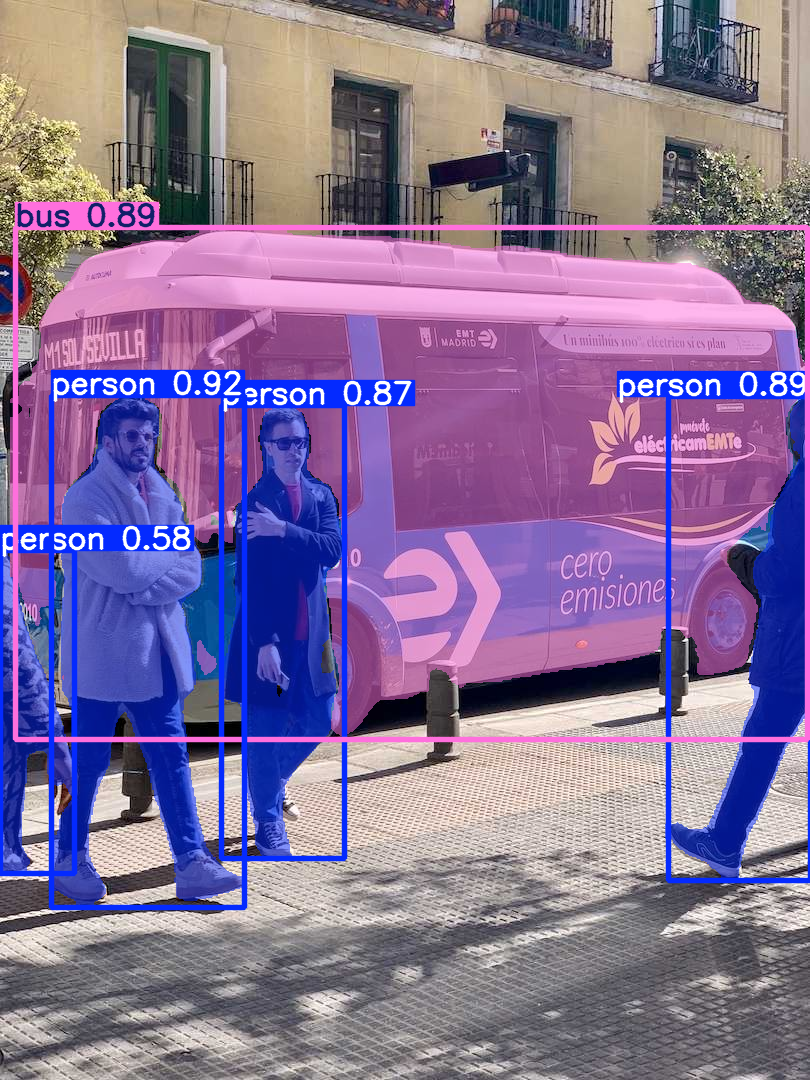
객체 세그먼트 마스크를 표현하고 출력해 보자.


from ultralytics import YOLO

model = YOLO("yolo26n-seg.pt")
results = model("bus.jpg")

for result in results:
	print(result[0].masks.xy) # tensor로 표현된 픽셀 좌표의 세그먼트 목록입니다.
	# 첫 번째 오브젝트의 마스크 픽셀 좌표 출력
	#print(result[0].masks.xyn) # tensor로 표현된 정규화된 세그먼트 목록입니다.

	result.show()


model()는 model.predict()와 같은 의미인 것 같다. 사용할 수 있는 인수는 아래 링크에서 확인하자.

Inference Arguments


원래 이미지


각 인스턴스의 세그먼트를 구분하는 마스크가 표현된다.


첫 번째(92%의 확률을 갖는) 사람의 마스크 픽셀 좌표.


반응형
Posted by J-sean
:
반응형

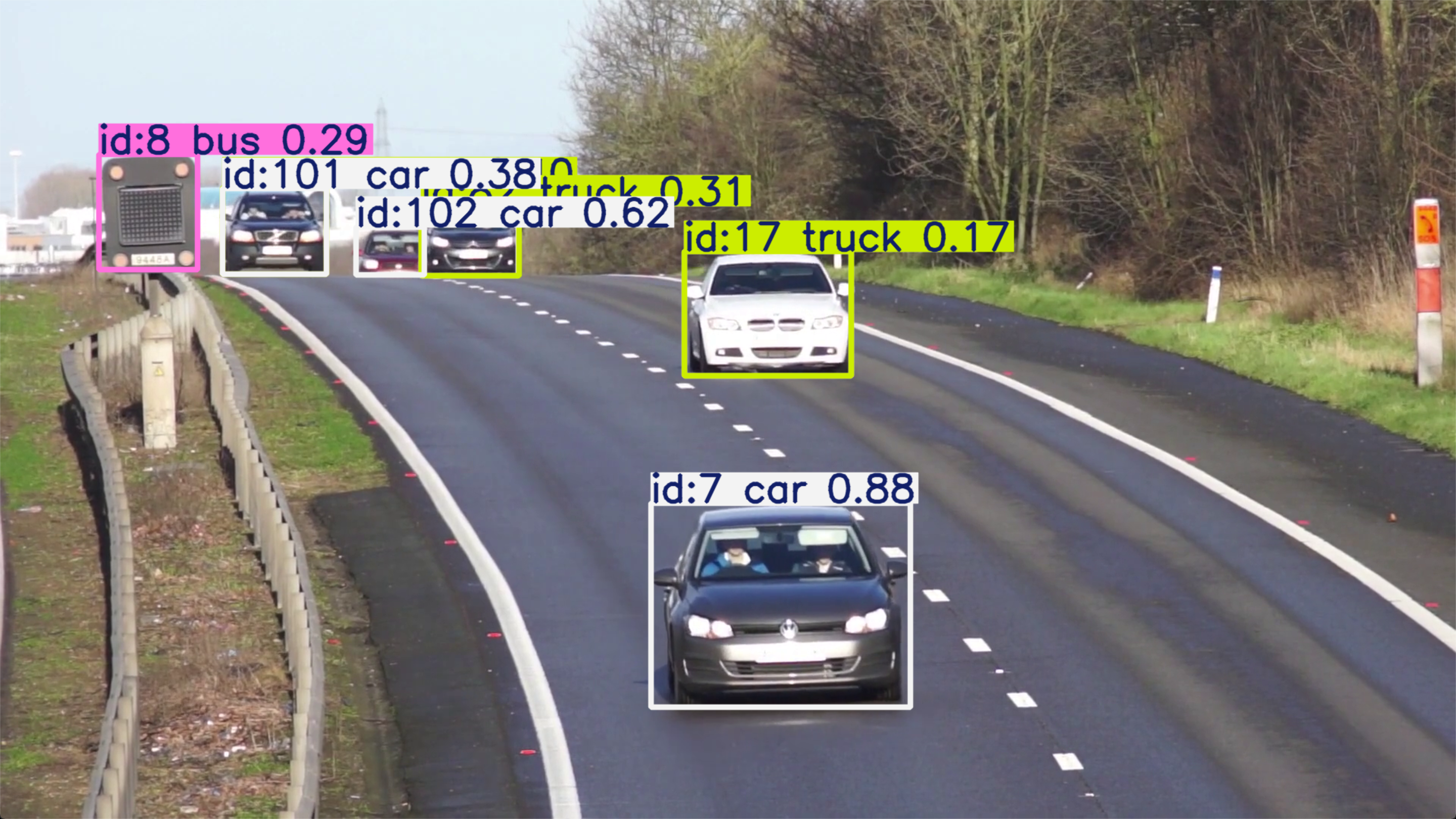
OpenCV와 함께 다수의 물체를 추적해 보자.


import cv2
from ultralytics import YOLO

# Load the YOLO26 model
model = YOLO("yolo26n.pt")

# Open the webcam
# cap = cv2.VideoCapture(0)
# cap.set(cv2.CAP_PROP_FRAME_WIDTH, 640)
# cap.set(cv2.CAP_PROP_FRAME_HEIGHT, 480)
# if cap.set(cv2.CAP_PROP_FPS, 30):
# 	print("FPS set")
# else:
# 	print("FPS setting failed")

cap = cv2.VideoCapture("Cars_On_Highway.mp4")

# Loop through the video frames
while cap.isOpened():
    # Read a frame from the video
    success, frame = cap.read()

    if success:
        # Run YOLO26 tracking on the frame, persisting tracks between frames
        results = model.track(frame, persist=True, verbose=False)

        # Visualize the results on the frame
        annotated_frame = results[0].plot()

        print(f"Number of objects: {len(results[0])}")
        #print(results[0].boxes.id) # (tensor) 바운딩 박스의 track ID를 반환합니다 (사용 가능한 경우).
        #print(results[0].names) # (dict) 클래스 인덱스를 클래스 이름에 매핑하는 사전입니다.
        #print(results[0].boxes.cls) # (tensor) bounding box의 클래스 값을 반환합니다.

        # ID와 각 물체의 클래스 출력
        for id, cls in zip(results[0].boxes.id, results[0].boxes.cls):
            print(f"ID: {id.int()} Class: {results[0].names[cls.int().item()]}", end=', ')
        print()

        # Display the annotated frame
        cv2.imshow("YOLO26 Tracking", annotated_frame)

        # Break the loop if 'q' is pressed
        if cv2.waitKey(1) & 0xFF == ord("q"):
            break
    else:
        # Break the loop if the end of the video is reached
        break

# Release the video capture object and close the display window
cap.release()
cv2.destroyAllWindows()


웹캠을 사용하거나 원하는 영상을 준비하고 실행한다.

video1.avi
2.41MB
video2.avi
2.15MB


캡처하는 시간차 때문에 영상과 콘솔 화면의 출력이 일치하지는 않는다.


반응형
Posted by J-sean
:
반응형

학습 데이터를 준비하고 YOLO 모델을 트레이닝해 보자.


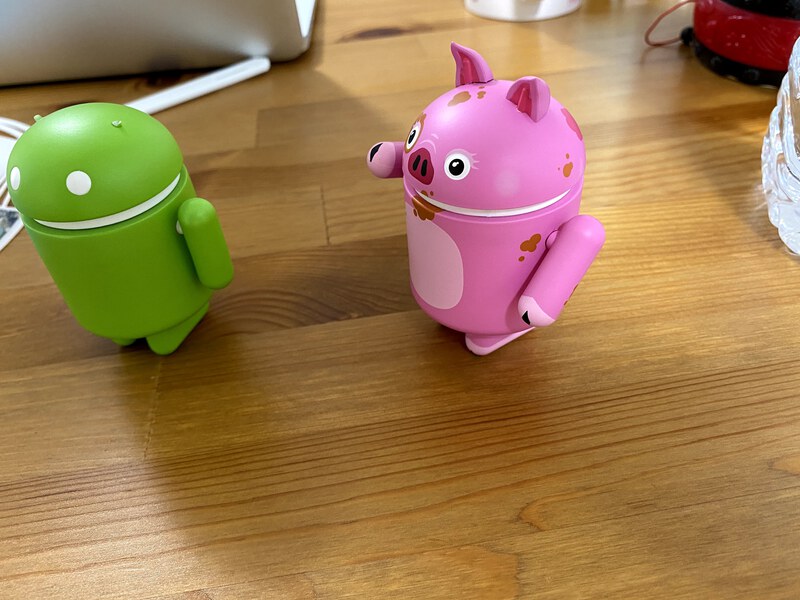
녹색 인형 Label: android 빨간색 인형 Label: android-red


android_figurine.zip
8.03MB


android_figurine.z01
19.53MB


학습할 안드로이드 인형 사진을 준비하고 Roboflow 에서 라벨링 및 데이터셋 준비 작업을 진행한다.


My First Project.v1-roboflow-instant-1--eval-.yolo26.zip
3.74MB

Roboflow에서 준비한 데이터셋


준비된 데이터셋을 프로젝트 폴더에 넣고 학습을 진행한다.


from ultralytics import YOLO

model = YOLO("yolo26n.pt")
results = model.train(data="data.yaml", epochs=100, imgsz=640)


yolo26n.pt 모델이 프로젝트에 없는 경우 자동으로 다운로드한다.

epochs를 10 정도로 하면 거의 학습이 되지 않는다. 진행은 되지만 검증 결과를 확인해 보면 아무것도 검출하지 못한다.


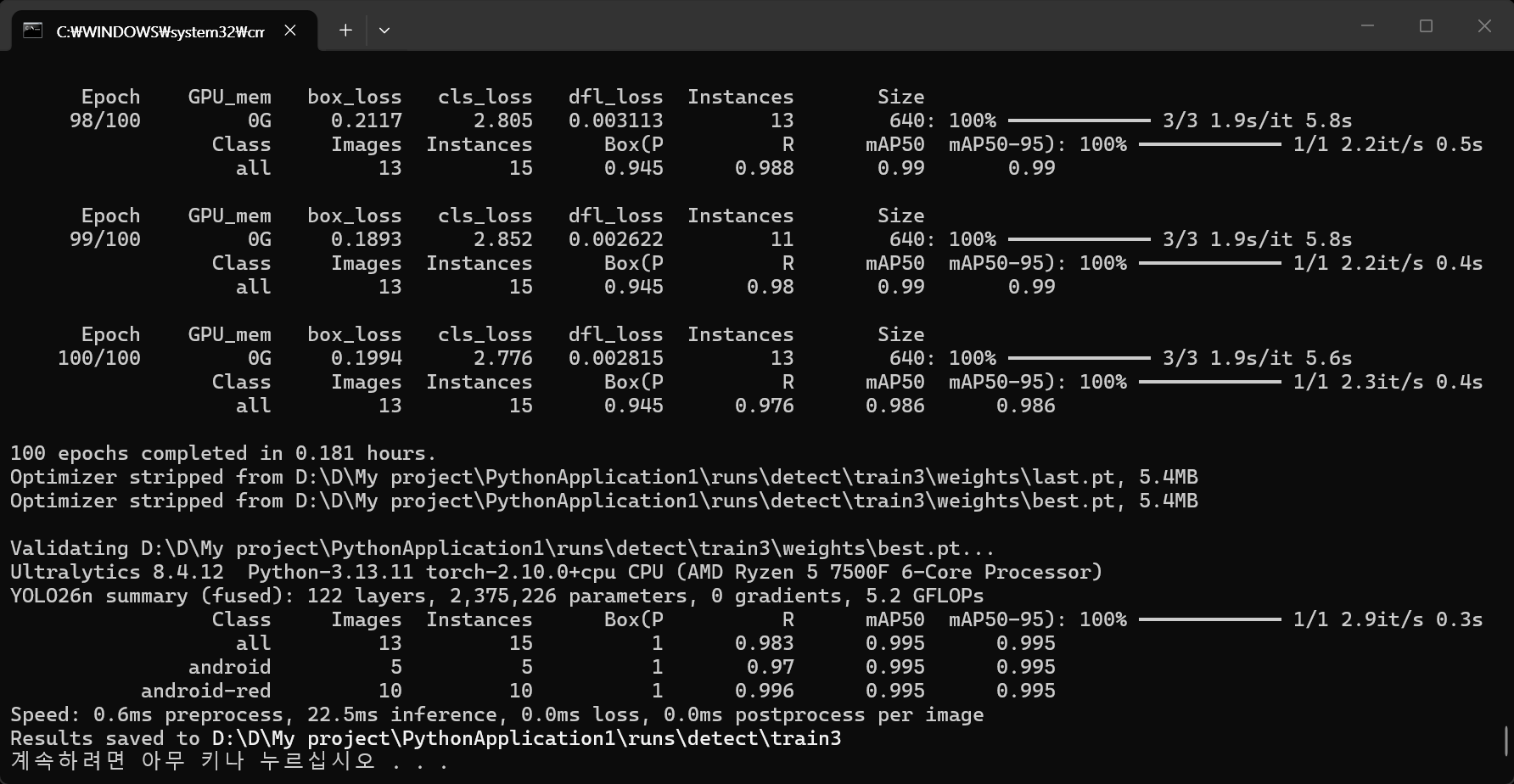
학습 100회 진행


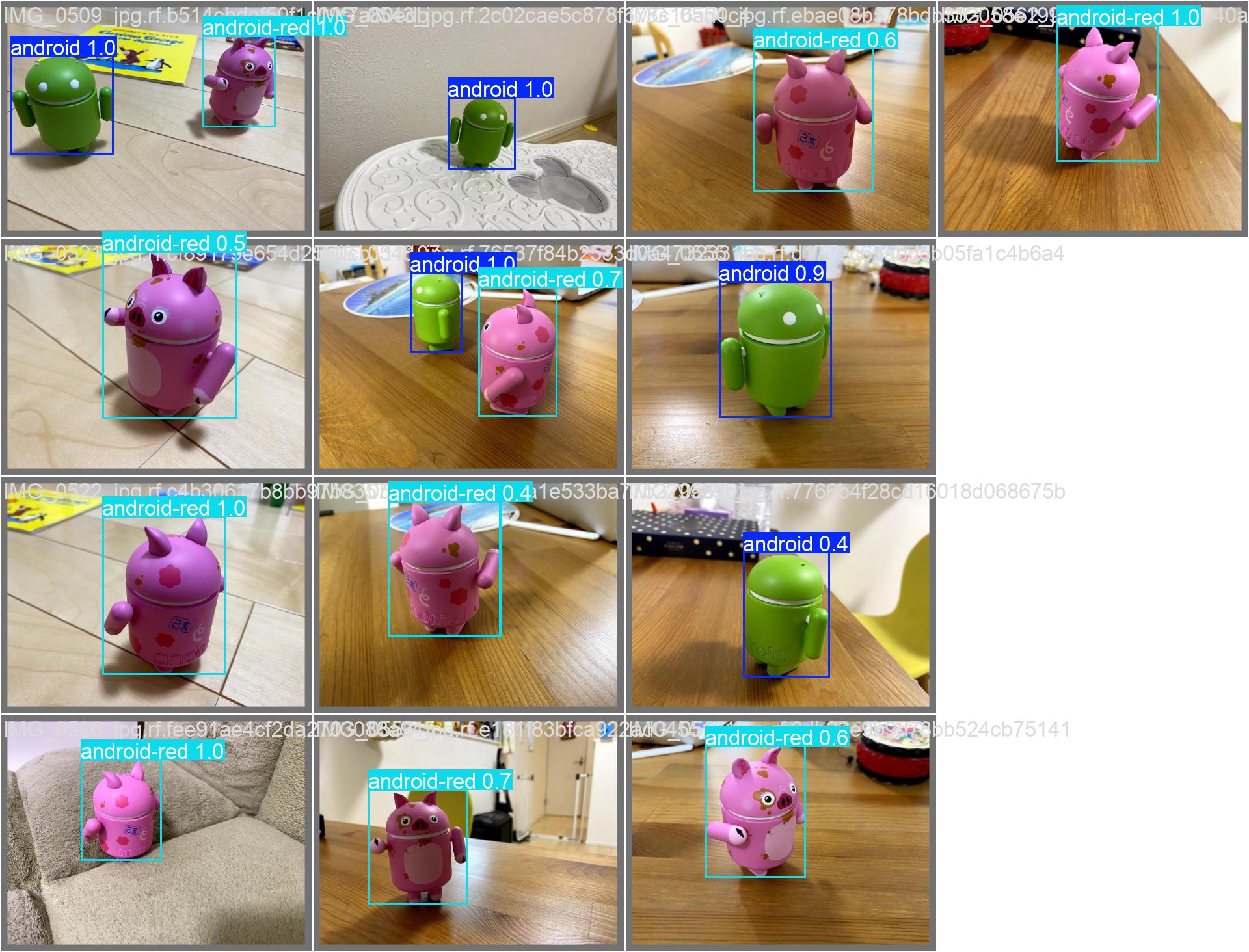
학습이 완료되었으면 run 폴더에서 검증 결과를 확인해 보자.


검증 결과


from ultralytics import YOLO

model = YOLO("best.pt")
results = model("IMG_1.jpg")

for result in results:
    boxes = result.boxes  # Boxes object for bounding box outputs
    masks = result.masks  # Masks object for segmentation masks outputs
    keypoints = result.keypoints  # Keypoints object for pose outputs
    probs = result.probs  # Probs object for classification outputs
    obb = result.obb  # Oriented boxes object for OBB outputs
    result.show()  # display to screen
    result.save(filename="result.jpg")  # save to disk


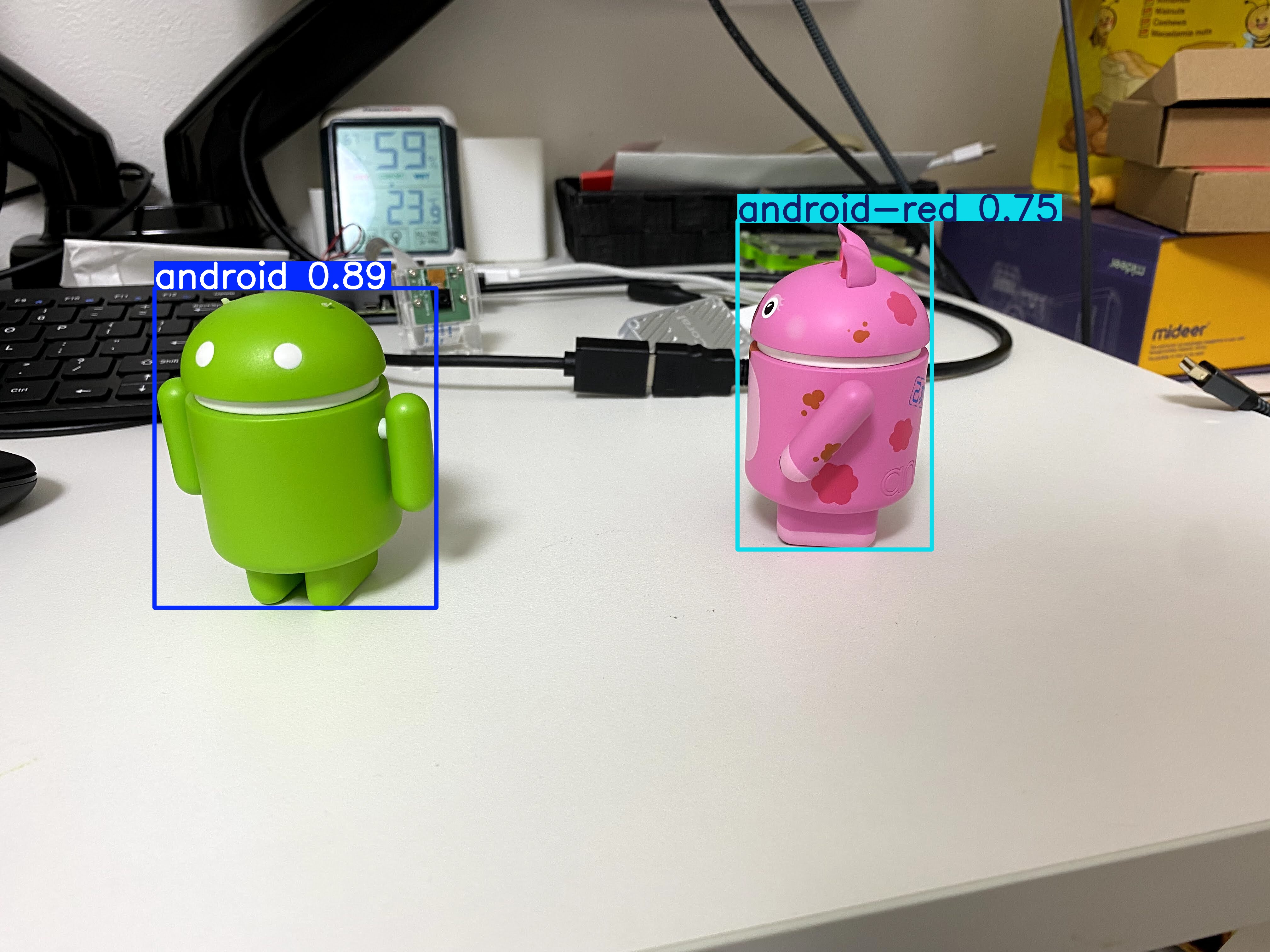
학습 결과로 생성된 'best.pt' 모델을 이용하여 IMG_1.jpg 파일을 테스트해 보자.


정확하게 android와 android-red를 검출했다.


반응형

'AI, ML, DL' 카테고리의 다른 글

[YOLO] Instance Segmentation 객체 분할  (0) 2026.02.10
[YOLO] Multi-Object Tracking 물체 추적  (0) 2026.02.10
[YOLO] with OpenCV  (0) 2026.02.08
[YOLO] YOLO models to ONNX 파일 변환  (0) 2026.02.08
[YOLO] Pose Estimation 포즈 추정  (0) 2026.02.07
Posted by J-sean
:

[YOLO] with OpenCV

AI, ML, DL 2026. 2. 8. 18:40 |
반응형

YOLO와 OpenCV를 함께 사용해 보자.


import cv2
from ultralytics import YOLO

image = cv2.imread("palvin2.png")
model = YOLO("yolo26n-pose.pt")
result = model(image, save=False, show=False)[0]
# 1개의 이미지만 사용했으므로 이미지 내 사람 수와 상관없이 결과에는 항상 1개의 원소([0])만 있다

for i in range(len(result)):
	print(f"#{i} Confidence: {result.boxes.conf[i]}")
	print(f"Nose at ({result.keypoints.data[i][0][0].int()}, {result.keypoints.data[i][0][1].int()})")
	center = (result.keypoints.data[i][0][0].int().item(), result.keypoints.data[i][0][1].int().item())
	cv2.circle(image, center, 30, (255, 0, 0), 2)
	# result.keypoints.data[i][0] = nose(x, y)
	# Tensor.int() => 정수 tensor로 변환
	# Tensor.item() => tensor number를 Python number로 변환.

cv2.imshow("Image", image)
cv2.waitKey(0)
cv2.destroyAllWindows()


코 위치에 원이 그려진다.


아래 코드는 카메라를 사용해 매 프레임 마다 코 위치에 원을 그린다.

import cv2
from ultralytics import YOLO

capture = cv2.VideoCapture(0)
capture.set(cv2.CAP_PROP_FRAME_WIDTH, 640)
capture.set(cv2.CAP_PROP_FRAME_HEIGHT, 480)
if capture.set(cv2.CAP_PROP_FPS, 30):
	print("FPS set")
else:
	print("FPS setting failed")

model = YOLO("yolo26n-pose.pt")

while cv2.waitKey(1) < 0:
	ret, frame = capture.read()	
	result = model(frame, save=False, show=False, verbose=False)[0]
	# 1개의 프레임만 사용했으므로 프레임 내 사람 수와 상관없이 결과에는 항상 1개의 원소([0])만 있다

	for i in range(len(result)):		
		center = (result.keypoints.data[i][0][0].int().item(), result.keypoints.data[i][0][1].int().item())
		cv2.circle(frame, center, 30, (255, 0, 0), 2)
		# result.keypoints.data[i][0] = nose
		# Tensor.int() => 정수 tensor로 변환
		# Tensor.item() => tensor number를 Python number로 변환.

	cv2.imshow("Image", frame)

capture.release()
cv2.destroyAllWindows()


반응형
Posted by J-sean
:
반응형

pt파일을 onnx파일로 변환해 보자.


from ultralytics import YOLO

# Load the YOLO26 model
model = YOLO("yolo26n-pose.pt")

# Export the model to ONNX format
model.export(format="onnx")  # creates 'yolo26n.onnx'


yolo26n-pose.onnx 파일이 생성된다.


※ 참고

ONNX Export for YOLO26 Models


반응형
Posted by J-sean
:
반응형

YOLO를 이용해 포즈를 추정해 보자.


from ultralytics import YOLO

kpt_names = ["nose", "left_eye", "right_eye", "left_ear", "right_ear", "left_shoulder",
             "right_shoulder", "left_elbow", "right_elbow", "left_wrist", "right_wrist",
             "left_hip", "right_hip", "left_knee", "right_knee", "left_ankle", "right_ankle"]

model = YOLO("yolo26n-pose.pt")  # "yolo26n-pose.pt"가 없다면 자동으로 다운로드 받는다
results = model("palvin1.png", save=True)

print(f"Length of results: {len(results)}")
# 1개의 이미지만 사용했으므로 results에는 1개의 원소만 있다

# Access the results
for result in results: # results에는 1개의 원소만 있기 때문에 for 루프를 사용하는 의미는 없다
    xy = result.keypoints.xy  # x and y coordinates
    xyn = result.keypoints.xyn  # normalized
    kpts = result.keypoints.data  # x, y, visibility (if available)
    
    print(f"Number of people: {len(result)}")
        
    for i, kpt in enumerate(kpts):
        print(f"Confidence: {result.boxes.conf[i]}")
        for name, k in zip(kpt_names, kpt):
            if k[2] > 0.3: # k[2]: visibility
                print(f"{name} is at {k}")
            else:
                print(f"{name} is not visible")
        print()


※ 참고

Predict

Pose Estimation

YOLO8 OpenCV


반응형
Posted by J-sean
: