


[C#] Asynchronous Threading 비동기 스레딩
C# 2026. 3. 31. 09:53 |여러 가지 비동기 스레딩을 구현해 보자.
우선 인수와 리턴값이 없는 스레드다.
아래 3가지 코드는 모두 같은 내용이지만 다른 방식으로 작성되었다.
using System;
using System.Threading;
using System.Threading.Tasks;

namespace ConsoleApp1
{
    internal class Program
    {
        static void Counter()
        {
            int subCounter = 0;
            for (int i = 0; i < 5; i++)
            {
                Thread.Sleep(1000);
                Console.WriteLine($"Sub Thread counting... {subCounter++}");
            }
        }

        static void Main(string[] args)
        {
            Task task = new Task(Counter);
            task.Start();

            int mainCounter = 0;
            for (int i = 0; i < 5; i++)
            {
                Thread.Sleep(1000);
                Console.WriteLine($"Main Thread counting... {mainCounter++}");
            }

            task.Wait();
        }
    }
}
using System;
using System.Threading;
using System.Threading.Tasks;

namespace ConsoleApp1
{
    internal class Program
    {
        static void Main(string[] args)
        {
            Action counter = () =>
            {
                int subCounter = 0;
                for (int i = 0; i < 5; i++)
                {
                    Thread.Sleep(1000);
                    Console.WriteLine($"Sub Thread counting... {subCounter++}");
                }
            };

            Task task = new Task(counter);
            task.Start();

            int mainCounter = 0;
            for (int i = 0; i < 5; i++)
            {
                Thread.Sleep(1000);
                Console.WriteLine($"Main Thread counting... {mainCounter++}");
            }

            task.Wait();
        }
    }
}
using System;
using System.Threading;
using System.Threading.Tasks;

namespace ConsoleApp1
{
    internal class Program
    {
        static void Main(string[] args)
        {
            Task task = Task.Run(() =>
            {
                int subCounter = 0;
                for (int i = 0; i < 5; i++)
                {
                    Thread.Sleep(1000);
                    Console.WriteLine($"Task counting... {subCounter++}");
                }
            });

            int mainCounter = 0;
            for (int i = 0; i < 5; i++)
            {
                Thread.Sleep(1000);
                Console.WriteLine($"Main Thread counting... {mainCounter++}");
            }

            task.Wait();
        }
    }
}
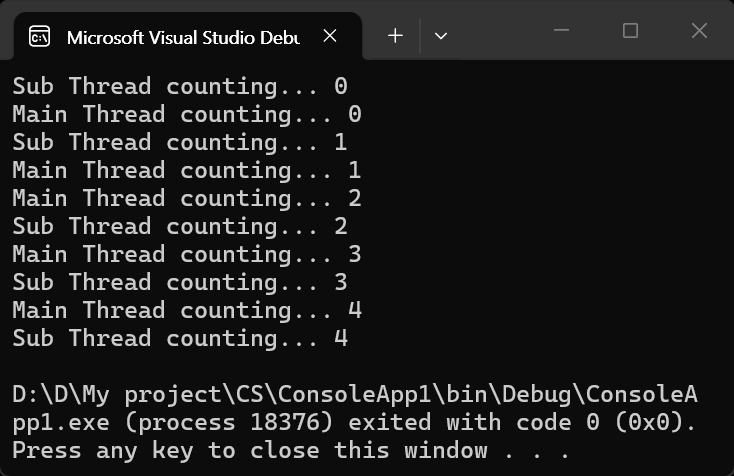
이번엔 인수를 하나 받는 스레드를 만들어 보자. 아래 2가지 코드는 모두 같은 내용이지만 다른 방식으로 작성되었다.
using System;
using System.Threading;
using System.Threading.Tasks;

namespace ConsoleApp1
{
    internal class Program
    {
        static void Counter(object to)
        {
            int subCounter = 0;
            for (int i = 0; i < (int)to; i++)
            {
                Thread.Sleep(1000);
                Console.WriteLine($"Sub Thread counting... {subCounter++}");
            }
        }

        static void Main(string[] args)
        {
            Task task = new Task(Counter, 5);
            task.Start();

            int mainCounter = 0;
            for (int i = 0; i < 5; i++)
            {
                Thread.Sleep(1000);
                Console.WriteLine($"Main Thread counting... {mainCounter++}");
            }

            task.Wait();
        }
    }
}
using System;
using System.Threading;
using System.Threading.Tasks;

namespace ConsoleApp1
{
    internal class Program
    {
        static void Main(string[] args)
        {
            Action<object> Counter = (object to) =>
            {
                int subCounter = 0;
                for (int i = 0; i < (int)to; i++)
                {
                    Thread.Sleep(1000);
                    Console.WriteLine($"Sub Thread counting... {subCounter++}");
                }
            };

            Task task = new Task(Counter, 5);
            task.Start();

            int mainCounter = 0;
            for (int i = 0; i < 5; i++)
            {
                Thread.Sleep(1000);
                Console.WriteLine($"Main Thread counting... {mainCounter++}");
            }

            task.Wait();
        }
    }
}
인수가 있는 경우, Task.Run() 메서드에서 람다식으로 코드를 만드는 건 의미가 없는 것 같다.
결과는 위와 같다.
이번엔 리턴값이 있는 스레드를 만들어 보자. 아래 2가지 코드는 모두 같은 내용이지만 다른 방식으로 작성되었다.
using System;
using System.Threading;
using System.Threading.Tasks;

namespace ConsoleApp1
{
    internal class Program
    {
        static int Counter()
        {
            int subCounter = 0;
            for (int i = 0; i < 5; i++)
            {
                Thread.Sleep(1000);
                Console.WriteLine($"Sub Thread counting... {subCounter++}");
            }

            return subCounter;
        }

        static void Main(string[] args)
        {
            Task<int> task = new Task<int>(Counter);
            task.Start();

            int mainCounter = 0;
            for (int i = 0; i < 5; i++)
            {
                Thread.Sleep(1000);
                Console.WriteLine($"Main Thread counting... {mainCounter++}");
            }

            task.Wait();
            Console.WriteLine($"Sub Thread finished with count: {task.Result}");
        }
    }
}
using System;
using System.Threading;
using System.Threading.Tasks;

namespace ConsoleApp1
{
    internal class Program
    {
        static void Main(string[] args)
        {
            Task<int> task = Task<int>.Run(() =>
            {
                int subCounter = 0;
                for (int i = 0; i < 5; i++)
                {
                    Thread.Sleep(1000);
                    Console.WriteLine($"Sub Thread counting... {subCounter++}");
                }

                return subCounter;
            });

            int mainCounter = 0;
            for (int i = 0; i < 5; i++)
            {
                Thread.Sleep(1000);
                Console.WriteLine($"Main Thread counting... {mainCounter++}");
            }

            task.Wait();
            Console.WriteLine($"Sub Thread finished with count: {task.Result}");
        }
    }
}
Action은 리턴값이 없는 메서드 전용이기 때문에 이 경우 Action을 사용할 수 없다.
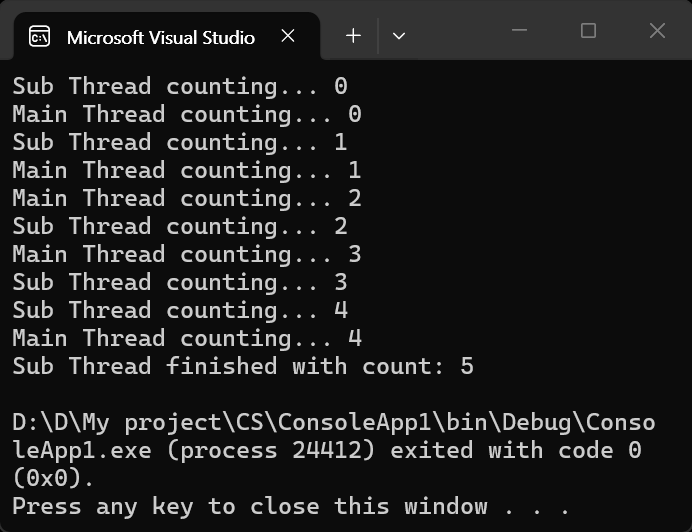
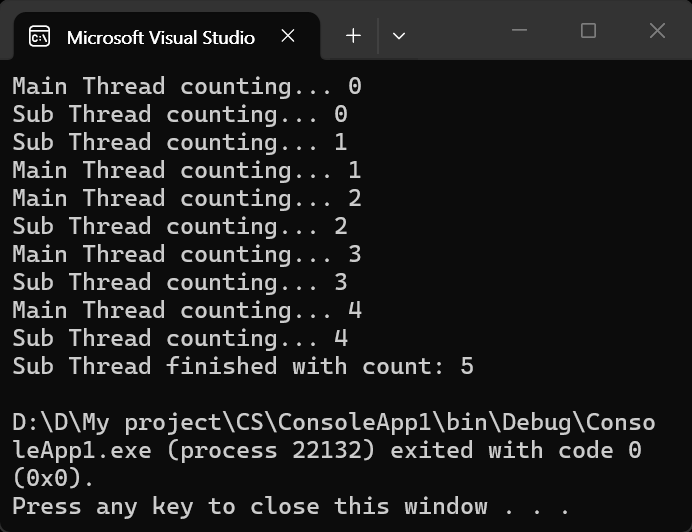
이번엔 인수도 있고 리턴값도 있는 스레드를 만들어 보자.
아래 2가지 코드는 모두 같은 내용이지만 다른 방식으로 작성되었다.
using System;
using System.Threading;
using System.Threading.Tasks;

namespace ConsoleApp1
{
    internal class Program
    {
        static int Counter(object to)
        {
            int subCounter = 0;
            for (int i = 0; i < (int)to; i++)
            {
                Thread.Sleep(1000);
                Console.WriteLine($"Sub Thread counting... {subCounter++}");
            }

            return subCounter;
        }

        static void Main(string[] args)
        {
            Task<int> task = new Task<int>(Counter, 5);
            task.Start();

            int mainCounter = 0;
            for (int i = 0; i < 5; i++)
            {
                Thread.Sleep(1000);
                Console.WriteLine($"Main Thread counting... {mainCounter++}");
            }

            task.Wait();
            Console.WriteLine($"Sub Thread finished with count: {task.Result}");
        }
    }
}
using System;
using System.Threading;
using System.Threading.Tasks;

namespace ConsoleApp1
{
    internal class Program
    {
        static void Main(string[] args)
        {
            Func<object, int> Counter = (object to) =>
            {
                int subCounter = 0;
                for (int i = 0; i < (int)to; i++)
                {
                    Thread.Sleep(1000);
                    Console.WriteLine($"Sub Thread counting... {subCounter++}");
                }

                return subCounter;
            };

            Task<int> task = new Task<int>(Counter, 5);
            task.Start();

            int mainCounter = 0;
            for (int i = 0; i < 5; i++)
            {
                Thread.Sleep(1000);
                Console.WriteLine($"Main Thread counting... {mainCounter++}");
            }

            task.Wait();
            Console.WriteLine($"Sub Thread finished with count: {task.Result}");
        }
    }
}
async, await를 사용해 보자.
아래 코드는 컴파일 에러가 발생한다. Main 함수에는 async가 단순하게 그냥 붙을 수 없다.
using System;
using System.Threading;
using System.Threading.Tasks;

namespace ConsoleApp1
{
    internal class Program
    {
    	// 컴파일 에러 발생
        static async void Main(string[] args)
        {
            await Task.Run(() => Count());

            int mainCounter = 0;
            for (int i = 0; i < 5; i++)
            {
                Thread.Sleep(1000);
                Console.WriteLine($"Main Thread counting... {mainCounter++}");
            }
        }

        static void Count()
        {
            int subCounter = 0;
            for (int i = 0; i < 5; i++)
            {
                Thread.Sleep(1000);
                Console.WriteLine($"Sub Thread counting... {subCounter++}");
            }

        }
    }
}
Main 함수에 단순하게 async가 붙으면 다음과 같은 에러가 발생한다.
Program does not contain a static 'Main' method suitable for an entry point
또, 아래와 같이 바꾸면 단일 스레드처럼 동작한다.
using System;
using System.Threading;
using System.Threading.Tasks;

namespace ConsoleApp1
{
    internal class Program
    {
        static async Task Main(string[] args)
        {
            await Task.Run(() => Count());

            int mainCounter = 0;
            for (int i = 0; i < 5; i++)
            {
                Thread.Sleep(1000);
                Console.WriteLine($"Main Thread counting... {mainCounter++}");
            }
        }

        static void Count()
        {
            int subCounter = 0;
            for (int i = 0; i < 5; i++)
            {
                Thread.Sleep(1000);
                Console.WriteLine($"Sub Thread counting... {subCounter++}");
            }

        }
    }
}
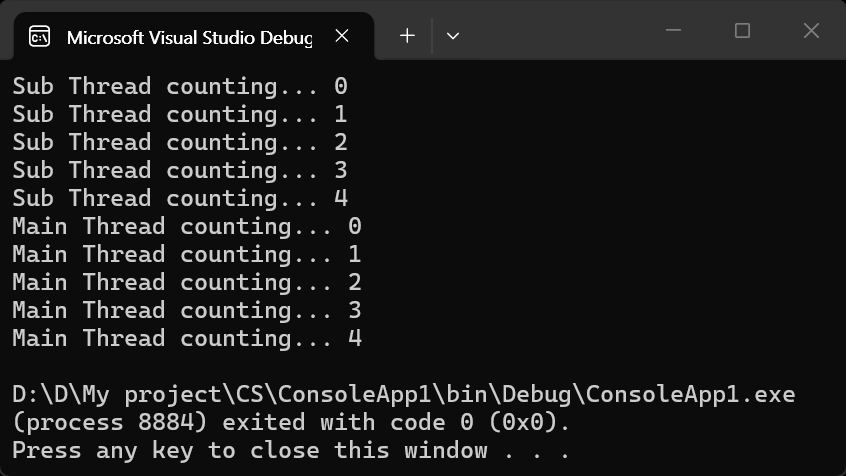
await 키워드는 이 비동기 작업(서브 스레드)이 완전히 끝날 때까지 여기서 기다리겠다는 의미이기 때문이다.
아래와 같이 바꿔보자.
using System;
using System.Threading;
using System.Threading.Tasks;

namespace ConsoleApp1
{
    internal class Program
    {
        static async Task Main(string[] args)
        {
            // await 없이 Task를 실행(시작)만 하고 변수에 담아둔다.
            // 이 시점부터 서브 스레드가 백그라운드에서 동작한다.
            Task countTask = Task.Run(() => Count());

            // 메인 스레드는 멈추지 않고 자신의 루프 작업을 동시에 수행한다.
            int mainCounter = 0;
            for (int i = 0; i < 5; i++)
            {
                // 참고: 비동기 메서드(async) 내에서는 Thread.Sleep 대신 await Task.Delay를 사용하는 것을 권장.
                await Task.Delay(1000);
                Console.WriteLine($"Main Thread counting... {mainCounter++}");
            }

            // 메인 스레드의 작업이 다 끝나면, 메인 프로세스가 종료되기 전에
            // 서브 스레드의 작업이 모두 완료되었는지 마지막으로 확인(대기).
            await countTask;
        }

        static void Count()
        {
            int subCounter = 0;
            for (int i = 0; i < 5; i++)
            {
                Thread.Sleep(1000);
                Console.WriteLine($"Sub Thread counting... {subCounter++}");
            }
        }
    }
}
아니면 아래와 같이 다른 함수에서 async, await를 사용하도록 코드를 바꾼다.
using System;
using System.Threading;
using System.Threading.Tasks;

namespace ConsoleApp1
{
    internal class Program
    {
        static void Main(string[] args)
        {
            Count();

            int mainCounter = 0;
            for (int i = 0; i < 5; i++)
            {
                Thread.Sleep(1000);
                Console.WriteLine($"Main Thread counting... {mainCounter++}");
            }
        }

        static async void Count()
        {
            await Task.Run(async () =>
            {
                int subCounter = 0;
                for (int i = 0; i < 5; i++)
                {
                    // Use Task.Delay instead of Thread.Sleep to avoid blocking the thread
                    await Task.Delay(1000);
                    Console.WriteLine($"Sub Thread counting... {subCounter++}");
                }
            });
        }
    }
}
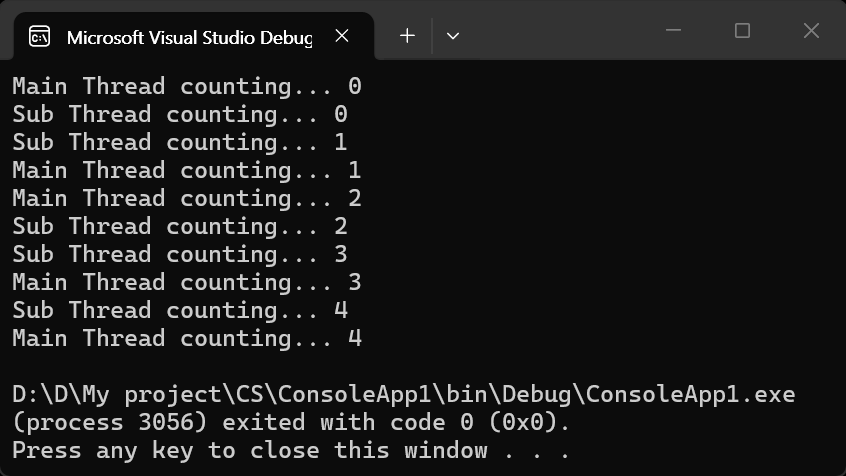
이번엔 반환값이 있는 함수를 살펴보자.
using System;
using System.Threading;
using System.Threading.Tasks;

namespace ConsoleApp1
{
    internal class Program
    {
        static void Main(string[] args)
        {
            Task<int> taskResult = Count();

            int mainCounter = 0;
            for (int i = 0; i < 5; i++)
            {
                Thread.Sleep(1000);
                Console.WriteLine($"Main Thread counting... {mainCounter++}");
            }

            int result = taskResult.Result;
            Console.WriteLine($"Result from Sub Thread: {result}");
        }

        static async Task<int> Count()
        {
            return await Task.Run(() =>
            {
                int subCounter = 0;
                for (int i = 0; i < 5; i++)
                {
                    Thread.Sleep(1000);
                    Console.WriteLine($"Sub Thread counting... {subCounter++}");
                }

                return subCounter;
            });
        }
    }
}
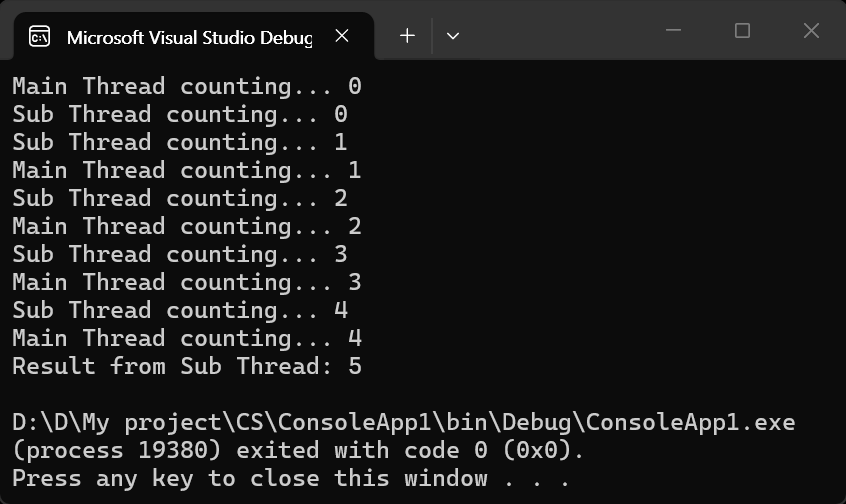
위 코드를 아래와 같이 바꾸면 단일 스레드처럼 작동하게 된다. 조심하자.
using System;
using System.Threading;
using System.Threading.Tasks;

namespace ConsoleApp1
{
    internal class Program
    {
        static void Main(string[] args)
        {
            int taskResult = Count().Result;
            // Task가 시작되자마자 바로 Result를 요구하고 있다.
            // 메인 스레드가 진행하지 못하게 된다.
            Console.WriteLine($"Result from Sub Thread: {taskResult}");

            int mainCounter = 0;
            for (int i = 0; i < 5; i++)
            {
                Thread.Sleep(1000);
                Console.WriteLine($"Main Thread counting... {mainCounter++}");
            }
        }

        static async Task<int> Count()
        {
            return await Task.Run(() =>
            {
                int subCounter = 0;
                for (int i = 0; i < 5; i++)
                {
                    Thread.Sleep(1000);
                    Console.WriteLine($"Sub Thread counting... {subCounter++}");
                }

                return subCounter;
            });
        }
    }
}
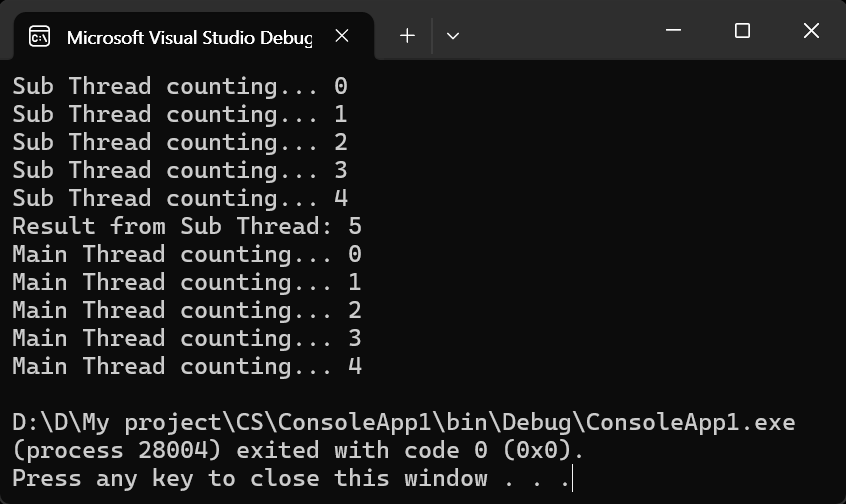
Parallel 클래스를 사용해서 간편하게 스레드를 사용해 보자.
using System;
using System.Threading;
using System.Threading.Tasks;

namespace ConsoleApp1
{
    internal class Program
    {
        static void Main(string[] args)
        {
            Parallel.For(0, 10, DoSomething);

            // Alternatively, you can use a lambda expression:
            //Parallel.For(0, 10, i =>
            //{
            //    DoSomething(i);
            //});
        }

        static void DoSomething(int i)
        {
            Thread.Sleep(1000);
            Console.WriteLine($"Job {i} completed.");
        }
    }
}
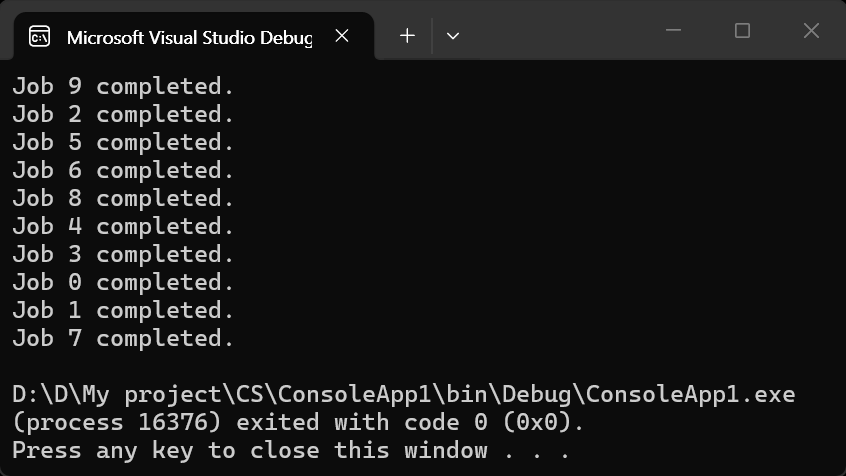
하나씩 처리하면 10초가 걸리는 작업이 10개의 스레드가 생성되어 1초 만에 끝난다. (스레드는 CPU 코어의 갯수에 따라 다르게 생성된다)
'C#' 카테고리의 다른 글
| [LiveCharts] 설치 및 기본 차트 그리기 (0) | 2026.04.20 |
|---|---|
| [C#] DateTime Class & DateTimePicker (0) | 2026.04.07 |
| [C#] 콘솔 프로그램 실행하고 결과 확인하기 (0) | 2026.03.28 |
| [C#] 언어, 지역, 문화에 따른 숫자, 날짜 등 데이터 표현 (0) | 2026.02.07 |
| [C#] 난수 생성, 배열 섞기, 리스트 컴프리헨션 (1) | 2025.12.30 |