


[wxWidgets] Timer 타이머
C, C++ 2026. 5. 10. 19:41 |반응형
타이머를 사용해 보자.
#include <wx/wx.h>

class MyApp : public wxApp
{
public:
	bool OnInit() override;
};

wxIMPLEMENT_APP(MyApp);

class MyFrame : public wxFrame
{
public:
	MyFrame();

private:
	wxTimer m_timer; // 타이머 객체 추가

	void OnHello(wxCommandEvent& event);
	void OnExit(wxCommandEvent& event);
	void OnAbout(wxCommandEvent& event);
	void OnTimer(wxTimerEvent& event); // 타이머 이벤트 핸들러 추가
};

enum
{
	ID_Hello = 1
};

bool MyApp::OnInit()
{
	MyFrame* frame = new MyFrame();
	frame->Show(true);
	return true;
}

MyFrame::MyFrame() : wxFrame(nullptr, wxID_ANY, "Hello World")
{
	wxMenu* menuFile = new wxMenu;
	menuFile->Append(ID_Hello, "&Hello...\tCtrl-H", "Help string shown in status bar for this menu item");
	menuFile->AppendSeparator();
	menuFile->Append(wxID_EXIT);

	wxMenu* menuHelp = new wxMenu;
	menuHelp->Append(wxID_ABOUT);

	wxMenuBar* menuBar = new wxMenuBar;
	menuBar->Append(menuFile, "&File");
	menuBar->Append(menuHelp, "&Help");

	SetMenuBar(menuBar);

	CreateStatusBar();
	SetStatusText("Welcome to wxWidgets!");

	// 타이머 초기화 및 시작 방법 1: 타이머 객체에 직접 이벤트 핸들러 바인딩
	m_timer.Bind(wxEVT_TIMER, &MyFrame::OnTimer, this, m_timer.GetId()); // 타이머 이벤트 핸들러 바인딩
	m_timer.Start(1000); // 1초마다 타이머 이벤트 발생

	// 타이머 초기화 및 시작 방법 2: 프레임에서 타이머 이벤트 핸들러 바인딩
	//m_timer.SetOwner(this); // 타이머의 소유자를 현재 프레임으로 설정
	//Bind(wxEVT_TIMER, &MyFrame::OnTimer, this, m_timer.GetId()); // 현재 프레임에서 타이머 이벤트 핸들러 바인딩
	//m_timer.Start(1000); // 1초마다 타이머 이벤트 발생

	wxPanel* panel = new wxPanel(this, wxID_ANY);
	wxButton* myButton = new wxButton(panel, wxID_ANY, "Press Me", wxPoint(30, 30), wxSize(100, 30));
	myButton->Bind(wxEVT_BUTTON, &MyFrame::OnHello, this);
	//Bind(wxEVT_BUTTON, &MyFrame::OnHello, this, myButton->GetId());

	Bind(wxEVT_MENU, &MyFrame::OnHello, this, ID_Hello);
	Bind(wxEVT_MENU, &MyFrame::OnAbout, this, wxID_ABOUT);
	Bind(wxEVT_MENU, &MyFrame::OnExit, this, wxID_EXIT);
}

void MyFrame::OnExit(wxCommandEvent& event)
{
	Close(true);
}

void MyFrame::OnAbout(wxCommandEvent& event)
{
	wxMessageBox("This is a wxWidgets Hello World example", "About Hello World", wxOK | wxICON_INFORMATION);
}

void MyFrame::OnHello(wxCommandEvent& event)
{
	wxLogMessage("Hello world from wxWidgets!");
}

void MyFrame::OnTimer(wxTimerEvent& event) // 타이머 이벤트 핸들러 구현
{
	static int count = 0;
	count++;
	SetStatusText(wxString::Format("Timer tick: %d", count));
}
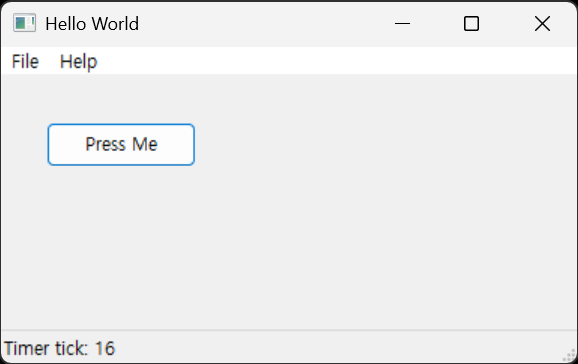
복수의 타이머도 동일한 방법으로 생성한다.
#include <wx/wx.h>

class MyApp : public wxApp
{
public:
	bool OnInit() override;
};

wxIMPLEMENT_APP(MyApp);

class MyFrame : public wxFrame
{
public:
	MyFrame();

private:
	wxTimer m_timer; // 타이머 객체 추가
	wxTimer m_timer2; // 타이머 객체 추가

	void OnHello(wxCommandEvent& event);
	void OnExit(wxCommandEvent& event);
	void OnAbout(wxCommandEvent& event);
	void OnTimer(wxTimerEvent& event); // 타이머 이벤트 핸들러 추가
	void OnTimer2(wxTimerEvent& event); // 타이머 이벤트 핸들러 추가
};

enum
{
	ID_Hello = 1
};

bool MyApp::OnInit()
{
	MyFrame* frame = new MyFrame();
	frame->Show(true);
	return true;
}

MyFrame::MyFrame() : wxFrame(nullptr, wxID_ANY, "Hello World")
{
	wxMenu* menuFile = new wxMenu;
	menuFile->Append(ID_Hello, "&Hello...\tCtrl-H", "Help string shown in status bar for this menu item");
	menuFile->AppendSeparator();
	menuFile->Append(wxID_EXIT);

	wxMenu* menuHelp = new wxMenu;
	menuHelp->Append(wxID_ABOUT);

	wxMenuBar* menuBar = new wxMenuBar;
	menuBar->Append(menuFile, "&File");
	menuBar->Append(menuHelp, "&Help");

	SetMenuBar(menuBar);

	CreateStatusBar();
	SetStatusText("Welcome to wxWidgets!");

	// 타이머 초기화 및 시작 방법 1: 타이머 객체에 직접 이벤트 핸들러 바인딩
	m_timer.Bind(wxEVT_TIMER, &MyFrame::OnTimer, this, m_timer.GetId()); // 타이머 이벤트 핸들러 바인딩
	m_timer.Start(1000); // 1초마다 타이머 이벤트 발생

	m_timer2.Bind(wxEVT_TIMER, &MyFrame::OnTimer2, this, m_timer2.GetId()); // 타이머2 이벤트 핸들러 바인딩
	m_timer2.Start(1000); // 1초마다 타이머2 이벤트 발생

	// 타이머 초기화 및 시작 방법 2: 프레임에서 타이머 이벤트 핸들러 바인딩
	//m_timer.SetOwner(this); // 타이머의 소유자를 현재 프레임으로 설정
	//Bind(wxEVT_TIMER, &MyFrame::OnTimer, this, m_timer.GetId()); // 현재 프레임에서 타이머 이벤트 핸들러 바인딩
	//m_timer.Start(1000); // 1초마다 타이머 이벤트 발생

	//m_timer2.SetOwner(this); // 타이머2의 소유자를 현재 프레임으로 설정
	//Bind(wxEVT_TIMER, &MyFrame::OnTimer2, this, m_timer2.GetId()); // 현재 프레임에서 타이머2 이벤트 핸들러 바인딩
	//m_timer2.Start(1000); // 1초마다 타이머2 이벤트 발생

	wxPanel* panel = new wxPanel(this, wxID_ANY);
	wxButton* myButton = new wxButton(panel, wxID_ANY, "Press Me", wxPoint(30, 30), wxSize(100, 30));
	myButton->Bind(wxEVT_BUTTON, &MyFrame::OnHello, this);
	//Bind(wxEVT_BUTTON, &MyFrame::OnHello, this, myButton->GetId());

	Bind(wxEVT_MENU, &MyFrame::OnHello, this, ID_Hello);
	Bind(wxEVT_MENU, &MyFrame::OnAbout, this, wxID_ABOUT);
	Bind(wxEVT_MENU, &MyFrame::OnExit, this, wxID_EXIT);
}

void MyFrame::OnExit(wxCommandEvent& event)
{
	Close(true);
}

void MyFrame::OnAbout(wxCommandEvent& event)
{
	wxMessageBox("This is a wxWidgets Hello World example", "About Hello World", wxOK | wxICON_INFORMATION);
}

void MyFrame::OnHello(wxCommandEvent& event)
{
	wxLogMessage("Hello world from wxWidgets!");
}

void MyFrame::OnTimer(wxTimerEvent& event) // 타이머 이벤트 핸들러 구현
{
	static int count = 0;
	count++;
	SetStatusText(wxString::Format("Timer tick: %d", count));
}

void MyFrame::OnTimer2(wxTimerEvent& event) // 타이머 이벤트 핸들러 구현
{
	static int count = 0;
	count++;
	SetTitle(wxString::Format("Timer2 tick: %d", count));
}
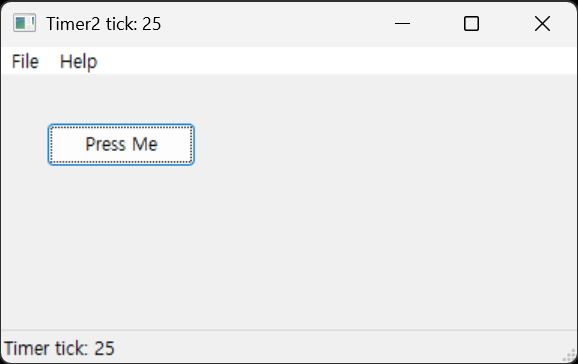
반응형
'C, C++' 카테고리의 다른 글
| [C++] Date, Time 날짜, 시간 (0) | 2026.05.16 |
|---|---|
| [wxWidgets] wxChartDir Simple Real-Time Chart 간단한 리얼타임 차트 (0) | 2026.05.10 |
| [wxWidgets] wxChartDir 차트 그리기 (0) | 2026.05.05 |
| [wxWidgets] wxCharts 차트 그리기 (0) | 2026.05.04 |
| [wxWidgets] Window Handle & Titlebar Icon 윈도우 핸들 구하기 및 타이틀바 아이콘 바꾸기 (0) | 2026.05.04 |