


[C++] Date, Time 날짜, 시간
C, C++ 2026. 5. 16. 22:52 |반응형
C++에서 날짜와 시간을 문자열로 표현해 보자.
#include <iostream>
#include <chrono>
#include <format>
#include <filesystem>

int main() {
	std::chrono::system_clock::time_point currentTime = std::chrono::system_clock::now();
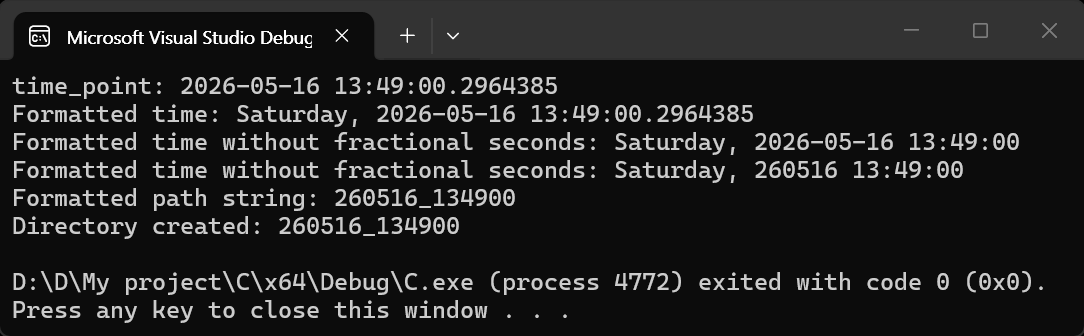
	std::cout << "time_point: " << currentTime << std::endl;

	// format() 함수에 0은 index로써 currentTime을 가리킨다.
	// %A: 요일, %Y: 연도(4자리), %m: 월, %d: 일, %H: 시, %M: 분, %S: 초
	std::string formattedTime1 = std::format("{0:%A, %Y-%m-%d %H:%M:%S}", currentTime);
	std::cout << "Formatted time: " << formattedTime1 << std::endl;

	// std::chrono::floor를 사용하여 시간을 초 단위로 내림 처리할 수 있다.
	std::chrono::time_point flooredCurrentTime = std::chrono::floor<std::chrono::seconds>(currentTime);

	std::string formattedTime2 = std::format("{0:%A, %Y-%m-%d %H:%M:%S}", flooredCurrentTime);
	std::cout << "Formatted time without fractional seconds: " << formattedTime2 << std::endl;

	// %y: 연도(2자리)
	std::string formattedTime3 = std::format("{0:%A, %y%m%d %H:%M:%S}", flooredCurrentTime);
	std::cout << "Formatted time without fractional seconds: " << formattedTime3 << std::endl;

	// %y%m%d_%H%M%S 형식으로 폴더 이름을 생성한다.
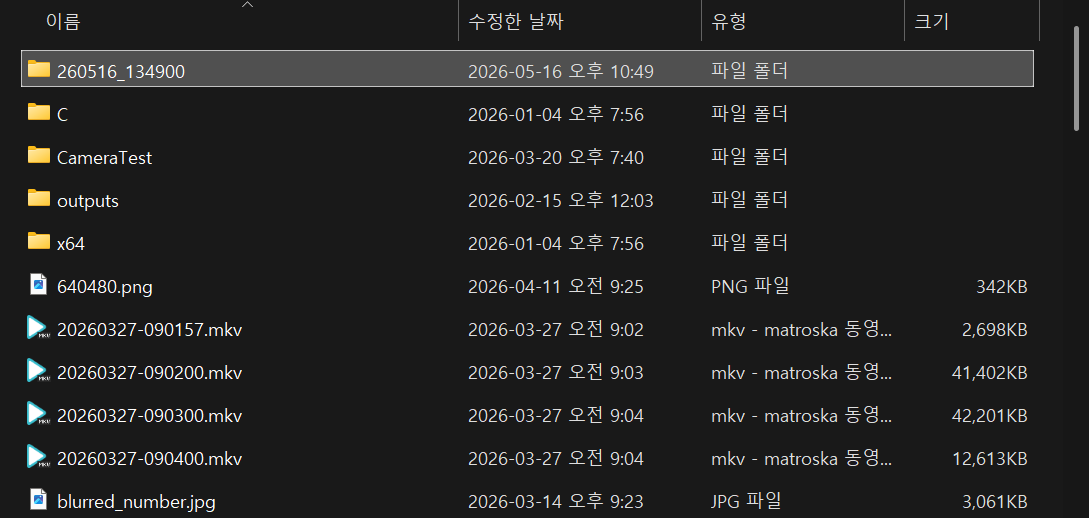
	std::string pathStr = std::format("{0:%y%m%d_%H%M%S}", flooredCurrentTime);
	std::cout << "Formatted path string: " << pathStr << std::endl;

	std::filesystem::path dirPath(pathStr); // std::filesystem::path 객체 생성
	// 디렉토리를 생성한다. 이미 존재하는 경우에는 실패할 수 있다.
	if (std::filesystem::create_directory(dirPath))
		std::cout << "Directory created: " << pathStr << std::endl;
	else
		std::cout << "Failed to create directory: " << pathStr << std::endl;

	return 0;
}
반응형
'C, C++' 카테고리의 다른 글
| [wxWidgets] wxChartDir Simple Real-Time Chart 간단한 리얼타임 차트 (0) | 2026.05.10 |
|---|---|
| [wxWidgets] Timer 타이머 (0) | 2026.05.10 |
| [wxWidgets] wxChartDir 차트 그리기 (0) | 2026.05.05 |
| [wxWidgets] wxCharts 차트 그리기 (0) | 2026.05.04 |
| [wxWidgets] Window Handle & Titlebar Icon 윈도우 핸들 구하기 및 타이틀바 아이콘 바꾸기 (0) | 2026.05.04 |