


[WPF] Google's Material Design
C# 2026. 6. 18. 17:00 |반응형
Google's Material Design을 사용해 보자.

코드를 약간 수정해야 한다.
<Application x:Class="Test.App"
             xmlns="http://schemas.microsoft.com/winfx/2006/xaml/presentation"
             xmlns:x="http://schemas.microsoft.com/winfx/2006/xaml"
             xmlns:local="clr-namespace:Test"
             StartupUri="MainWindow.xaml">
    <Application.Resources>

    </Application.Resources>
</Application>
원래 App.xaml
<Application x:Class="Test.App"
             xmlns="http://schemas.microsoft.com/winfx/2006/xaml/presentation"
             xmlns:x="http://schemas.microsoft.com/winfx/2006/xaml"
             xmlns:materialDesign="http://materialdesigninxaml.net/winfx/xaml/themes"
             StartupUri="MainWindow.xaml">
    <Application.Resources>
        <ResourceDictionary>
            <ResourceDictionary.MergedDictionaries>
                <materialDesign:BundledTheme BaseTheme="Light" PrimaryColor="DeepPurple" SecondaryColor="Lime" />
                <ResourceDictionary Source="pack://application:,,,/MaterialDesignThemes.Wpf;component/Themes/MaterialDesign3.Defaults.xaml" />
            </ResourceDictionary.MergedDictionaries>
        </ResourceDictionary>
    </Application.Resources>
</Application>
수정된 App.xaml
<Window x:Class="Test.MainWindow"
        xmlns="http://schemas.microsoft.com/winfx/2006/xaml/presentation"
        xmlns:x="http://schemas.microsoft.com/winfx/2006/xaml"
        xmlns:d="http://schemas.microsoft.com/expression/blend/2008"
        xmlns:mc="http://schemas.openxmlformats.org/markup-compatibility/2006"
        xmlns:local="clr-namespace:Test"
        mc:Ignorable="d"
        Title="MainWindow" Height="450" Width="800">
    <Grid>

    </Grid>
</Window>
원래 MainWindow.xaml
<Window x:Class="Test.MainWindow"
        xmlns="http://schemas.microsoft.com/winfx/2006/xaml/presentation"
        xmlns:x="http://schemas.microsoft.com/winfx/2006/xaml"
        xmlns:d="http://schemas.microsoft.com/expression/blend/2008"
        xmlns:mc="http://schemas.openxmlformats.org/markup-compatibility/2006"
        xmlns:local="clr-namespace:Test"
        mc:Ignorable="d"
        Style="{StaticResource MaterialDesignWindow}"
        Title="MainWindow" Height="450" Width="800">
    <Grid>

    </Grid>
</Window>
수정된 MainWindow.xaml (Style 속성만 추가 되었다)
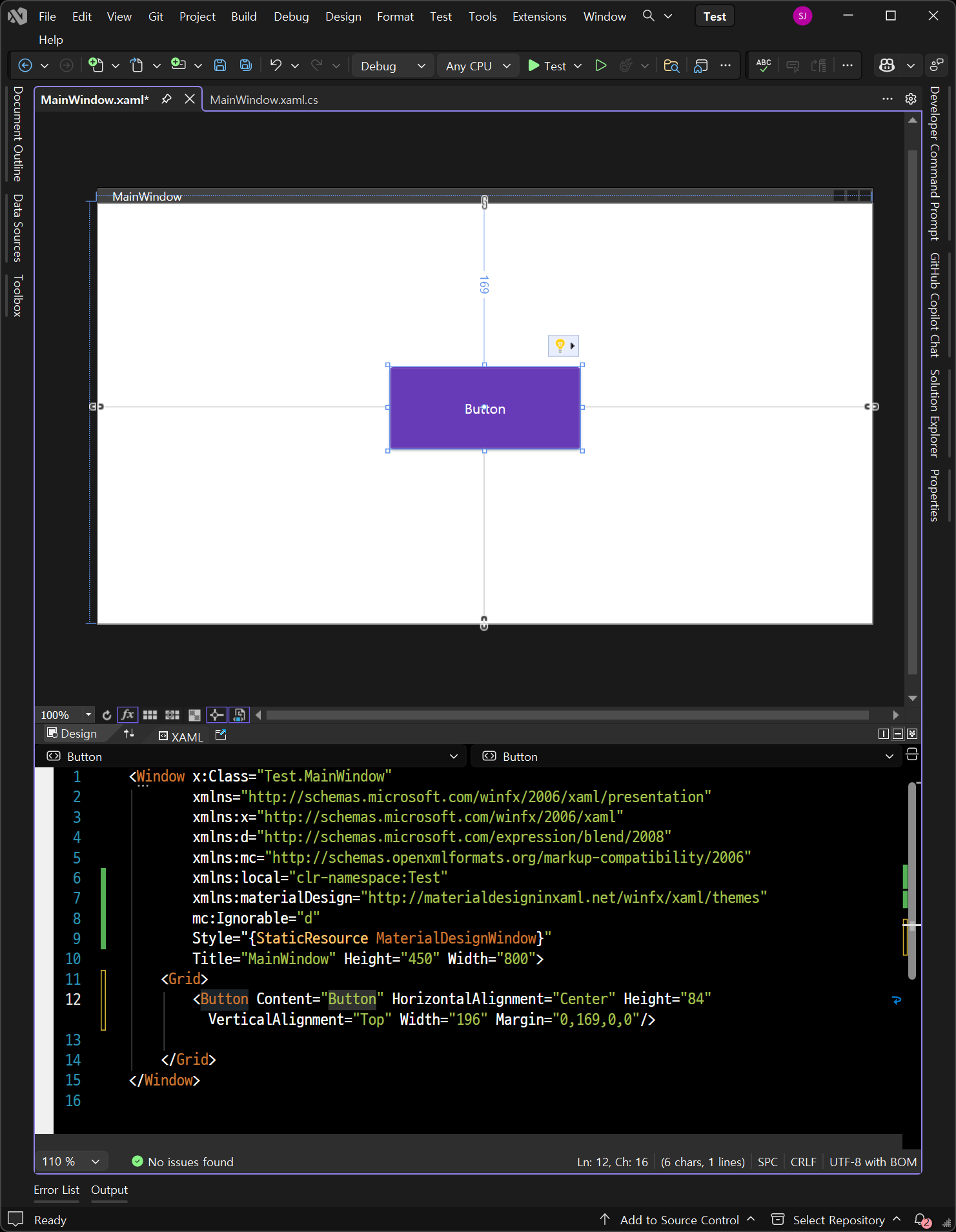
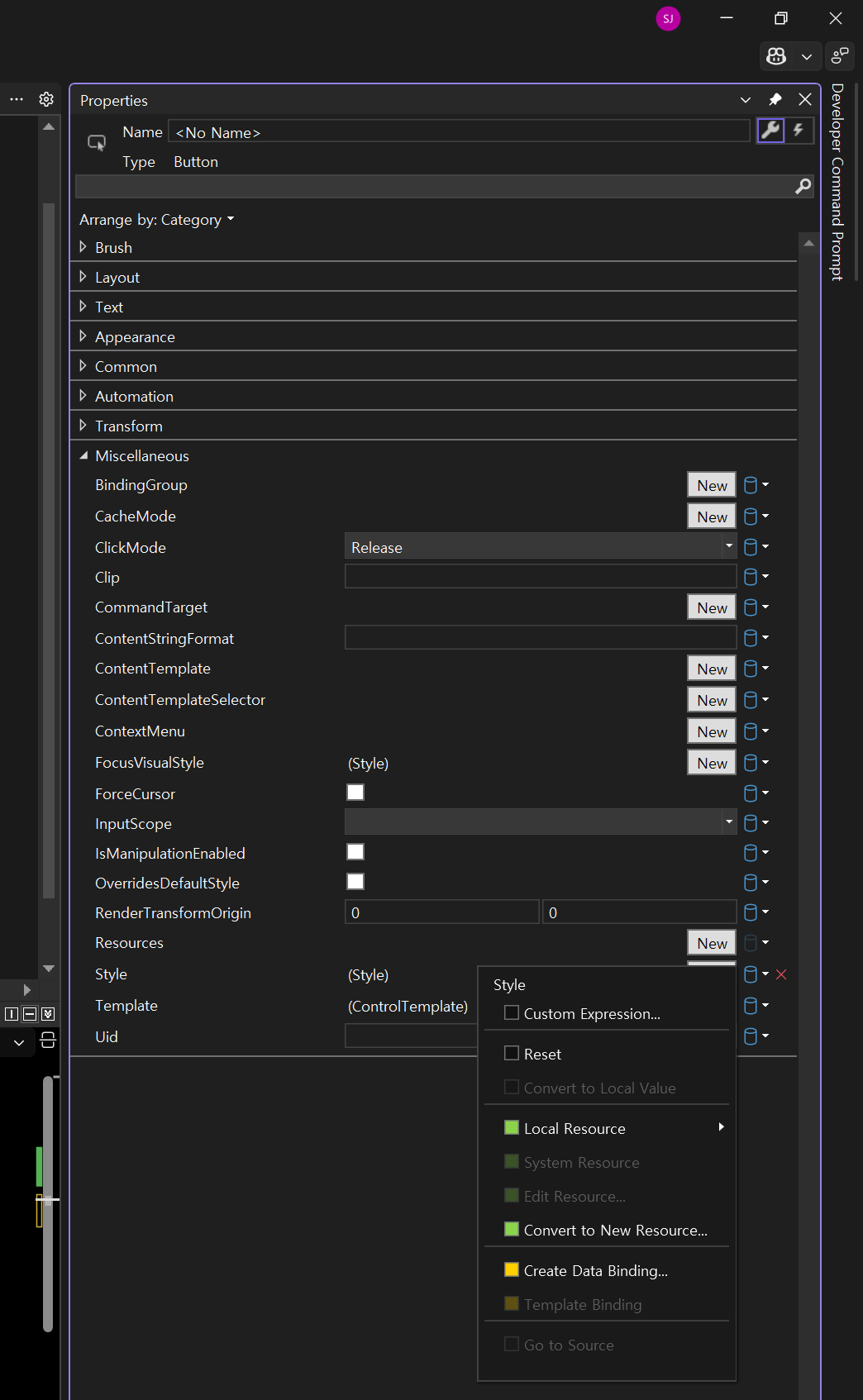
Material Design을 설치하고 세팅하기 전에는 Style 항목이 비어 있다. Material Design을 설치하고 세팅했기 때문에 선택할 수 있는 것이다.


※ 참고
Getting Started (오른쪽 패널의 Controls, Theming 등도 참고 하자)
반응형
'C#' 카테고리의 다른 글
| [C#] Asynchronously Write DateTime and Value Text File 시간, 값 데이터 텍스트 파일 비동기 쓰기 (0) | 2026.07.20 |
|---|---|
| [C#] Application Settings 애플리케이션 세팅 (0) | 2026.05.26 |
| [C#] CPU Usage 사용량 (0) | 2026.04.21 |
| [LiveCharts] NVR, VMS Playback Timeline UI (0) | 2026.04.21 |
| [LiveCharts] 설치 및 기본 차트 그리기 (0) | 2026.04.20 |