


[x32dbg/x64dbg/Ghidra] Windows API Function Parameter Analysis 윈도우 API 함수 매개변수 분석
Reverse Engineering 2025. 7. 26. 09:39 |반응형
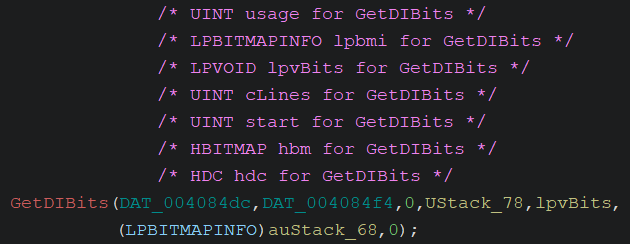
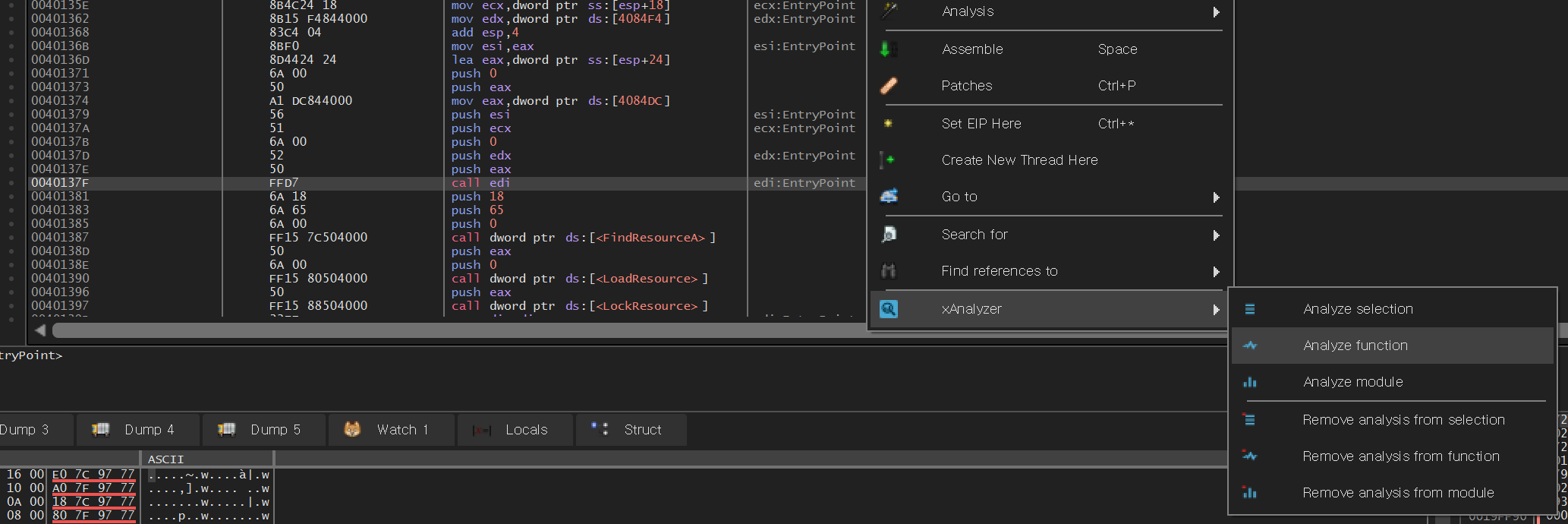
윈도우 API 함수 파라미터를 분석해 보자.
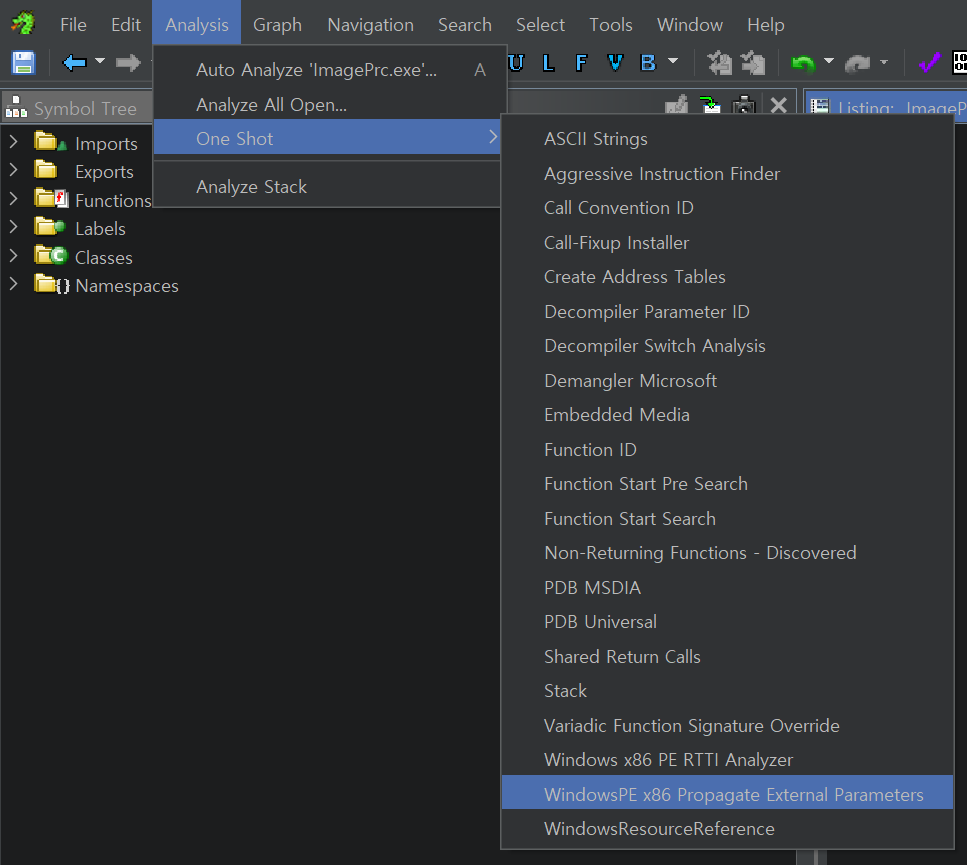
파일을 처음 임포트해서 분석할 때 옵션에서 선택할 수도 있다.


반응형

|
윈도우 API 함수 파라미터를 분석해 보자.
파일을 처음 임포트해서 분석할 때 옵션에서 선택할 수도 있다.
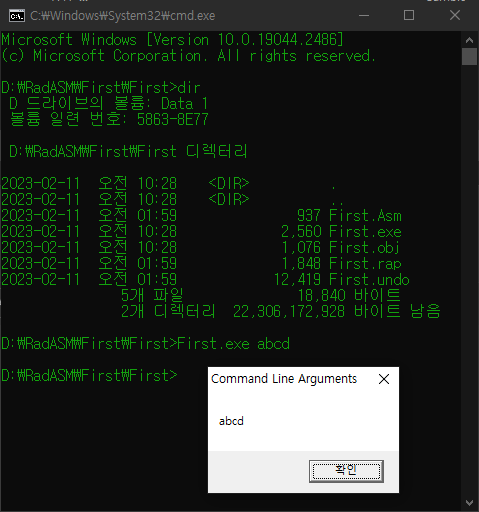
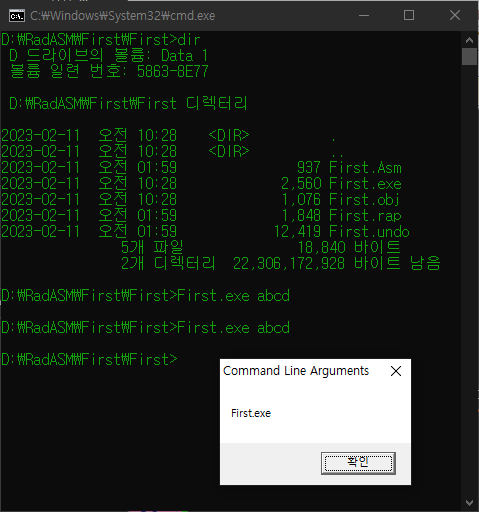
어셈블리 언어로 작성된 프로그램 실행 시 인수를 확인해 보자.

|
1
2
3
4
5
6
7
8
9
10
11
12
|
include masm32rt.inc
.data
strTitle db "Command Line Arguments",0
strMessage db 128 dup(?)
.code
start:
invoke GetCL, 1, ADDR strMessage
invoke MessageBox, 0, ADDR strMessage, ADDR strTitle, MB_OK
invoke ExitProcess, 0
end start
|
GetCL 함수의 첫 번째 인수로 1을 주면 프로그램의 첫 번째 인수가 저장된다.
|
1
2
3
4
5
6
7
8
9
10
11
12
|
include masm32rt.inc
.data
strTitle db "Command Line Arguments",0
strMessage db 128 dup(?)
.code
start:
invoke GetCL, 0, ADDR strMessage
invoke MessageBox, 0, ADDR strMessage, ADDR strTitle, MB_OK
invoke ExitProcess, 0
end start
|
GetCL 함수의 첫 번째 인수로 0을 주면 프로그램 파일명이 저장된다.
| C - Assembly(어셈블리) - Machine Code(기계 코드) (0) | 2023.04.28 |
|---|---|
| [MASM] C/C++ with Assembly Module 어셈블리 모듈 (0) | 2023.02.11 |
| RadASM Debugging 디버깅 (0) | 2023.02.02 |
| Visual Studio Assembly Debugging Registers Window Flags Info (2) | 2023.01.23 |
| [Assembly Language] Setup an Assembly Project on Visual Studio (0) | 2023.01.12 |
Test class declares Change() as a friend function and it accesses the private member variable 'a'.
아래 코드에서 Test 클래스는 Change라는 friend 함수를 선언 하고 멤버 변수 a에 접근한다.
1 2 3 4 5 6 7 8 9 10 11 12 13 14 15 16 17 18 19 20 21 22 23 24 25 26 27 28 29 30 31 | #include <iostream> using namespace std; class Test { private: int a; public: Test() { a = 0; } ~Test() { } void Show() { cout << "a: " << a << endl; } friend void Change(Test& t, int c); }; void Change(Test& t, int c) { t.a = c; } int main(int argc, char* argv[]) { Test t; t.Show(); Change(t, 10); t.Show(); return 0; } | cs |
How to set default arguments in a friend function?
friend 함수 Change에 디폴트 매개 변수를 설정하고 싶다면 어떻게 해야 할까?
1 2 3 4 5 6 7 8 9 10 11 12 13 14 15 16 17 18 19 20 21 22 23 24 25 26 27 28 29 30 31 | #include <iostream> using namespace std; class Test { private: int a; public: Test() { a = 0; } ~Test() { } void Show() { cout << "a: " << a << endl; } friend void Change(Test& t, int c = 100); }; void Change(Test& t, int c) { t.a = c; } int main(int argc, char* argv[]) { Test t; t.Show(); Change(t, 10); t.Show(); return 0; } | cs |
Setting default arguments in the friend function declaration will cause an error message like below.
위 코드와 같이 friend 선언부에 디폴트 매개 변수를 설정 하면 별 문제 없이 빌드는 되지만 아래와 같은 메세지가 나타나게 된다.
friend declaration cannot add default arguments to previous declaration
Try to set default arguments in the function definition.
아래와 같이 함수 정의부에 디폴트 매개 변수를 설정 하면 에러 메세지가 나타나지 않는다.
1 2 3 4 5 6 7 8 9 10 11 12 13 14 15 16 17 18 19 20 21 22 23 24 25 26 27 28 29 30 31 | #include <iostream> using namespace std; class Test { private: int a; public: Test() { a = 0; } ~Test() { } void Show() { cout << "a: " << a << endl; } friend void Change(Test& t, int c); }; void Change(Test& t, int c = 100) { t.a = c; } int main(int argc, char* argv[]) { Test t; t.Show(); Change(t, 10); t.Show(); return 0; } | cs |
Or, you can declare and define the friend function and set the default arguments at once.
아니면 friend 함수 선언부에서 함수 정의까지 작성하고 매개 변수를 설정해 준다.
1 2 3 4 5 6 7 8 9 10 11 12 13 14 15 16 17 18 19 20 21 22 23 24 25 26 27 28 29 | #include <iostream> using namespace std; class Test { private: int a; public: Test() { a = 0; } ~Test() { } void Show() { cout << "a: " << a << endl; } friend void Change(Test& t, int c = 100) { t.a = c; } }; int main(int argc, char* argv[]) { Test t; t.Show(); Change(t, 10); t.Show(); return 0; } | cs |
<Result>
| Sending a mouse input 마우스 입력 보내기 (0) | 2019.10.28 |
|---|---|
| Sending a keyboard input 키 입력 보내기 (0) | 2019.10.27 |
| Integrated Color Picker for Visual Studio IDE and Editor (0) | 2019.07.05 |
| How to open a command prompt on the project's path in Visual Studio (2) | 2019.07.03 |
| How to make a game save file editor 간단한 게임 에디터 만들기 (1) | 2019.06.30 |

