반응형

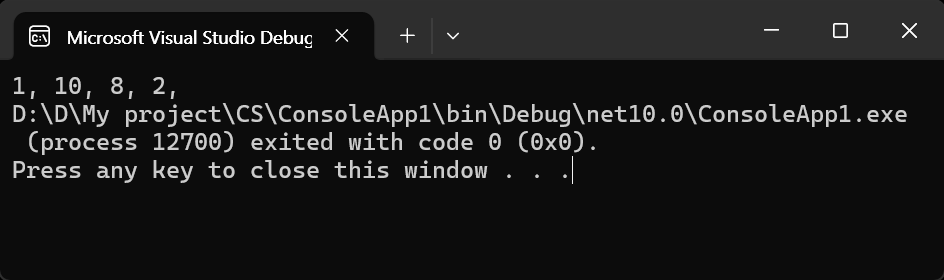
난수를 만들고 섞어보자.


namespace ConsoleApp1
{
    internal class Program
    {
        static void Main(string[] args)
        {
            Random random = new Random(); // 난수 생성기

            // byte 배열 난수 생성
            byte[] bytes = new byte[10];            
            random.NextBytes(bytes);
            foreach (byte b in bytes)
            {
                Console.Write($"{b}, ");
            }
            Console.WriteLine();

            // 난수 섞기
            random.Shuffle<byte>(bytes);
            foreach (byte b in bytes)
            {
                Console.Write($"{b}, ");
            }
            Console.WriteLine();

            // 문자열 리스트 섞기
            List<string> fruits = new List<string> { "사과", "바나나", "딸기", "오렌지", "수박", "멜론", "키위" };
            string[] fruitsArray = fruits.ToArray();
            random.Shuffle<string>(fruitsArray);
            
            foreach (string fruit in fruitsArray)
            {
                Console.Write(fruit + ", ");
            }
            Console.WriteLine();

            // 정수 리스트 생성
            List<int> numbers = Enumerable.Range(1, 10).ToList();
            foreach (int i in numbers)
            {
                Console.Write(i + ", ");
            }
            Console.WriteLine();

            // 정수 배열 섞기
            int[] numbersArray = numbers.ToArray();
            random.Shuffle<int>(numbersArray);
            foreach (int i in numbersArray)
            {
                Console.Write(i + ", ");
            }
            Console.WriteLine();

            // 섞인 정수 배열 일부 선택
            foreach (int i in numbersArray[2..^5]) // '^'는 뒤에서 부터 인덱싱. ^5는 파이썬의 -5와 동일.
            {
                Console.Write(i + ", ");
            }
            Console.WriteLine();

            // 리스트 컴프리헨션 기능
            List<int> squared = (from x in numbers
                                 where x % 2 == 0 // 짝수라는 조건이 필요 없다면 삭제 가능.
                                 select x * x).ToList();
            foreach (int i in squared)
            {
                Console.Write(i + ", ");
            }
            Console.WriteLine();
        }
    }
}


정답(2)을 포함하는 선택지를 만들어 보자.


namespace ConsoleApp1
{
    internal class Program
    {
        static void Main(string[] args)
        {
            Random random = new Random(); // 난수 생성기

            // 1~10 정수 리스트 생성
            List<int> numbers = Enumerable.Range(1, 10).ToList();

            // 특정 숫자(2)를 포함하는 선택지 4개 만들기
            List<int> choices = new List<int>();
            choices.Add(2); // 2는 무조건 포함
            while (choices.Count < 4)
            {
                int i = random.Next(0, numbers.Count);
                if (!choices.Contains(numbers[i]))
                    choices.Add(numbers[i]);
            }

            // 선택지 섞기
            choices = choices.Shuffle<int>().ToList();
            foreach (int i in choices)
            {
                Console.Write(i + ", ");
            }
            Console.WriteLine();
        }
    }
}
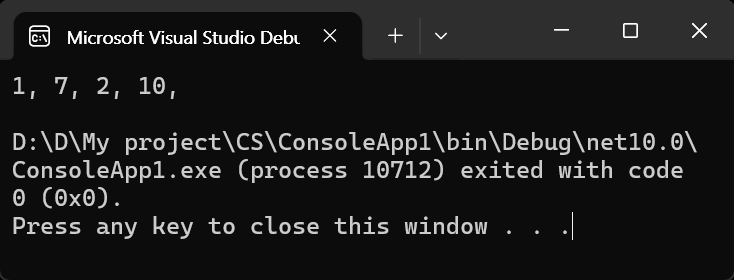


난수 생성기 없이 만들 수도 있다.


namespace ConsoleApp1
{
    internal class Program
    {
        static void Main(string[] args)
        {
            IEnumerable<int> numbers = Enumerable.Range(1, 10);
            numbers = numbers.Shuffle();
            // 1~10 정수를 생성하고 섞기

            IEnumerable<int> choices = [2]; // 선택지에 2는 무조건 포함

            foreach (int n in numbers)
            {
                if (!choices.Contains(n))
                    choices = choices.Append(n);

                if (choices.Count() >= 4)
                    break;
            }

            choices = choices.Shuffle();

            foreach (int i in choices)
                Console.Write(i + ", ");
        }
    }
}


반응형
Posted by J-sean
:
반응형

Intel® 64 and IA-32 Architectures Software Developer’s Manual을 확인해 보자.


RDTSC—Read Time-Stamp Counter

Reads the current value of the processor’s time-stamp counter (a 64-bit MSR) into the EDX:EAX registers. The EDX register is loaded with the high-order 32 bits of the MSR and the EAX register is loaded with the low-order 32 bits. (On processors that support the Intel 64 architecture, the high-order 32 bits of each of RAX and RDX are cleared.) The processor monotonically increments the time-stamp counter MSR every clock cycle and resets it to 0 whenever the processor is reset.

RDTSC 인스트럭션은 프로세서의 time-stamp counter를 EDX:EAX 레지스터로 가져온다. EDX에는 상위 32비트가 저장되고 EAX에는 하위 32비트가 저장된다.


EDX, EAX에 저장되는 값을 확인해 보자.

1
2
3
4
5
6
7
8
9
10
11
12
13
14
15
16
17
18
19
20
21
22
23
24
%include "io64.inc"
 
section .text
global CMAIN
CMAIN:
    rdtsc
 
    PRINT_STRING 'High-order 32 bits of Time Stamp Counter: '
    PRINT_HEX 4, edx
    NEWLINE
    NEWLINE
    
    PRINT_STRING 'Low-order 32 bits of Time Stamp Counter: '
    PRINT_HEX 4, eax
    NEWLINE
    NEWLINE
    
    PRINT_STRING 'Time Stamp Counter: '    
    shl rdx, 32
    xor rdx, rax
    PRINT_HEX 8, rdx
 
    xor rax, rax
   ret


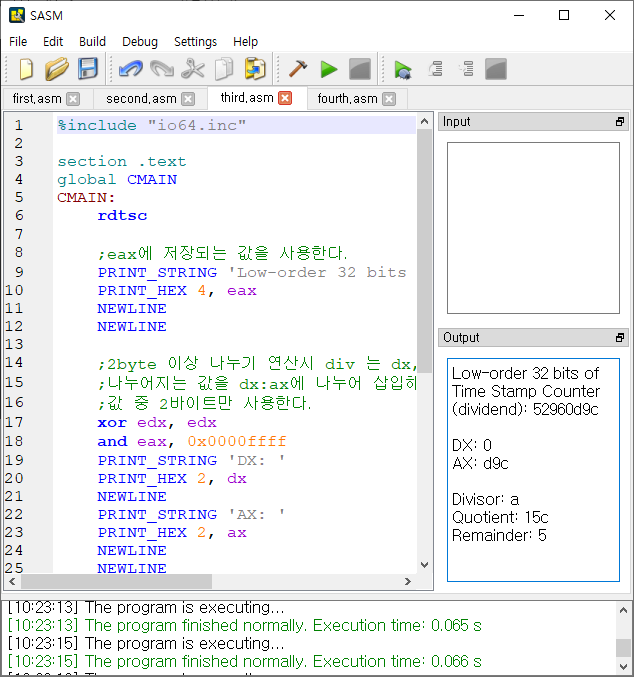
EDX, EAX의 값을 확인한다.


EAX 레지스터에 저장된 값을 이용해 1~10까지의 랜덤 넘버를 추출해 보자.

1
2
3
4
5
6
7
8
9
10
11
12
13
14
15
16
17
18
19
20
21
22
23
24
25
26
27
28
29
30
31
32
33
34
35
36
37
38
39
40
41
42
%include "io64.inc"
 
section .text
global CMAIN
CMAIN:
    rdtsc
    
    ;eax에 저장되는 값을 사용한다.
    PRINT_STRING 'Low-order 32 bits of Time Stamp Counter (dividend): '
    PRINT_HEX 4, eax
    NEWLINE
    NEWLINE
    
    ;2byte 이상 나누기 연산시 div 는 dx, ax를 사용한다.
    ;나누어지는 값을 dx:ax에 나누어 삽입해야 하므로 edx를 0으로 만들고 eax의
    ;값 중 2바이트만 사용한다.
    xor edx, edx
    and eax, 0x0000ffff
    PRINT_STRING 'DX: '
    PRINT_HEX 2, dx
    NEWLINE
    PRINT_STRING 'AX: '
    PRINT_HEX 2, ax
    NEWLINE
    NEWLINE
    
    mov bx, 0xa ;나누는 수를 10으로 설정한다.
    PRINT_STRING 'Divisor: '
    PRINT_HEX 2, bx
    NEWLINE
        
    div bx ;bx(10)로 나눈다. 나머지는 0~9가 나온다.
    PRINT_STRING 'Quotient: '
    PRINT_HEX 2, ax ;몫은 ax에 저장된다.
    NEWLINE
    PRINT_STRING 'Remainder: '
    inc dx
    ;나머지는 dx에 저장된다. 1을 더해서 범위를 1~10으로 맞춘다.
    PRINT_HEX 2, dx
    
    xor rax, rax
   ret


Remainder로 1~10의 숫자가 무작위로 추출된다.


그런데 실제로 여러번 해 보면 홀수만 나오는 것을 알 수 있다. 내 컴퓨터에서만 그러는건지는 모르겠지만 rdtsc 명령어가 (EAX 레지스터에)짝수만 반환하기 때문이다. (마지막에 1을 더하므로 결국 홀수가 된다)


EDX 레지스터의 값을 사용해 보자.

1
2
3
4
5
6
7
8
9
10
11
12
13
14
15
16
17
18
19
20
21
22
23
24
25
26
27
28
29
30
31
32
33
34
35
36
37
38
39
40
41
42
%include "io64.inc"
 
section .text
global CMAIN
CMAIN:
    rdtsc
    
    ;edx에 저장되는 값을 사용한다.
    PRINT_STRING 'High-order 32 bits of Time Stamp Counter (dividend): '
    PRINT_HEX 4, edx
    NEWLINE
    NEWLINE
    
    ;2byte 이상 나누기 연산시 div 는 dx, ax를 사용한다.
    ;나누어지는 값을 dx:ax에 나누어 삽입해야 하므로 edx의 값을 eax에 저장하고
    ;edx를 0으로 만든다. 그리고 eax의 값 중 2바이트만 사용한다.
    mov eax, edx    
    xor edx, edx
    and eax, 0x0000ffff
    PRINT_STRING 'DX: '
    PRINT_HEX 2, dx
    NEWLINE
    PRINT_STRING 'AX: '
    PRINT_HEX 2, ax
    NEWLINE
    NEWLINE
    
    mov bx, 0xa ;
    PRINT_STRING 'Divisor: '
    PRINT_HEX 2, bx
    NEWLINE
        
    div bx
    PRINT_STRING 'Quotient: '
    PRINT_HEX 2, ax
    NEWLINE
    PRINT_STRING 'Remainder: '
    inc dx
    PRINT_HEX 2, dx
 
    xor rax, rax
   ret


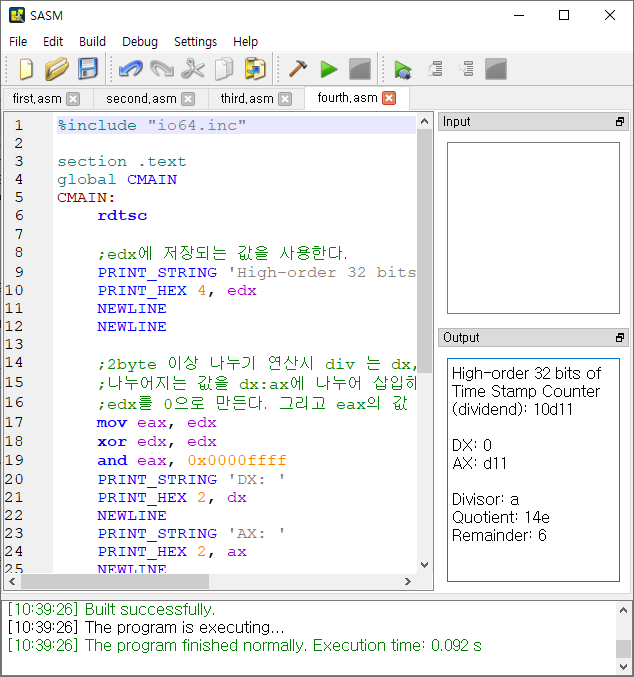
홀수, 짝수 상관없이 1~10의 숫자가 무작위로 추출된다.

하지만 EDX 레지스터의 값은 일반적인 시간의 '초' 단위와 비슷한 간격으로 바뀐다. 프로그램을 빠르게 반복 실행하면 동일한 숫자가 반복되어 나오는걸 알 수 있다. 빠른 반복 추출이 필요하다면 EAX 레지스터의 값 중 하위 2바이트가 아닌 중간 2바이트 숫자를 이용하는 등 다른 방법으로 랜덤 넘버를 추출한다.


※ 주의

DIV 연산시 나누는 수가 작아 몫이 너무 크게 되면 ax가 저장할 수 있는 용량(2바이트)을 넘어서게 되고 Program received signal SIGFPE, arithmetic exception 메세지가 나타난다. Floating-Point Exception을 의미하지만 0으로 나누는 연산과 같은 모든 산술 연산 에러를 포함한다.

Program Error Signals


SIGFPE 예외 발생시 프로그램이 멈추게 된다. 디버깅해야 메세지를 확인 할 수 있다.


반응형
Posted by J-sean
:
반응형

Random number generator. It encapsulates the state (currently, a 64-bit integer) and has methods to return scalar random values and to fill arrays with random values. Currently, it supports uniform and Gaussian (normal) distributions. The generator uses Multiply-With-Carry algorithm, introduced by G. Marsaglia (http://en.wikipedia.org/wiki/Multiply-with-carry). Gaussian-distribution random numbers are generated using the Ziggurat algorithm (http://en.wikipedia.org/wiki/Ziggurat_algorithm), introduced by G. Marsaglia and W. W. Tsang.


아래 코드는 OpenCV에서 지원하는 난수 발생기의 사용 방법 입니다.

1
2
3
4
5
6
7
8
9
10
11
12
13
14
15
16
17
18
19
20
21
22
23
24
25
26
27
28
29
30
31
32
33
34
35
36
#include <opencv2/opencv.hpp>
 
using namespace std;
using namespace cv;
 
int main(int argc, char** argv)
{
    RNG rng(getTickCount());    // Constructor sets the state to the specified value.
    Mat mat(300400, CV_8SC3);
    
    // Fills arrays with random numbers.
    rng.fill(mat, RNG::UNIFORM, Scalar::all(0), Scalar::all(255));
    
    // Returns uniformly distributed integer random number from [a,b) range
    cout << "RNG::uniform()" << endl;
    cout << "- rng.uniform(0, 255): " << rng.uniform(0255<< endl;
    cout << "- rng.uniform(0.0f, 255.0f): " << rng.uniform(0.0f, 255.0f) << endl;
    cout << "- rng.uniform(0.0, 255.0): " << rng.uniform(0.0255.0<< endl << endl;
 
    // Returns a random integer sampled uniformly from [0, N).
    cout << "RNG::operator()" << endl;
    for (int i = 0; i < 5; i++)
        cout << "- rng(10): " << rng(10<< endl;
 
    // The method updates the state using the MWC algorithm and returns
    // the next 32-bit random number.
    cout << endl << "RNG::next()" << endl;
    for (int i = 0; i < 5; i++)
        cout << "- rng.next(): " << rng.next() << endl;
 
    imshow("RNG", mat);
 
    waitKey(0);
 
    return 0;
}
cs


Matrix filled by RNG::fill().


Random numbers generated by RNG.


반응형
Posted by J-sean
: