[wxWidgets] Build and Simple Example 빌드와 간단한 예제 (feat.OpenCV)
C, C++ 2026. 5. 3. 15:08 |반응형
wxWidgets을 빌드하고 간단한 예제를 만들어 보자.


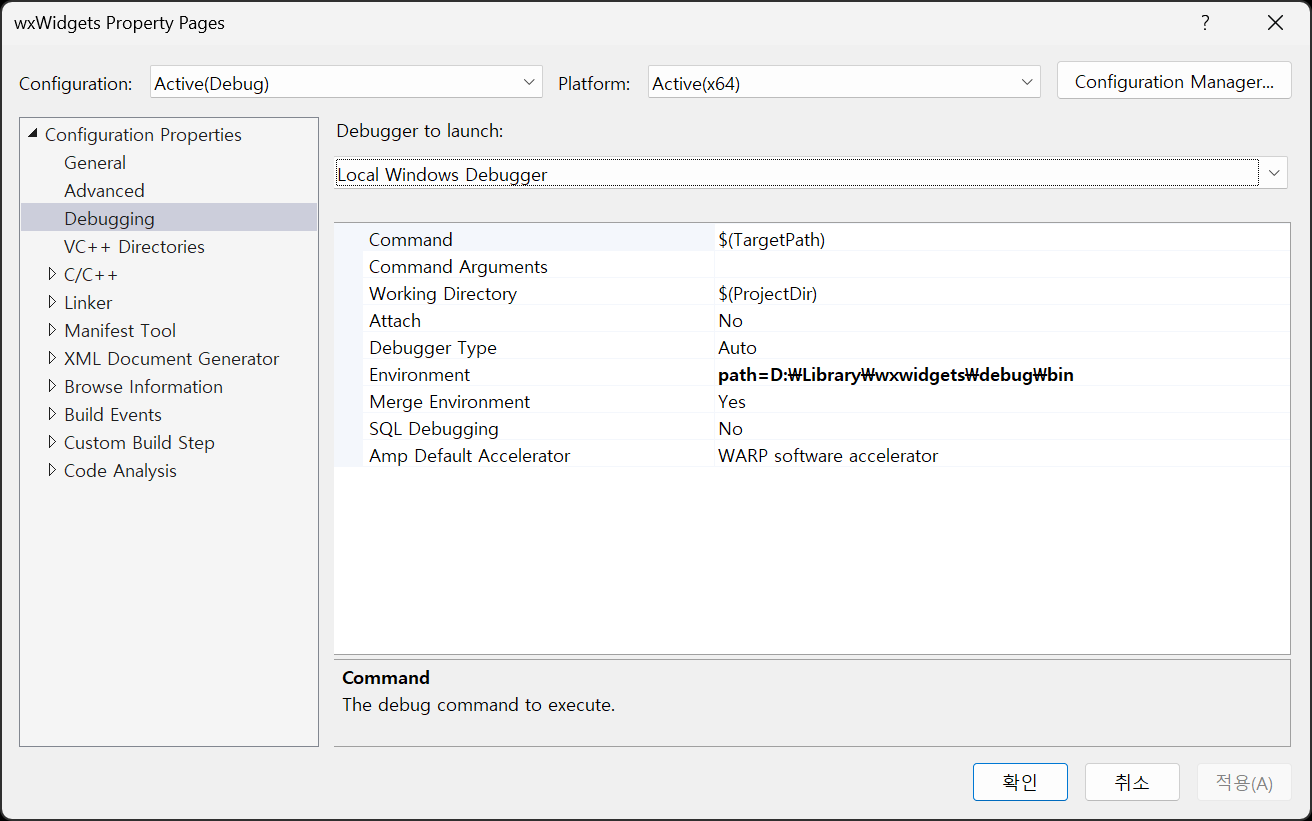


간단한 예제.
#include <wx/wx.h>

class MyApp : public wxApp
{
public:
	bool OnInit() override;
};

wxIMPLEMENT_APP(MyApp);

class MyFrame : public wxFrame
{
public:
	MyFrame();

private:
	void OnHello(wxCommandEvent& event);
	void OnExit(wxCommandEvent& event);
	void OnAbout(wxCommandEvent& event);
};

enum
{
	ID_Hello = 1
};

bool MyApp::OnInit()
{
	MyFrame* frame = new MyFrame();
	frame->Show(true);
	return true;
}

MyFrame::MyFrame()
	: wxFrame(nullptr, wxID_ANY, "Hello World")
{
	wxMenu* menuFile = new wxMenu;
	menuFile->Append(ID_Hello, "&Hello...\tCtrl-H", "Help string shown in status bar for this menu item");
	menuFile->AppendSeparator();
	menuFile->Append(wxID_EXIT);

	wxMenu* menuHelp = new wxMenu;
	menuHelp->Append(wxID_ABOUT);

	wxMenuBar* menuBar = new wxMenuBar;
	menuBar->Append(menuFile, "&File");
	menuBar->Append(menuHelp, "&Help");

	SetMenuBar(menuBar);

	CreateStatusBar();
	SetStatusText("Welcome to wxWidgets!");

	Bind(wxEVT_MENU, &MyFrame::OnHello, this, ID_Hello);
	Bind(wxEVT_MENU, &MyFrame::OnAbout, this, wxID_ABOUT);
	Bind(wxEVT_MENU, &MyFrame::OnExit, this, wxID_EXIT);
}

void MyFrame::OnExit(wxCommandEvent& event)
{
	Close(true);
}

void MyFrame::OnAbout(wxCommandEvent& event)
{
	wxMessageBox("This is a wxWidgets Hello World example", "About Hello World", wxOK | wxICON_INFORMATION);
}

void MyFrame::OnHello(wxCommandEvent& event)
{
	wxLogMessage("Hello world from wxWidgets!");
}
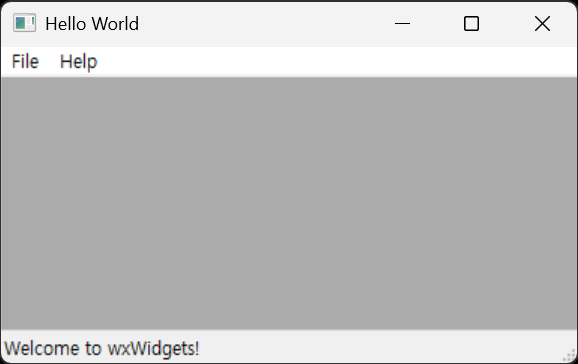
버튼을 추가해 보자.
.
.
.
	CreateStatusBar();
	SetStatusText("Welcome to wxWidgets!");

	wxPanel* panel = new wxPanel(this, wxID_ANY);
	wxButton* myButton = new wxButton(panel, wxID_ANY, "Press Me", wxPoint(30, 30), wxSize(100, 30));
	myButton->Bind(wxEVT_BUTTON, &MyFrame::OnHello, this);
	//Bind(wxEVT_BUTTON, &MyFrame::OnHello, this, myButton->GetId());

	Bind(wxEVT_MENU, &MyFrame::OnHello, this, ID_Hello);
	Bind(wxEVT_MENU, &MyFrame::OnAbout, this, wxID_ABOUT);
	Bind(wxEVT_MENU, &MyFrame::OnExit, this, wxID_EXIT);
.
.
.

코드만으로 UI를 디자인하기는 쉽지 않다. 필요하다면 wysiwyg 방식으로 디자인할 수 있는 wxFormBuilder를 사용하자.
이번에는 OpenCV를 이용해 이미지를 표시해 보자.
#include <wx/wx.h>
#include <opencv2/opencv.hpp>

class MyApp : public wxApp
{
public:
	bool OnInit() override;
};

wxIMPLEMENT_APP(MyApp);

class MyFrame : public wxFrame
{
public:
	MyFrame();

private:
	void OnHello(wxCommandEvent& event);
	void OnExit(wxCommandEvent& event);
	void OnAbout(wxCommandEvent& event);

	wxPanel* m_panel; // 버튼과 이미지를 담을 패널
	wxStaticBitmap* m_imageCtrl; // 이미지 표시를 위한 컨트롤
};

enum
{
	ID_Hello = 1
};

bool MyApp::OnInit()
{
	MyFrame* frame = new MyFrame();
	frame->Show(true);
	return true;
}

MyFrame::MyFrame()
	: wxFrame(nullptr, wxID_ANY, "Hello World")
{
	wxMenu* menuFile = new wxMenu;
	menuFile->Append(ID_Hello, "&Hello...\tCtrl-H", "Help string shown in status bar for this menu item");
	menuFile->AppendSeparator();
	menuFile->Append(wxID_EXIT);

	wxMenu* menuHelp = new wxMenu;
	menuHelp->Append(wxID_ABOUT);

	wxMenuBar* menuBar = new wxMenuBar;
	menuBar->Append(menuFile, "&File");
	menuBar->Append(menuHelp, "&Help");

	SetMenuBar(menuBar);

	CreateStatusBar();
	SetStatusText("Welcome to wxWidgets!");

	m_panel = new wxPanel(this, wxID_ANY);
	wxButton* myButton = new wxButton(m_panel, wxID_ANY, "Press Me", wxPoint(30, 30), wxSize(100, 30));
	myButton->Bind(wxEVT_BUTTON, &MyFrame::OnHello, this);
	//Bind(wxEVT_BUTTON, &MyFrame::OnHello, this, myButton->GetId());

	m_imageCtrl = new wxStaticBitmap(m_panel, wxID_ANY, wxNullBitmap, wxPoint(30, 80));
	// 이미지 표시 컨트롤 초기화. wxNullBitmap으로 초기화하여 나중에 이미지가 로드될 때 업데이트할 수 있도록 함.

	Bind(wxEVT_MENU, &MyFrame::OnHello, this, ID_Hello);
	Bind(wxEVT_MENU, &MyFrame::OnAbout, this, wxID_ABOUT);
	Bind(wxEVT_MENU, &MyFrame::OnExit, this, wxID_EXIT);
}

void MyFrame::OnExit(wxCommandEvent& event)
{
	Close(true);
}

void MyFrame::OnAbout(wxCommandEvent& event)
{
	wxMessageBox("This is a wxWidgets Hello World example", "About Hello World", wxOK | wxICON_INFORMATION);
}

void MyFrame::OnHello(wxCommandEvent& event)
{
	//wxLogMessage("Hello world from wxWidgets!");
	cv::Mat image = cv::imread("palvin1.png");
	if (image.empty())
	{
		wxLogError("Could not load image!");
	}
	else
	{
		// OpenCV는 BGR을 사용하므로 wxImage에서 필요로 하는 RGB 형식으로 변환.
		cv::cvtColor(image, image, cv::COLOR_BGR2RGB);

		// wxWidgets 구조상 플랫폼 비의존적(Device Independent)인 픽셀 데이터를 플랫폼 의존적(Device Dependent)인
		// 이미지로 그리기 위해서는 wxImage를 거쳐 wxBitmap으로 변환해야 한다. wxImage는 픽셀 데이터를 소유하므로
		// 이미지가 wxImage에 의해 관리되도록 true를 전달한다.
		wxImage wxImg(image.cols, image.rows, image.data, true);
		wxBitmap bitmap(wxImg);

		if (m_imageCtrl)
		{
			m_imageCtrl->SetBitmap(bitmap);
			m_imageCtrl->SetSize(bitmap.GetWidth(), bitmap.GetHeight());
			m_panel->Refresh();
		}
	}
}

wxStaticBitmap과 같은 컨트롤을 거치지 않고 wxPaintDC(Device Context)를 이용하여 디스플레이에 직접 그리는 방식도 가능하다. 이 방법은 비디오 캡처 등으로 계속 프레임이 바뀔 때 컨트롤을 계속 업데이트하는 오버헤드를 줄이는데 유리할 수 있다.
#include <wx/wx.h>
//#include <wx/dcbuffer.h> // wxBufferedPaintDC를 사용하기 위한 헤더
#include <opencv2/opencv.hpp>

class MyApp : public wxApp
{
public:
	bool OnInit() override;
};

wxIMPLEMENT_APP(MyApp);

class MyFrame : public wxFrame
{
public:
	MyFrame();

private:
	void OnHello(wxCommandEvent& event);
	void OnExit(wxCommandEvent& event);
	void OnAbout(wxCommandEvent& event);
	void OnPaint(wxPaintEvent& event);

	wxPanel* m_panel; // 버튼과 이미지를 담을 패널
	wxBitmap m_bitmap; // 직접 그릴 비트맵 데이터
};

enum
{
	ID_Hello = 1
};

bool MyApp::OnInit()
{
	MyFrame* frame = new MyFrame();
	frame->Show(true);
	return true;
}

MyFrame::MyFrame()
	: wxFrame(nullptr, wxID_ANY, "Hello World")
{
	wxMenu* menuFile = new wxMenu;
	menuFile->Append(ID_Hello, "&Hello...\tCtrl-H", "Help string shown in status bar for this menu item");
	menuFile->AppendSeparator();
	menuFile->Append(wxID_EXIT);

	wxMenu* menuHelp = new wxMenu;
	menuHelp->Append(wxID_ABOUT);

	wxMenuBar* menuBar = new wxMenuBar;
	menuBar->Append(menuFile, "&File");
	menuBar->Append(menuHelp, "&Help");

	SetMenuBar(menuBar);

	CreateStatusBar();
	SetStatusText("Welcome to wxWidgets!");

	m_panel = new wxPanel(this, wxID_ANY);
	//m_panel->SetBackgroundStyle(wxBG_STYLE_PAINT);
	// wxBufferedPaintDC 사용시 검은 화면 방지, wxBG_STYLE_PAINT는 직접 패널 배경을 그리겠다는 의미로
	// OnPaint에서 DC의 배경색으로 패널의 배경색을 설정하고 Clear()를 호출하여 화면을 지워야 한다.

	wxButton* myButton = new wxButton(m_panel, wxID_ANY, "Press Me", wxPoint(30, 30), wxSize(100, 30));
	myButton->Bind(wxEVT_BUTTON, &MyFrame::OnHello, this);
	//Bind(wxEVT_BUTTON, &MyFrame::OnHello, this, myButton->GetId());

	// 패널에 페인트 이벤트를 바인드하여 DC를 통해 직접 그린다.
	m_panel->Bind(wxEVT_PAINT, &MyFrame::OnPaint, this);
	m_panel->Bind(wxEVT_ERASE_BACKGROUND, [](wxEraseEvent& event) { event.Skip(); }); // 배경 지우기 이벤트를 무시하여 깜빡임 방지
	m_panel->SetDoubleBuffered(true); // 깜빡임 방지 위해 더블 버퍼링 활성화

	Bind(wxEVT_MENU, &MyFrame::OnHello, this, ID_Hello);
	Bind(wxEVT_MENU, &MyFrame::OnAbout, this, wxID_ABOUT);
	Bind(wxEVT_MENU, &MyFrame::OnExit, this, wxID_EXIT);
}

void MyFrame::OnExit(wxCommandEvent& event)
{
	Close(true);
}

void MyFrame::OnAbout(wxCommandEvent& event)
{
	wxMessageBox("This is a wxWidgets Hello World example", "About Hello World", wxOK | wxICON_INFORMATION);
}

void MyFrame::OnHello(wxCommandEvent& event)
{
	//wxLogMessage("Hello world from wxWidgets!");
	cv::Mat image = cv::imread("palvin1.png");
	if (image.empty())
	{
		wxLogError("Could not load image!");
	}
	else
	{
		// OpenCV는 BGR을 사용하므로 wxImage에서 필요로 하는 RGB 형식으로 변환.
		cv::cvtColor(image, image, cv::COLOR_BGR2RGB);

		// wxWidgets 구조상 플랫폼 비의존적(Device Independent)인 픽셀 데이터를 플랫폼 의존적(Device Dependent)인
		// 이미지로 그리기 위해서는 wxImage를 거쳐 wxBitmap으로 변환해야 한다. wxImage는 픽셀 데이터를 소유하므로
		// 이미지가 wxImage에 의해 관리되도록 true를 전달한다.
		wxImage wxImg(image.cols, image.rows, image.data, true);
		m_bitmap = wxBitmap(wxImg);

		m_panel->Refresh(); // 패널을 다시 그리도록 요청하여 OnPaint가 호출되게 한다.
	}
}

void MyFrame::OnPaint(wxPaintEvent& event)
{
	// m_panel에 대한 Paint DC 생성 (페인트 이벤트 안에서만 사용 가능)
	wxPaintDC dc(m_panel);

	// wxPaintDC 대신 메모리에 먼저 그리고 화면에 출력하는 wxBufferedPaintDC 클래스를 사용해도 부드러운 출력이
	// 가능하며 깜빡임도 줄일 수 있다고 한다. wxBufferedPaintDC는 wxPaintDC를 상속하므로 wxPaintDC 대신
	// wxBufferedPaintDC를 사용하면 된다. 이 경우 m_panel에 더블 버퍼링은 활성화할 필요가 없다.
	// 둘 중 하나만 사용하면 된다. wxPaintDC + SetDoubleBuffered 사용을 추천.
	// wxBufferedPaintDC는 운영체제의 네이티브 더블 버퍼링을 지원하지 않는 옛날 OS나 특수한 상황을 위해 존재한다.

	// 상단의 #include <wx/dcbuffer.h> 주석 취소.
	//wxBufferedPaintDC dc(m_panel);

	//dc.SetBackground(wxBrush(m_panel->GetBackgroundColour()));
	//dc.Clear();
	// 패널 기본 배경색으로 화면을 지워준다.
	// wxBG_STYLE_PAINT 스타일을 사용했다면 OnPaint에서 DC의 배경색을 패널의 배경색으로 설정하고 Clear()를 호출하여 화면을
	// 지워야 검은색으로 나타나지 않는다.

	if (m_bitmap.IsOk()) // 비트맵이 유효한 경우에만 그린다.
	{
		// 지정된 좌표 (30, 80)에 비트맵을 직접 그린다. 마스크 사용은 false로 설정.
		dc.DrawBitmap(m_bitmap, 30, 80, false);
	}
}
결과는 이전 코드와 같다.
※ 참고
반응형
'C, C++' 카테고리의 다른 글
| [wxWidgets] Window Handle & Titlebar Icon 윈도우 핸들 구하기 및 타이틀바 아이콘 바꾸기 (0) | 2026.05.04 |
|---|---|
| [wxWidgets] wxFormBuiler XRC 파일 사용하기 (0) | 2026.05.03 |
| [C++] Linear Interpolation (Lerp) 선형보간 (0) | 2026.05.02 |
| [C++] deque 덱 (0) | 2026.05.02 |
| [OpenMP] Parallel Programming Simple Example 병렬 프로그래밍 간단한 예제 (0) | 2026.05.01 |