반응형

윈도우 디스플레이 배율을 확인 해 보자.


#include <windows.h>
#include <iostream>

void getDisplayScaleDpi(HWND hwnd) {
	/*if (hwnd == NULL)
		hwnd = GetDesktopWindow();

	UINT dpi = GetDpiForWindow(hwnd);*/

	// Get the DPI for the system.    
	UINT dpi = GetDpiForSystem();

	// Calculate scale factor: 96 DPI = 100% scale
	double scaleFactor = (double)dpi / 96.0;
	double scalePercent = scaleFactor * 100.0;

	std::cout << "DPI: " << dpi << std::endl;
	std::cout << "Scale Factor: " << scaleFactor << std::endl;
	std::cout << "Scale Percent: " << scalePercent << "%" << std::endl;
}

int main() {
	// Ensure the application is DPI aware.    
	SetProcessDpiAwarenessContext(DPI_AWARENESS_CONTEXT_SYSTEM_AWARE);
	//SetProcessDPIAware(); // same as above

	getDisplayScaleDpi(NULL);

	return 0;
}


모니터(디스플레이)의 크기를 여러가지 방법으로 확인해 보자.

#include <iostream>
#include <Windows.h>

int main() {
	HWND hWnd = GetDesktopWindow();
	if (hWnd == NULL)
		return -1;

	RECT rc;
	GetWindowRect(hWnd, &rc);
	//GetClientRect(hWnd, &rc);
	//GetWindowRect()와 같은 결과.(실제 해상도(150%): 3840 X 2160)

	std::cout << "Desktop Window Rect" << std::endl;
	std::cout << "(" << rc.left << ", " << rc.top << ")" << ", ";
	std::cout << "(" << rc.right << ", " << rc.bottom << ")" << std::endl;

	POINT pt;
	GetCursorPos(&pt);
	std::cout << "Cursor Position: " << "(" << pt.x << ", " << pt.y << ")" << std::endl;

	//HMONITOR hmon = MonitorFromWindow(hWnd, MONITOR_DEFAULTTONULL);
	HMONITOR hmon = MonitorFromPoint(pt, MONITOR_DEFAULTTONULL);
	// 마우스 포인터가 위치한 모니터를 반환한다.
	MONITORINFO mi{ .cbSize = sizeof(mi) };
	GetMonitorInfo(hmon, &mi);

	std::cout << "Monitor Rect" << std::endl;
	std::cout << "(" << mi.rcMonitor.left << ", " << mi.rcMonitor.top << ")" << ", ";
	std::cout << "(" << mi.rcMonitor.right << ", " << mi.rcMonitor.bottom << ")" << std::endl;

	return 0;
}


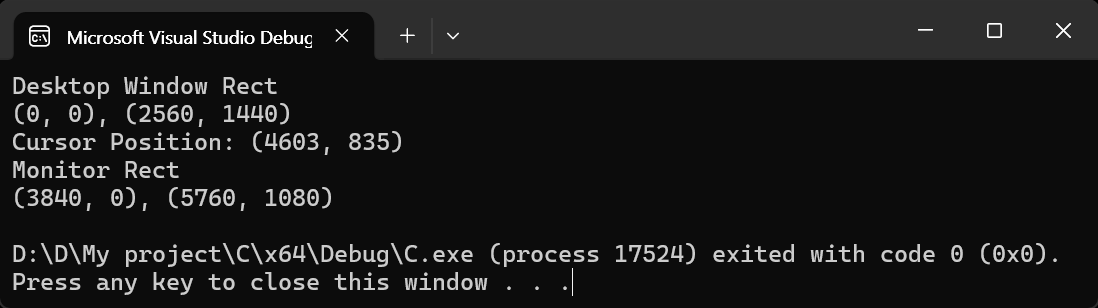
기본 모니터의 실제 해상도는 150% 확대되어 (3840 X 2160)이지만 (2560 X 1440)으로 표시된다.

프로그램 실행 시 마우스 커서를 보조 모니터에 두고 실행했기 때문에 두 번째 해상도는 (1920 X 1080)으로 표시된다.

(5760 - 3840 = 1920)


※ 참고

Confine the mouse cursor to one monitor


반응형
Posted by J-sean
:
반응형

Display number, name, format, width, height, refresh rate 등의 정보를 확인해 보자.


#include "SDL3/SDL.h"

int main() {
	if (!SDL_Init(SDL_INIT_VIDEO)) {
		SDL_Log("Couldn't initialize SDL: %s", SDL_GetError());
		return SDL_APP_FAILURE;
	}

	// 모든 디스플레이 정보 가져오기(해상도, 주사율 등)
	int num_displays;
	SDL_DisplayID* displays = SDL_GetDisplays(&num_displays);
	SDL_Log("Found %d display(s)\n\n", num_displays);

	for (int i = 0; i < num_displays; i++) {
		const SDL_DisplayMode* displaymode = SDL_GetCurrentDisplayMode(displays[i]);
		SDL_Log("Display %d: %s(width: %d, height: %d)", i, SDL_GetDisplayName(displays[i]),
			displaymode->w, displaymode->h);
	}

	SDL_free(displays);

	// 위 코드보다 간단히 현재 디스플레이 정보만 가져오기(해상도, 주사율 등)
	const SDL_DisplayMode* displaymode = SDL_GetCurrentDisplayMode(SDL_GetPrimaryDisplay());
	SDL_Log("\nPrimary Display: %s(width: %d, height: %d)", SDL_GetDisplayName(SDL_GetPrimaryDisplay()),
		displaymode->w, displaymode->h);

	SDL_Quit();

	return 0;
}


코드를 작성하고 빌드한다.

SDL_DisplayMode 구조체는 아래와 같이 구성되어 있다.

■ SDL_DisplayID displayID; /* the display this mode is associated with */
■ SDL_PixelFormat format; /* pixel format */
■ int w; /* width */
■ int h; /* height */
■ float pixel_density; /* scale converting size to pixels (e.g. a 1920x1080 mode with 2.0 scale would have 3840x2160 pixels) */
■ float refresh_rate; /* refresh rate (or 0.0f for unspecified) */
■ int refresh_rate_numerator; /* precise refresh rate numerator (or 0 for unspecified) */
■ int refresh_rate_denominator; /* precise refresh rate denominator */


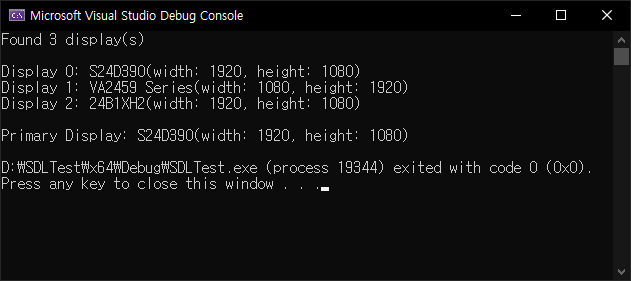
실행하면 디스플레이 정보가 표시된다.


반응형
Posted by J-sean
:
반응형

SDL3에 Dear ImGui를 사용해 보자. 아래 링크를 참고해 SDL3를 준비한다.

2025.03.30 - [C, C++] - [SDL3] Simple DirectMedia Layer 3 Setup and Getting Started - SDL3 설정 및 초기화


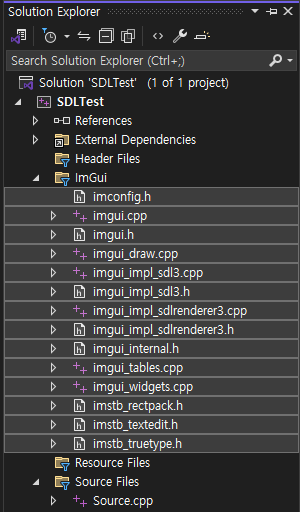
프로젝트 폴더에 위와 같이 ImGui 관련 파일을 복사한다. (lib, dll 파일은 없다)


프로젝트에 ImGui 필터를 추가하고 파일을 추가한다.


1
2
3
4
5
6
7
8
9
10
11
12
13
14
15
16
17
18
19
20
21
22
23
24
25
26
27
28
29
30
31
32
33
34
35
36
37
38
39
40
41
42
43
44
45
46
47
48
49
50
51
52
53
54
55
56
57
58
59
60
61
62
63
64
65
66
67
68
69
70
71
72
73
74
75
76
77
78
79
80
81
82
83
84
85
86
87
88
89
90
91
92
93
94
95
96
97
98
99
100
101
102
103
104
105
106
107
108
109
110
111
112
113
114
115
116
117
118
119
120
121
122
123
124
125
126
127
128
129
130
131
132
133
134
#define SDL_MAIN_USE_CALLBACKS 1
#include <SDL3/SDL.h>
#include <SDL3/SDL_main.h>
#include <stdio.h>
#include <Windows.h>
 
#include "imgui.h"
#include "imgui_impl_sdl3.h"
#include "imgui_impl_sdlrenderer3.h"
 
static SDL_Window* window = NULL;
static SDL_Renderer* renderer = NULL;
ImGuiIO* pio = NULL;
 
SDL_AppResult SDL_AppInit(void** appstate, int argc, char* argv[])
{
    SDL_SetAppMetadata("Example Renderer Clear""1.0""com.example.renderer-clear");
 
    if (!SDL_Init(SDL_INIT_VIDEO)) {
        SDL_Log("Couldn't initialize SDL: %s", SDL_GetError());
        return SDL_APP_FAILURE;
    }
 
    if (!SDL_CreateWindowAndRenderer("examples/renderer/clear"6404800&window, &renderer)) {
        SDL_Log("Couldn't create window/renderer: %s", SDL_GetError());
        return SDL_APP_FAILURE;
    }
 
    // Setup Dear ImGui context
    IMGUI_CHECKVERSION();
    ImGui::CreateContext();
    ImGuiIO& io = ImGui::GetIO(); (void)io;
    // (void)io는 의미 없는 명령.  just to avoid compiler warning on unused variable
    pio = &io;
    // io가 SDL_AppIterate()에서 사용되기 때문에 전역 포인터 변수 pio에 대입.
    io.ConfigFlags |= ImGuiConfigFlags_NavEnableKeyboard;     // Enable Keyboard Controls
    //io.ConfigFlags |= ImGuiConfigFlags_NavEnableGamepad;      // Enable Gamepad Controls
 
    // Setup Dear ImGui style
    //ImGui::StyleColorsDark();
    ImGui::StyleColorsLight();
 
    // Setup Platform/Renderer backends
    ImGui_ImplSDL3_InitForSDLRenderer(window, renderer);
    ImGui_ImplSDLRenderer3_Init(renderer);
 
    return SDL_APP_CONTINUE;
}
 
SDL_AppResult SDL_AppEvent(void* appstate, SDL_Event* event)
{
    // Poll and handle events (inputs, window resize, etc.)
    // You can read the io.WantCaptureMouse, io.WantCaptureKeyboard flags to tell if dear imgui wants to use your inputs.
    // - When io.WantCaptureMouse is true, do not dispatch mouse input data to your main application, or clear/overwrite your copy of the mouse data.
    // - When io.WantCaptureKeyboard is true, do not dispatch keyboard input data to your main application, or clear/overwrite your copy of the keyboard data.
    // Generally you may always pass all inputs to dear imgui, and hide them from your application based on those two flags.
    ImGui_ImplSDL3_ProcessEvent(event);
 
    switch (event->type) {
    case SDL_EVENT_QUIT:
        return SDL_APP_SUCCESS;
    case SDL_EVENT_KEY_DOWN:
        printf("Key pressed: %s\n", SDL_GetKeyName(event->key.key));
        if (event->key.key == SDLK_ESCAPE)
            return SDL_APP_SUCCESS;
        break;
    default:
        break;
    }
 
    return SDL_APP_CONTINUE;
}
 
SDL_AppResult SDL_AppIterate(void* appstate)
{
    // Start the Dear ImGui frame
    ImGui_ImplSDLRenderer3_NewFrame();
    ImGui_ImplSDL3_NewFrame();
    ImGui::NewFrame();
 
    // Show a simple window that we create ourselves. We use a Begin/End pair to create a named window.
    {
        static float f = 0.0f;
        static int counter = 0;
 
        ImGui::Begin("Hello, world!"); // Create a window called "Hello, world!" and append into it.
        //ImGui::SetWindowSize(ImVec2(100, 20)); // 매 프레임마다 윈도우 사이즈를 (100, 20)으로 지정한다.
        //ImGui::SetWindowSize(ImVec2(100, 20), ImGuiCond_Once); // 프로그램을 시작할때 한 번만 윈도우 사이즈를 지정한다.
        //ImGui::SetWindowSize(ImVec2(100, 20), ImGuiCond_FirstUseEver); // 프로그램을 처음 시작할때(imgui.ini파일이 존재하지 않을때)
                                                                         // 한 번만 윈도우 사이즈를 지정한다.
        ImGui::Text("This is some useful text."); // Display some text (you can use a format strings too)
        if (ImGui::Button("Button")) // Buttons return true when clicked (most widgets return true when edited/activated)
            counter++;
        ImGui::SameLine();
        ImGui::Text("counter = %d", counter);
        ImGui::Text("Application average %.3f ms/frame (%.1f FPS)"1000.0f / pio->Framerate, pio->Framerate);
        ImGui::End();
    }
    // 윈도우 없이 위치가 고정된 버튼 생성하기.
    {
        ImGui::Begin("No Window"0, ImGuiWindowFlags_NoBackground | ImGuiWindowFlags_NoDecoration);
        ImGui::SetWindowPos(ImVec2(1020));
        ImGui::SetWindowSize(ImVec2(10020));
        // WindowSize()는 이 예제 블럭에서 생성하려는 버튼의 사이즈를 지정하는 함수가 아니다. 버튼을 포함하는 윈도우의 사이즈다.
        // 이 예제는 윈도우가 보이지 않으므로 사이즈를 지정하지 않으면 버튼 사이즈보다 훨씬 크게 지정되서 근처의 다른 UI가
        // 이 윈도우에 가려져 제대로 동작하지 않을 수 있다. (보이기는 하지만 클릭이 되지 않는다)
        // 아니면, Begin()에서 ImGuiWindowFlags_NoBringToFrontOnFocus 옵션을 추가하면 다른 윈도우의 UI 동작을 방해하지 않는다.
        // 이 예제에서 ImGuiWindowFlags_NoInputs 옵션은 버튼을 비활성화 시키므로 사용하면 안된다.        
        ImGui::Button("Fixed Button");
        ImGui::End();
    }
 
    // Rendering
    ImGui::Render();
 
    SDL_SetRenderDrawColor(renderer, 255255255, SDL_ALPHA_OPAQUE);
    SDL_RenderClear(renderer);
    ImGui_ImplSDLRenderer3_RenderDrawData(ImGui::GetDrawData(), renderer);
    SDL_RenderPresent(renderer);
 
    return SDL_APP_CONTINUE;
}
 
void SDL_AppQuit(void* appstate, SDL_AppResult result)
{
    // Cleanup    
    ImGui_ImplSDLRenderer3_Shutdown();
    ImGui_ImplSDL3_Shutdown();
    ImGui::DestroyContext();
 
    SDL_DestroyRenderer(renderer);
    SDL_DestroyWindow(window);
    SDL_Quit();
}


소스를 입력하고 빌드한다.


실행하면 GUI가 표시된다.


이번엔 ImGui를 이용해 이미지를 출력해 보자.


stb_image.h를 추가한다.
stb_image.h
0.27MB


Image Loading and Displaying Examples

위 링크를 참고해 소스를 작성한다.


1
2
3
4
5
6
7
8
9
10
11
12
13
14
15
16
17
18
19
20
21
22
23
24
25
26
27
28
29
30
31
32
33
34
35
36
37
38
39
40
41
42
43
44
45
46
47
48
49
50
51
52
53
54
55
56
57
58
59
60
61
62
63
64
65
66
67
68
69
70
71
72
73
74
75
76
77
78
79
80
81
82
83
84
85
86
87
88
89
90
91
92
93
94
95
96
97
98
99
100
101
102
103
104
105
106
107
108
109
110
111
112
113
114
115
116
117
118
119
120
121
122
123
124
125
126
127
128
129
130
131
132
133
134
135
136
137
138
139
140
141
142
143
144
145
146
147
148
149
150
151
152
153
154
155
156
157
158
159
160
161
162
163
164
165
166
167
168
169
170
171
172
173
174
175
176
177
178
179
180
181
182
183
184
185
186
187
188
189
#define _CRT_SECURE_NO_WARNINGS
#define STB_IMAGE_IMPLEMENTATION
#define SDL_MAIN_USE_CALLBACKS 1
#include <SDL3/SDL.h>
#include <SDL3/SDL_main.h>
#include <stdio.h>
#include <Windows.h>
 
#include "imgui.h"
#include "imgui_impl_sdl3.h"
#include "imgui_impl_sdlrenderer3.h"
 
#include "stb_image.h"
 
static SDL_Window* window = NULL;
static SDL_Renderer* renderer = NULL;
ImGuiIO* pio = NULL;
 
SDL_Texture* my_texture;
int my_image_width, my_image_height;
 
bool LoadTextureFromMemory(const void* data, size_t data_size, SDL_Renderer* renderer, SDL_Texture** out_texture, int* out_width, int* out_height)
{
    int image_width = 0;
    int image_height = 0;
    int channels = 4;
    unsigned char* image_data = stbi_load_from_memory((const unsigned char*)data, (int)data_size, &image_width, &image_height, NULL4);
    if (image_data == nullptr)
    {
        fprintf(stderr, "Failed to load image: %s\n", stbi_failure_reason());
        return false;
    }
 
    SDL_Surface* surface = SDL_CreateSurfaceFrom(image_width, image_height, SDL_PIXELFORMAT_RGBA32, (void*)image_data, channels * image_width);
    if (surface == nullptr)
    {
        fprintf(stderr, "Failed to create SDL surface: %s\n", SDL_GetError());
        return false;
    }
 
    SDL_Texture* texture = SDL_CreateTextureFromSurface(renderer, surface);
    if (texture == nullptr)
        fprintf(stderr, "Failed to create SDL texture: %s\n", SDL_GetError());
 
    *out_texture = texture;
    *out_width = image_width;
    *out_height = image_height;
 
    SDL_DestroySurface(surface);
    stbi_image_free(image_data);
 
    return true;
}
 
// Open and read a file, then forward to LoadTextureFromMemory()
bool LoadTextureFromFile(const char* file_name, SDL_Renderer* renderer, SDL_Texture** out_texture, int* out_width, int* out_height)
{
    FILE* f = fopen(file_name, "rb");
    if (f == NULL)
        return false;
    fseek(f, 0, SEEK_END);
    size_t file_size = (size_t)ftell(f);
    if (file_size == -1)
        return false;
    fseek(f, 0, SEEK_SET);
    void* file_data = IM_ALLOC(file_size);
    fread(file_data, 1, file_size, f);
    fclose(f);
    bool ret = LoadTextureFromMemory(file_data, file_size, renderer, out_texture, out_width, out_height);
    IM_FREE(file_data);
    return ret;
}
 
SDL_AppResult SDL_AppInit(void** appstate, int argc, char* argv[])
{
    SDL_SetAppMetadata("Example Renderer Clear""1.0""com.example.renderer-clear");
 
    if (!SDL_Init(SDL_INIT_VIDEO)) {
        SDL_Log("Couldn't initialize SDL: %s", SDL_GetError());
        return SDL_APP_FAILURE;
    }
 
    if (!SDL_CreateWindowAndRenderer("examples/renderer/clear"6404800&window, &renderer)) {
        SDL_Log("Couldn't create window/renderer: %s", SDL_GetError());
        return SDL_APP_FAILURE;
    }
 
    // Setup Dear ImGui context
    IMGUI_CHECKVERSION();
    ImGui::CreateContext();
    ImGuiIO& io = ImGui::GetIO(); (void)io;
    // (void)io는 의미 없는 명령.  just to avoid compiler warning on unused variable
    pio = &io;
    // io가 SDL_AppIterate()에서 사용되기 때문에 전역 포인터 변수 pio에 대입.
    io.ConfigFlags |= ImGuiConfigFlags_NavEnableKeyboard;     // Enable Keyboard Controls
    //io.ConfigFlags |= ImGuiConfigFlags_NavEnableGamepad;      // Enable Gamepad Controls
 
    // Setup Dear ImGui style
    //ImGui::StyleColorsDark();
    ImGui::StyleColorsLight();
 
    // Setup Platform/Renderer backends
    ImGui_ImplSDL3_InitForSDLRenderer(window, renderer);
    ImGui_ImplSDLRenderer3_Init(renderer);
 
    // Load our texture after initialising SDL
    bool ret = LoadTextureFromFile("palvin.jpg", renderer, &my_texture, &my_image_width, &my_image_height);
    IM_ASSERT(ret);
 
    return SDL_APP_CONTINUE;
}
 
SDL_AppResult SDL_AppEvent(void* appstate, SDL_Event* event)
{
    // Poll and handle events (inputs, window resize, etc.)
    // You can read the io.WantCaptureMouse, io.WantCaptureKeyboard flags to tell if dear imgui wants to use your inputs.
    // - When io.WantCaptureMouse is true, do not dispatch mouse input data to your main application, or clear/overwrite your copy of the mouse data.
    // - When io.WantCaptureKeyboard is true, do not dispatch keyboard input data to your main application, or clear/overwrite your copy of the keyboard data.
    // Generally you may always pass all inputs to dear imgui, and hide them from your application based on those two flags.
    ImGui_ImplSDL3_ProcessEvent(event);
 
    switch (event->type) {
    case SDL_EVENT_QUIT:
        return SDL_APP_SUCCESS;
    case SDL_EVENT_KEY_DOWN:
        printf("Key pressed: %s\n", SDL_GetKeyName(event->key.key));
        if (event->key.key == SDLK_ESCAPE)
            return SDL_APP_SUCCESS;
        break;
    default:
        break;
    }
 
    return SDL_APP_CONTINUE;
}
 
SDL_AppResult SDL_AppIterate(void* appstate)
{
    // Start the Dear ImGui frame
    ImGui_ImplSDLRenderer3_NewFrame();
    ImGui_ImplSDL3_NewFrame();
    ImGui::NewFrame();
 
    // Show a simple window that we create ourselves. We use a Begin/End pair to create a named window.
    {
        static float f = 0.0f;
        static int counter = 0;
 
        ImGui::Begin("Hello, world!"); // Create a window called "Hello, world!" and append into it.
        ImGui::Text("This is some useful text."); // Display some text (you can use a format strings too)
        if (ImGui::Button("Button")) // Buttons return true when clicked (most widgets return true when edited/activated)
            counter++;
        ImGui::SameLine();
        ImGui::Text("counter = %d", counter);
        ImGui::Text("Application average %.3f ms/frame (%.1f FPS)"1000.0f / pio->Framerate, pio->Framerate);
        ImGui::End();
    }
    // 윈도우 없이 위치가 고정된 이미지 생성하기.
    {
        ImGui::Begin("No Window"0, ImGuiWindowFlags_NoBackground | ImGuiWindowFlags_NoDecoration | ImGuiWindowFlags_NoBringToFrontOnFocus | ImGuiWindowFlags_NoInputs);
        ImGui::SetWindowPos(ImVec2(00));
        ImGui::Text("pointer = %p", my_texture);
        ImGui::Text("size = %d x %d", my_image_width, my_image_height);
        ImGui::Image((ImTextureID)(intptr_t)my_texture, ImVec2((float)my_image_width, (float)my_image_height));
        ImGui::End();
    }
 
    // Rendering
    ImGui::Render();
 
    SDL_SetRenderDrawColor(renderer, 255255255, SDL_ALPHA_OPAQUE);
    SDL_RenderClear(renderer);
    ImGui_ImplSDLRenderer3_RenderDrawData(ImGui::GetDrawData(), renderer);
    SDL_RenderPresent(renderer);
 
    return SDL_APP_CONTINUE;
}
 
void SDL_AppQuit(void* appstate, SDL_AppResult result)
{
    // Cleanup    
    ImGui_ImplSDLRenderer3_Shutdown();
    ImGui_ImplSDL3_Shutdown();
    ImGui::DestroyContext();
 
    SDL_DestroyRenderer(renderer);
    SDL_DestroyWindow(window);
    SDL_Quit();
}


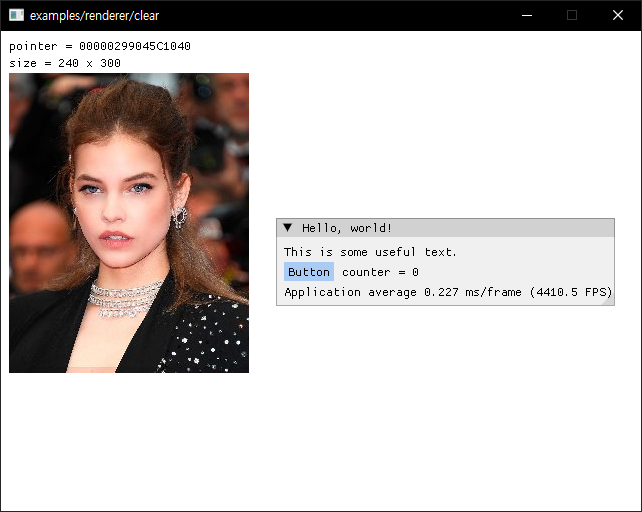
실행하면 이미지가 표시된다.


반응형
Posted by J-sean
:
반응형

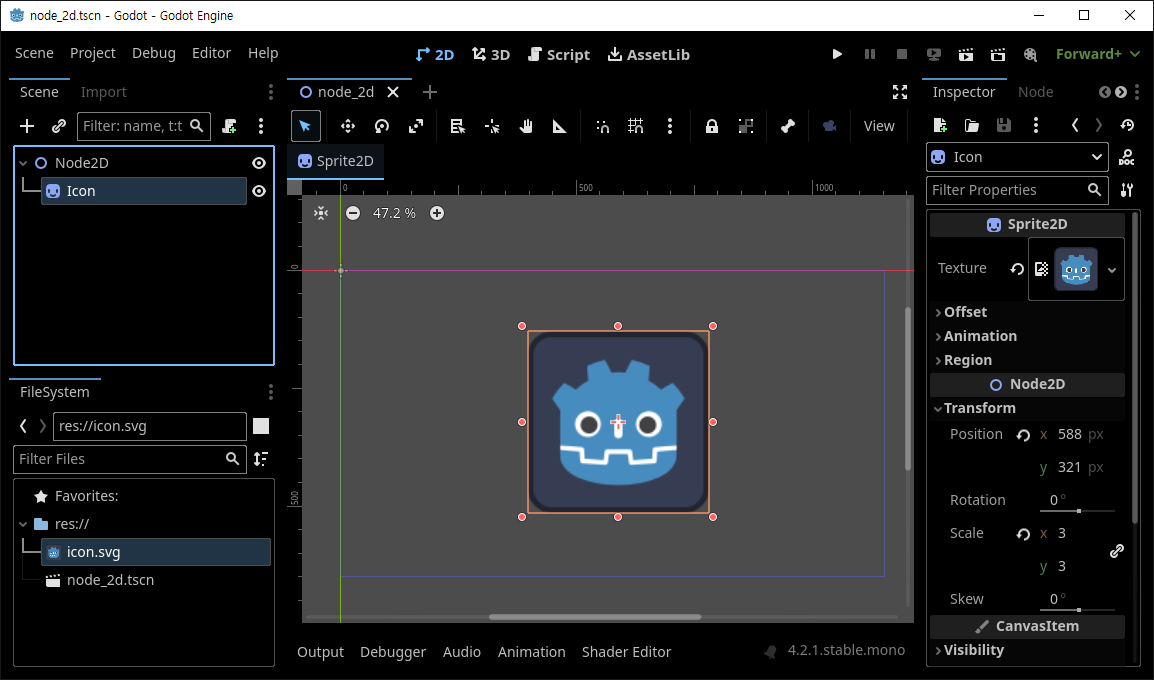
윈도우 사이즈 변경 시 적용되는 뷰포트 화면 비율 모드를 설정해 보자.


스프라이트를 하나 추가한다.


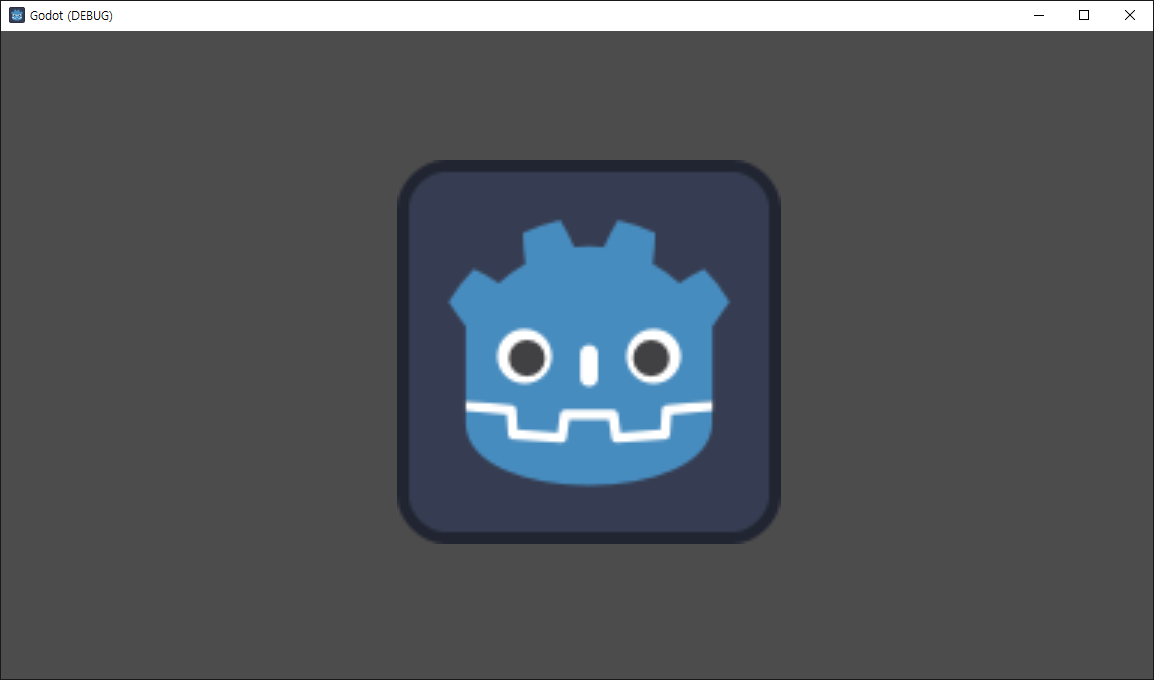
실행하면 스프라이트가 나타난다.


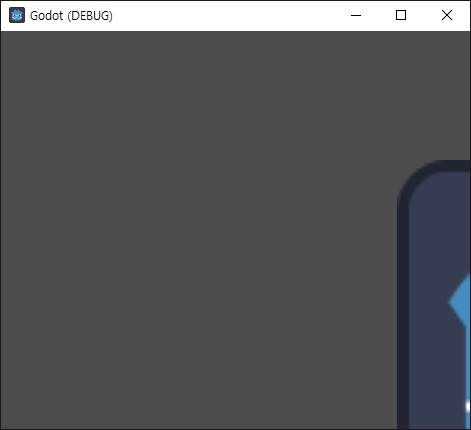
윈도우 사이즈를 변경하면 화면이 잘린다.


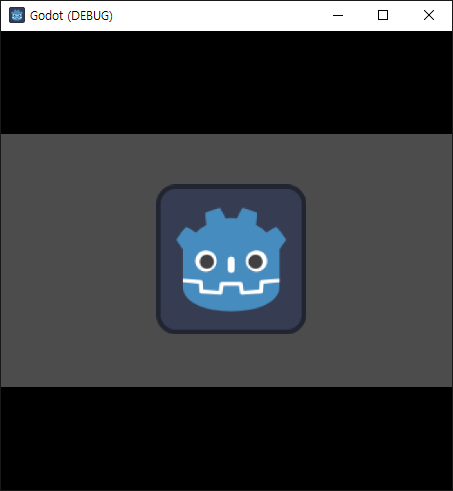
Project Settings... - Display - Window - Stretch - Mode를 viewport로 변경한다.


사이즈를 변경하면 뷰포트의 비율이 유지된 상태로 늘어나거나 줄어든다.


Aspect를 expand로 변경한다.


뷰포트의 비율이 유지되지 않은 상태로 늘어나거나 줄어든다.


반응형
Posted by J-sean
:
반응형

바탕화면에 이미지를 출력하고 움직여 보자.


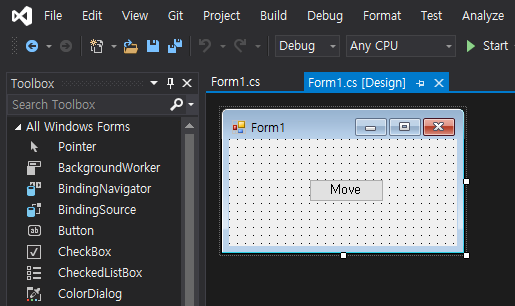
폼과 버튼을 적당히 배치한다.


1
2
3
4
5
6
7
8
9
10
11
12
13
14
15
16
17
18
19
20
21
22
23
24
25
26
27
28
29
30
31
32
33
34
35
36
37
38
39
40
41
42
43
44
45
46
47
48
49
50
51
52
53
54
55
56
57
58
59
60
61
62
63
64
65
66
67
68
69
70
71
72
73
74
75
76
77
78
79
80
81
82
83
84
85
86
87
88
89
90
91
92
93
94
95
96
97
98
99
using System;
using System.Collections.Generic;
using System.ComponentModel;
using System.Data;
using System.Drawing;
using System.Linq;
using System.Text;
using System.Threading.Tasks;
using System.Windows.Forms;
 
using System.Runtime.InteropServices;
 
namespace WindowsFormsApp1
{
    public partial class Form1 : Form
    {
        [DllImport("user32.dll", ExactSpelling = true, SetLastError = true)]
        private static extern IntPtr GetDC(IntPtr hWnd);
 
        [DllImport("user32.dll", ExactSpelling = true)]
        private static extern IntPtr ReleaseDC(IntPtr hWnd, IntPtr hDC);
 
        public Form1()
        {
            InitializeComponent();
        }
 
        private void button1_Click(object sender, EventArgs e)
        {
            int step = 1;   // 이동 스텝
 
            Rectangle targetRect = new Rectangle(100150400400);   // 표시할 그림 사이즈(Horizontal: 100~499(400) pixel, Vertical: 150~549(400) pixel) 
            Point outPoint = new Point(500300);   // 모니터의 표시 위치(x, y)
 
            //Image img = Image.FromFile("Barbara.jpg");  // Resolution Horizontal: 300, Vertical: 300  
            // 이렇게 하면 이미지 파일과 아래 buffer 비트맵의 해상도(96, 96)가 달라서 (사이즈가) 제대로 표시되지 않는다.
            Bitmap img = new Bitmap(Image.FromFile("Barbara.jpg")); // Resolution Horizontal: 96, Vertical: 96
            Bitmap scr = ScreenCapture.Capture();
            Bitmap buffer = new Bitmap(targetRect.Width + step, targetRect.Height + step);
            IntPtr desktopDC = GetDC(IntPtr.Zero);
 
            Graphics dG = Graphics.FromHdc(desktopDC);
            Graphics bG = Graphics.FromImage(buffer);
            
            for (int i = 0, j = 0; i < 100; i += step, j += step)
            {
                bG.DrawImage(scr, 00new Rectangle(outPoint.X + i, outPoint.Y + j, targetRect.Width + step , targetRect.Height + step ), GraphicsUnit.Pixel);
                bG.DrawImage(img, step, step, targetRect, GraphicsUnit.Pixel);                
                dG.DrawImage(buffer, outPoint.X + i, outPoint.Y + j);
            }
 
            for (int i = 100, j = 100; i > 0; i -= step, j -= step)
            {
                bG.DrawImage(scr, 00new Rectangle(outPoint.X + i, outPoint.Y + j, targetRect.Width + step, targetRect.Height + step), GraphicsUnit.Pixel);
                bG.DrawImage(img, 00, targetRect, GraphicsUnit.Pixel);
                dG.DrawImage(buffer, outPoint.X + i, outPoint.Y + j);
            }
 
            dG.Dispose();
            bG.Dispose();
            ReleaseDC(IntPtr.Zero, desktopDC);
        }
    }
 
    public class ScreenCapture
    {
        [DllImport("user32.dll", ExactSpelling = true, SetLastError = true)]
        private static extern IntPtr GetDC(IntPtr hWnd);
 
        [DllImport("user32.dll", ExactSpelling = true)]
        private static extern IntPtr ReleaseDC(IntPtr hWnd, IntPtr hDC);
 
        [DllImport("gdi32.dll", ExactSpelling = true)]
        private static extern IntPtr BitBlt(IntPtr hDestDC, int x, int y, int nWidth, int nHeight, IntPtr hSrcDC, int xSrc, int ySrc, int dwRop);
 
        [DllImport("user32.dll", EntryPoint = "GetDesktopWindow")]
        private static extern IntPtr GetDesktopWindow();
 
        public static Bitmap Capture()
        {
            int screenWidth = Screen.PrimaryScreen.Bounds.Width;
            int screenHeight = Screen.PrimaryScreen.Bounds.Height;
 
            Bitmap screenBmp = new Bitmap(screenWidth, screenHeight);
            Graphics g = Graphics.FromImage(screenBmp);
 
            IntPtr desktopDC = GetDC(GetDesktopWindow());
            IntPtr hDC = g.GetHdc();
 
            BitBlt(hDC, 00, screenWidth, screenHeight, desktopDC, 000x00CC0020);    //SRCCOPY (DWORD)0x00CC0020
 
            ReleaseDC(GetDesktopWindow(), desktopDC);
            g.ReleaseHdc(hDC);
            g.Dispose();
 
            return screenBmp;
        }
    }
}


소스를 입력하고 빌드한다.

Barbara.jpg
0.05MB


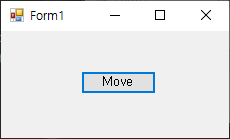
실행하고 버튼을 클릭한다.


지정된 위치에 이미지가 출력되고 움직인다.


반응형
Posted by J-sean
:
반응형

숫자(1~99,999)와 디스플레이 크기(1~10) s를 입력하면 [(2s+3)행 X (s+2)열] 크기의 디지털 숫자로 표시하는 프로그램을 만들어 보자. 각 숫자 사이에는 1줄의 공백이 있다.


숫자 5,238을 s=1의 크기로 표시한 예.


1
2
3
4
5
6
7
8
9
10
11
12
13
14
15
16
17
18
19
20
21
22
23
24
25
26
27
28
29
30
31
32
33
34
35
36
37
38
39
40
41
42
43
44
45
46
47
48
49
50
51
52
53
54
55
56
57
58
59
60
61
62
63
64
65
66
67
68
69
70
71
72
73
74
75
76
77
78
79
80
81
82
83
84
85
86
87
88
89
90
91
92
93
94
#include <iostream>
 
using namespace std;
 
int main()
{
    const int MAX_DIGIT = 5;
    const int MAX_SCALE = 10;
 
    char hor_bar[2][MAX_SCALE + 1= { {"          "}, {"----------"} };
    char ver_bar[2][2= { {" "}, {"|"} };
 
    char hor_dig[10][3= { {101}, {000}, {111}, {111}, {010},
        {111}, {111}, {100}, {111}, {111} };    // 0~9
    char ver_dig[10][4= { {1111}, {0101}, {0110}, {0101}, {1101},
        {1001}, {1011}, {0101}, {1111}, {1101} };    // 0~9
    //  -
    // | |
    //  -
    // | |
    //  -
    // 1 digit = 가로선 3개(3줄), 세로선 4개(2줄)
    //             최소 5행 3열
 
    char digits[5][(MAX_SCALE + 3* MAX_DIGIT] = { '\0', };    // 각 숫자 사이에 빈칸 + 마지막 개행 문자 = MAX_SCALE + 3.
                                                                // null문자 '\0'으로 초기화.
    char number[MAX_DIGIT + 1];
    cout << "Enter number(1~99,999): ";
    cin >> number;
 
    int scale;
    cout << "Enter scale(1~10): ";
    cin >> scale;
 
    // scale에 맞게 가로선 길이 조정.
    hor_bar[0][scale] = '\0';
    hor_bar[1][scale] = '\0';
 
    int count_number = strlen(number);
 
    for (int i = 0; i < count_number; i++)
    {
        int real_number = number[i] - '0';    // 문자를 숫자로 변환.
 
        // 두 번째 숫자부터 각 숫자마다 빈 칸 삽입.
        if (i > 0)
            for (int j = 0; j < 5; j++)
                strcat_s(digits[j], sizeof(digits[j]), " ");
 
        // 첫 번째 줄 삽입.
        strcat_s(digits[0], sizeof(digits[0]), " ");
        strcat_s(digits[0], sizeof(digits[0]), hor_bar[hor_dig[real_number][0]]);
        strcat_s(digits[0], sizeof(digits[0]), " ");
 
        // 두 번째 줄 삽입.
        strcat_s(digits[1], sizeof(digits[1]), ver_bar[ver_dig[real_number][0]]);
        strcat_s(digits[1], sizeof(digits[1]), hor_bar[0]);
        strcat_s(digits[1], sizeof(digits[1]), ver_bar[ver_dig[real_number][1]]);
 
        // 세 번째 줄 삽입.
        strcat_s(digits[2], sizeof(digits[2]), " ");
        strcat_s(digits[2], sizeof(digits[2]), hor_bar[hor_dig[real_number][1]]);
        strcat_s(digits[2], sizeof(digits[2]), " ");
 
        // 네 번째 줄 삽입.
        strcat_s(digits[3], sizeof(digits[3]), ver_bar[ver_dig[real_number][2]]);
        strcat_s(digits[3], sizeof(digits[3]), hor_bar[0]);
        strcat_s(digits[3], sizeof(digits[3]), ver_bar[ver_dig[real_number][3]]);
 
        // 다섯 번째 줄 삽입.
        strcat_s(digits[4], sizeof(digits[4]), " ");
        strcat_s(digits[4], sizeof(digits[4]), hor_bar[hor_dig[real_number][2]]);
        strcat_s(digits[4], sizeof(digits[4]), " ");
    }
 
    // 첫 번째 줄 출력
    cout << digits[0<< endl;
 
    // 두 번째 줄 출력
    for (int i = 0; i < scale; i++)
        cout << digits[1<< endl;
 
    // 세 번째 줄 출력
    cout << digits[2<< endl;
 
    // 네 번째 줄 출력
    for (int i = 0; i < scale; i++)
        cout << digits[3<< endl;
 
    // 다섯 번째 줄 출력
    cout << digits[4<< endl;
 
    return 0;
}


잘못된 입력에 대한 처리는 생략되어 있다.


실행 결과.


반응형
Posted by J-sean
:
반응형

라즈베리 파이를 이용한 여러가지 프로젝트를 진행하기 전에 쓸만한 디스플레이를 고르기 위해 AliExpress에서 7인치 디스플레이를 주문 했다. 다른 제품보다 충격에 민감할 수 밖에 없는 제품이기에 배송이 걱정 되었지만 사이즈가 작으니 포장만 잘 하면 문제 없이 도착할거라 생각했다.


우체국택배를 통해 배송 되었다.


박스를 열어 보니 다행히 나름 깔끔하게 잘 포장되어 있었다.


7 inch HD Display Screen. 해상도는 1024X600이다.


LCD Driver. 여기에 다른 부품들을 연결 한다.


디스플레이의 소스, 화면 상태등을 조정할 수 있는 보드. 상품 설명에는 Key Board라는 이름으로 소개 되어 있고 SOURCE, MENU, POWER등 5개의 버튼이 달려 있다.


디스플레이 리모컨, 5V USB 전원 케이블, Key Board 케이블


Key Board 케이블을 Key Board와 LCD Driver에 연결 한다. 굉장히 뻑뻑해서 한 번 연결되면 분리하기 어렵다.


디스플레이의 Flat Flexible Cable을 LCD Driver에 연결 한다. 더 들어갈거 같은데.. 라는 생각이 들 정도만 들어 간다.


5V 전원과 컴퓨터등의 소스를 연결한다. HDMI, D-Sub, Composite Video 케이블 연결이 가능 하다.


상품 소개에 나오는 각 포트 설명


케이블 연결이 잘 되었다면 특별히 설정할 건 없다. 소스로 연결한 기기를 켜면 일반 모니터와 동일하게 작동 한다. 레트로파이를 설치한 라즈베리 파이에 연결하고 Bubble Bobble을 실행했다.


Metal Slug 실행 화면. 7인치 디스플레이기 때문에 14인치 노트북의 절반 크기도 안된다.


노트북에 연결한 화면. 노트북 디스플레이의 내용도 잘 표시 된다. Key Board의 녹색 불빛은 생각보다 밝다.


구매 비용은 $24로 3만원이 좀 안되는 가격에 무료 배송이다. 저렴한 가격이지만 생각보다 괜찮은 성능을 보여 주는 제품으로 여러가지 프로젝트에 응용 가능할 것으로 생각되며 이 제품보다 약간 큰 9인치나 10.1인치도 구매해 보고 싶은 생각이 들 정도로 만족스러웠다.


반응형
Posted by J-sean
: